Most beginners get stuck in the same loop. They think, "I need experience to build a portfolio, but I need a portfolio to get experience." It's frustrating, especially when every job posting asks for one.
Recruiters don't actually care whether your projects came from a paying client or from your own laptop at 11 PM. They care about your thinking, your execution, and whether you can solve a design problem. That means you can absolutely build a solid design portfolio for beginners without ever having worked for a client.
In this guide, you'll learn how to create a beginner-friendly portfolio from scratch, what projects to include, where to publish them, and how to present it so it looks like the work of someone who's ready to get hired.
Why Beginners Struggle to Build a Portfolio
Many aspiring designers assume a portfolio is simply a collection of work completed for clients. Since they haven't worked professionally yet, they believe they have nothing worth showing, so they wait around for an internship or a freelance gig before starting. Months pass. The portfolio never happens.
A portfolio isn't a record of employment. It's evidence of your ability to solve visual communication problems. Whether that project came from a client, a classroom, or your own imagination matters much less than how well you executed it.
Some common reasons beginners hesitate include:
They think fake projects aren't allowed.
They compare themselves with experienced designers.
They only have classroom assignments.
They don't know how many projects are enough.
They're unsure where to publish their work.
The good news is that every professional designer started somewhere. Many built their first graphic design portfolio using personal projects before landing their first paid opportunity.
Can I Build a Design Portfolio Without Experience?
Yes, you can build a design portfolio without experience. A strong portfolio can be created entirely from self-initiated projects, redesigns, student assignments, passion projects, or design challenges.
Recruiters often value these projects because they reveal your thinking process instead of showing only the final outcome.
For example, instead of saying you designed a coffee shop logo, explain:
Why you chose that style
Who the target audience is
Which colours and typography support the brand
How the design solves the business problem
That context matters more than whether someone paid you.
Why Experience Isn't Required
The biggest misconception is that recruiters hire portfolios filled with client logos. In reality, they hire designers who demonstrate clear thinking.
Client Projects vs Self-Initiated Projects
Client Projects | Self-Initiated Projects |
Solve real business problems | Solve realistic fictional problems |
Include client feedback | Show your independent thinking |
Build credibility | Build creativity and versatility |
May have confidentiality limits | Full creative freedom |
Hard for beginners to obtain | Anyone can create them today |
What Recruiters Actually Care About
Here's the thing most beginners get wrong: recruiters aren't scanning your portfolio for job titles or client logos. They're looking for signs that you understand design as problem-solving.
Here are the qualities recruiters typically notice:
1. Quality Over Quantity
You don't need thirty projects.
Five to eight strong projects are usually enough for a beginner design portfolio if each one tells a complete story.
2. Your Design Process
Don't just show the final design.
Include:
Initial sketches
Wireframes
Mood boards
Color exploration
Typography choices
Final mockups
Showing your process proves that your decisions weren't random.
3. Variety
A portfolio that only contains logos feels limited.
Try mixing different project types such as:
Branding
Social media campaigns
Posters
Packaging
UI/UX concepts
Website landing pages
Mobile app screens
This demonstrates adaptability and curiosity.
4. Presentation
Even excellent work can appear average if it's presented poorly.
Use:
Consistent layouts
High-quality mockups
Plenty of white space
Readable typography
Simple navigation
A clean presentation reflects professionalism.
5. Problem Solving
Every project should answer one question:
What problem was this design created to solve?
That single sentence can completely change how someone views your work.
Instead of saying:
"I designed this poster."
Say:
"I designed this event poster to attract college students using bold typography and high-contrast colors that remain readable from a distance."
The second explanation shows purpose, not just execution.
10 Portfolio Projects Every Beginner Designer Can Create
The best design portfolio for beginners often starts with self-initiated work. These projects give you complete creative freedom while helping you build the skills recruiters and clients want to see.
Let's look at ten project ideas that can strengthen your graphic design portfolio.
1. Create a Complete Brand Identity
Branding projects are among the most valuable additions to a beginner portfolio because they showcase multiple skills in one project.
Instead of designing only a logo, build an entire visual identity.
Include:
Logo variations
Color palette
Typography system
Brand patterns
Business cards
Packaging
Social media templates
Brand guidelines
Example: Create a fictional coffee shop that focuses on organic coffee for remote workers. Explain the audience, brand personality, and design decisions.
2. Redesign an Existing Brand
One of the easiest ways to create realistic portfolio projects is by redesigning a brand everyone already knows.
Pick a company with outdated visuals or identify areas where you think the experience could improve.
For example:
Restaurant branding
Local bakery logo
Clothing store identity
Café menu
Event branding
Don't criticise the original design. Instead, explain your reasoning and show how your redesign addresses specific goals.
3. Design a Mobile App or Website
Even if you're not applying for a UI/UX role, basic interface design adds variety to your portfolio.
Create:
Landing pages
Mobile app screens
Dashboard concepts
Booking interfaces
Food delivery apps
Fitness trackers
A simple UI UX portfolio project can demonstrate layout, typography, hierarchy, spacing, and user-centred thinking.
4. Build a Packaging Design Project
Packaging helps employers see how your designs work beyond digital screens.
Ideas include:
Coffee bags
Chocolate boxes
Cosmetic products
Beverage cans
Perfume bottles
Use realistic mockups to present your work professionally.
5. Create a Social Media Campaign
Many businesses hire designers specifically for social media.
Design a campaign with:
Instagram posts
Stories
Carousel graphics
Facebook ads
LinkedIn banners
Keep the visuals consistent across every platform.
6. Design Event Posters
Poster design improves your understanding of typography and composition.
Try designing posters for:
Music festivals
Charity events
College fests
Film screenings
Sports tournaments
Each poster should communicate the message clearly within seconds.
7. Create an Editorial Layout
Show that you can work with long-form content.
Design:
Magazine spreads
Digital brochures
Travel guides
Restaurant menus
Annual reports
Pay attention to readability, spacing, and visual hierarchy.
8. Design an Icon Set
Icons may look simple, but they reveal your attention to consistency.
Create a themed icon collection such as:
Healthcare
Travel
Food delivery
Education
Finance
Present the icons in use within an interface rather than as standalone graphics.
9. Build an Infographic
Infographics demonstrate your ability to simplify complex information.
Choose a topic like:
Climate change
Healthy eating
AI trends
Digital marketing statistics
Travel planning
Focus on storytelling rather than decoration.
10. Create a Passion Project
This is where your personality shines.
Design something around a topic you genuinely enjoy:
Sports
Music
Gaming
Travel
Photography
Movies
Books
Passion projects often become conversation starters during interviews because they feel authentic.
Which Projects Should You Prioritise?
Here's a simple roadmap if you're starting from scratch.
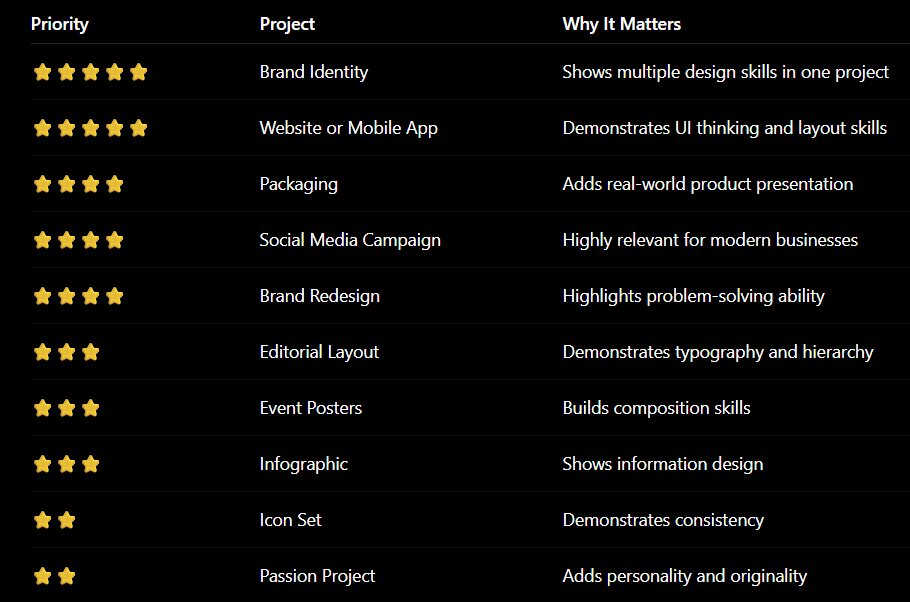
Aim for a mix of project types instead of creating five versions of the same logo. A varied portfolio suggests you're adaptable and willing to explore different design challenges.
How Many Projects Should Beginners Have?
Three to six strong projects are enough to start applying for jobs or internships. Quality beats quantity every time. A portfolio with four well-documented projects, each showing a different skill, is far more convincing than one with fifteen rushed pieces.
As you grow, you can replace your weakest project with a new, stronger one. Think of your portfolio as something you keep editing, not something you finish once and forget.
Build Projects Like Real Client Work
Here's the secret that separates an average student portfolio from one that gets interviews.
Don't upload only the final design. Treat every personal project as if it came from a real client.
For each project, include:
The project brief
The target audience
The problem you're solving
Your research and inspiration
Mood boards
Initial sketches
Design exploration
Final deliverables
Mockups
Key takeaways
When recruiters see your process, they gain confidence that you can handle real projects, not just create attractive visuals. A well-documented self-initiated project is often more convincing than a client project with no explanation.
While your portfolio demonstrates your design skills and problem-solving ability, your resume highlights your education, experience, and professional background. Understanding the difference between a portfolio and a resume can help you present both effectively when applying for design roles.
How to Write Portfolio Case Studies That Recruiters Actually Read
A beautiful design might grab attention, but a good case study keeps people engaged.
This is where many beginners miss an opportunity. They upload polished mockups without explaining what the project was about or why certain design decisions were made.
A strong portfolio case study turns a design into a story.
What Should a Portfolio Case Study Include?
A simple structure is enough. You don't need pages of text.
1. Project Overview
Start with a short introduction.
Include:
Project name
Type of project
Timeline (optional)
Tools used
Your role
Example
Bloom Café Branding
Brand identity design for a fictional specialty coffee shop targeting young professionals. Created using Adobe Illustrator and Photoshop.
2. The Problem
Explain what needed to be solved.
For example:
The café wanted a modern identity that felt warm and welcoming while standing out from large coffee chains.
This immediately gives context to your work.
3. Research and Inspiration
Show how you approached the challenge.
You can include:
Competitor analysis
Mood boards
Color exploration
Typography research
Visual references
Recruiters appreciate seeing your thought process rather than assuming ideas appeared out of nowhere.
4. Design Process
This is often the most interesting section.
Show:
Early sketches
Logo concepts
Wireframes
Layout exploration
Rejected ideas
Refinements
Don't be afraid to include work that didn't make the final cut. It demonstrates iteration and critical thinking.
5. Final Outcome
Now present the finished work.
Use high-quality mockups to show your designs in realistic situations.
For example:
Packaging
Website mockups
Store signage
Business cards
Mobile screens
Social media posts
Good presentation helps your work feel more professional.
6. What You Learned
End each case study with a short reflection.
Example:
This project taught me how color psychology influences branding decisions and how consistent typography improves brand recognition.
Recruiters like designers who can reflect on their work and continue improving.

Where Should You Publish Your Portfolio?
Creating great work is only half the job, people need a place to see it.
Most beginners start with Behance, but it's not your only option. Each platform serves a different purpose, and many designers use more than one.
Is Behance Enough?
Yes, for many beginners.
Behance is one of the easiest places to publish a Behance portfolio because it's free, widely recognized, and designed for visual storytelling.
You can upload complete projects, organize case studies, and become discoverable by recruiters searching for new talent.
If you're just starting out, a polished Behance profile with six strong projects is often enough to begin applying for internships or junior roles.
Should You Use Dribbble?
Dribbble is best for showcasing polished visuals rather than detailed project stories.
It's particularly useful if you create:
UI designs
Landing pages
Mobile interfaces
Illustrations
Icons
Branding snippets
Unlike Behance, Dribbble focuses on quick visual impact. A Dribbble portfolio works well as a supplement but shouldn't replace detailed case studies.
Do You Need a Portfolio Website?
Eventually, yes.
A personal portfolio website gives you complete control over how your work is presented and helps build your personal brand. If you're starting from scratch, you can learn how to create a portfolio website without coding and create a professional online presence without technical expertise.
Your website can include:
About Me
Featured projects
Resume
Contact information
Services (if freelancing)
Blog (optional)
Owning your own website also makes you look more established when applying for jobs or freelance work.
Behance vs Dribbble vs Portfolio Website
Platform | Best For | Advantages | Limitations |
Behance | Complete portfolio case studies | Free, recruiter-friendly, detailed project storytelling | Less personal branding |
Dribbble | Visual highlights | Great for exposure and networking | Limited project depth |
Portfolio Website | Professional branding | Full control, custom domain, SEO benefits | Requires setup and maintenance |
Recommendation for beginners:
Start with Behance.
Add Dribbble for extra visibility.
Build a personal website once you have several polished projects.
Common Beginner Mistakes to Avoid
Even talented designers can lose opportunities because of avoidable mistakes.
Let's look at some of the most common ones.
Do | Don't |
Show your design process | Upload only final images |
Focus on 5–8 strong projects | Add every design you've ever made |
Explain design decisions | Leave projects without context |
Use high-quality mockups | Export blurry or low-resolution images |
Keep layouts clean and consistent | Mix different styles on every page |
Update your portfolio regularly | Leave outdated projects for years |
Proofread all text | Ignore spelling and grammar mistakes |
Showcase variety | Fill your portfolio with only logos |
Other Mistakes Worth Avoiding
1. Copying trending designs
It's fine to learn from inspiration, but avoid creating work that looks identical to popular projects online.
2. Using too many mockups
Mockups should support your design, not hide it. Always include flat versions of logos, layouts, or interface screens before showing them in realistic environments.
3. Ignoring mobile viewing
Many recruiters open portfolios on their phones first. Check that your layouts remain readable on smaller screens.
4. Never updating your portfolio
Your portfolio should grow with you. Replace older work whenever you create something stronger.
Design Portfolio Checklist
Before you start applying for internships, freelance work, or junior design roles, spend a few minutes reviewing your portfolio.
A strong design portfolio for beginners isn't about having the most projects. It's about presenting your best work in a way that's easy to understand.
Use this checklist before hitting "Publish."
|
|
|
|
|
|
|
|
|
|
|
If you can confidently tick most of these boxes, you're ready to start sharing your work.
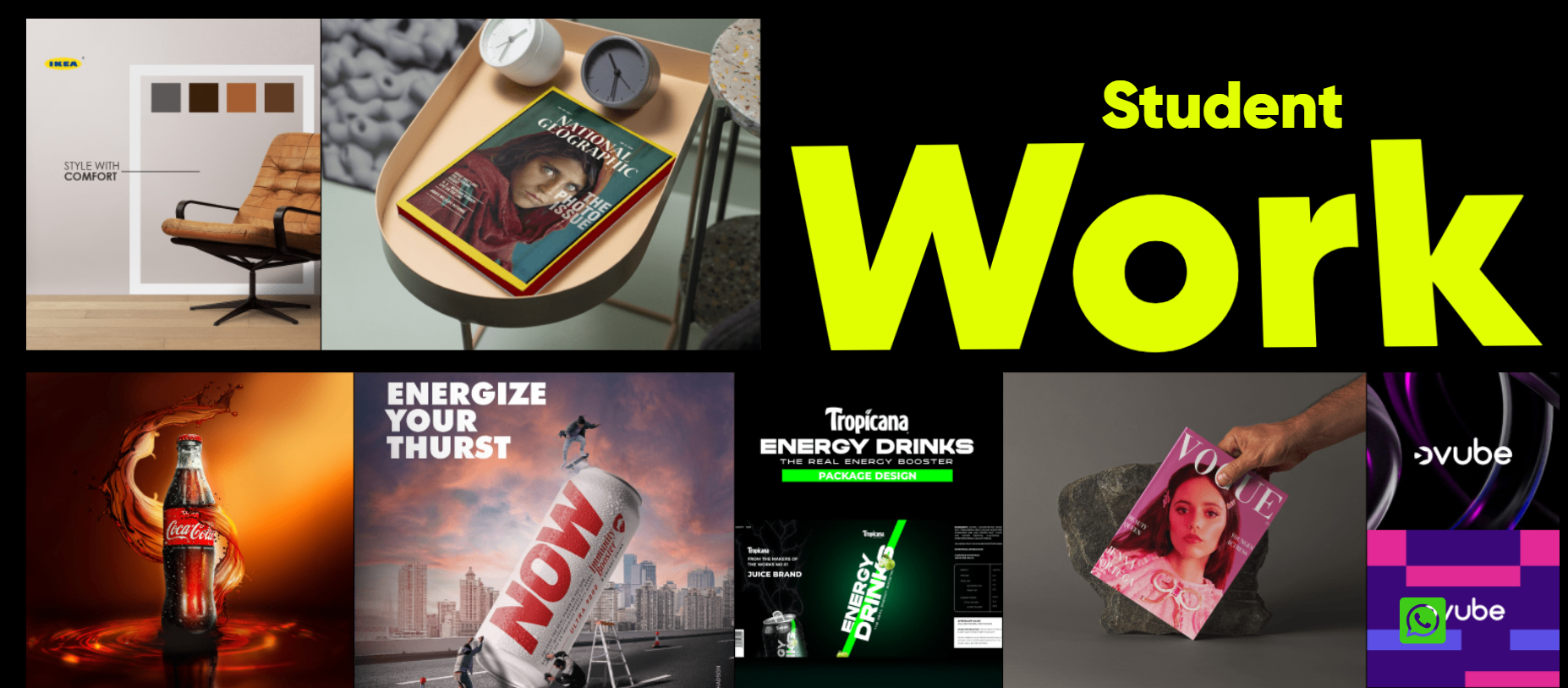
Once you've built your portfolio and are ready to explore career opportunities, it's also useful to understand the earning potential in the field. Check out our guide to Graphic Designer Salary in 2026 to learn how roles, skills, and experience can influence your earning potential.
Conclusion
Every designer you admire once started with a blank portfolio. They didn't wait until they had years of experience or a list of well-known clients. They started by creating meaningful projects, improving their skills with every design, and building a portfolio that reflected their potential.
The same applies to you.
Every branding concept, UI screen, packaging design, or passion project is an opportunity to demonstrate your creativity, problem-solving skills, and design thinking.
The best part? Your portfolio will keep evolving as you do. Start with a few well-crafted projects, document your process, ask for feedback, and continue refining your work. Over time, you'll replace beginner projects with real-world work, but every successful designer starts with that very first portfolio.
If you'd like expert guidance while building your portfolio, enrolling in a Graphic Design Course in Kerala can make the journey much easier. At HACA Design School, the Career Development Course (CDC) is designed to help aspiring designers become job-ready through practical learning. Along with industry-standard assignments and mentorship, you'll also receive a 1-month specialized niche internship, giving you hands-on experience and the chance to build portfolio-worthy projects under professional guidance.