Shopify SEO is the process of optimising a Shopify store so search engines can understand its products, collections, content and structure, while shoppers can quickly find and buy what they need. For a beginner, the most important starting points are keyword research, product and collection optimisation, clear site structure, technical SEO, useful content, internal linking and product visibility across Google.
But SEO should not sit separately from your marketing strategy. A Shopify store needs search traffic, social discovery, email retention, creator partnerships and paid campaigns to move people from discovery to purchase. Shopify also provides built-in tools for marketing campaigns, email, SMS, social channels, creator collaborations and paid promotion.
This guide explains how Shopify SEO works, what you should optimise first and how to market a Shopify store without relying entirely on paid ads.
What is Shopify SEO?
Shopify SEO is the practice of improving a Shopify store's visibility in organic search results for relevant customer queries.
It covers more than adding a keyword to a product description. A useful Shopify SEO strategy connects search intent, site architecture, product data, content, technical accessibility and authority.
For example, a store selling running shoes could target different search intents with different pages:
Search query | Best page type |
Running shoes | Collection page |
Women's trail running shoes | Specific collection page |
Nike trail running shoes | Product or brand-focused collection |
How to choose trail running shoes | Blog post |
Best trail running shoes for beginners | Buying guide |
Nike Pegasus price | Product page |
This distinction matters because Google recommends creating pages that match what searchers expect to find. Shopify's current SEO guidance similarly recommends matching each page to search intent and building collection pages around broader searches.
Why is Shopify SEO Important for an Online Store?
Shopify SEO helps potential customers discover your store when they are already searching for products, solutions or information related to what you sell.
Paid advertising can bring traffic quickly, but organic search can continue bringing visitors after a page is published. That makes SEO particularly useful for stores that want to build a long-term acquisition channel.
SEO also supports other marketing activities. A well-optimised product page can receive organic traffic, appear in Google product surfaces, become a destination for social campaigns and give creators a page to link to.
Google says ecommerce content can appear across surfaces including Google Search, Google Images and Google Lens. Product structured data can also make product information such as price, availability and reviews eligible for richer search appearances.
The important distinction is this: SEO brings the right person to the right page; the page still has to convince them to buy.
How Do You Start Shopify SEO as a Beginner?
Start with the pages that can generate revenue rather than publishing dozens of blog posts first.
A practical order is:
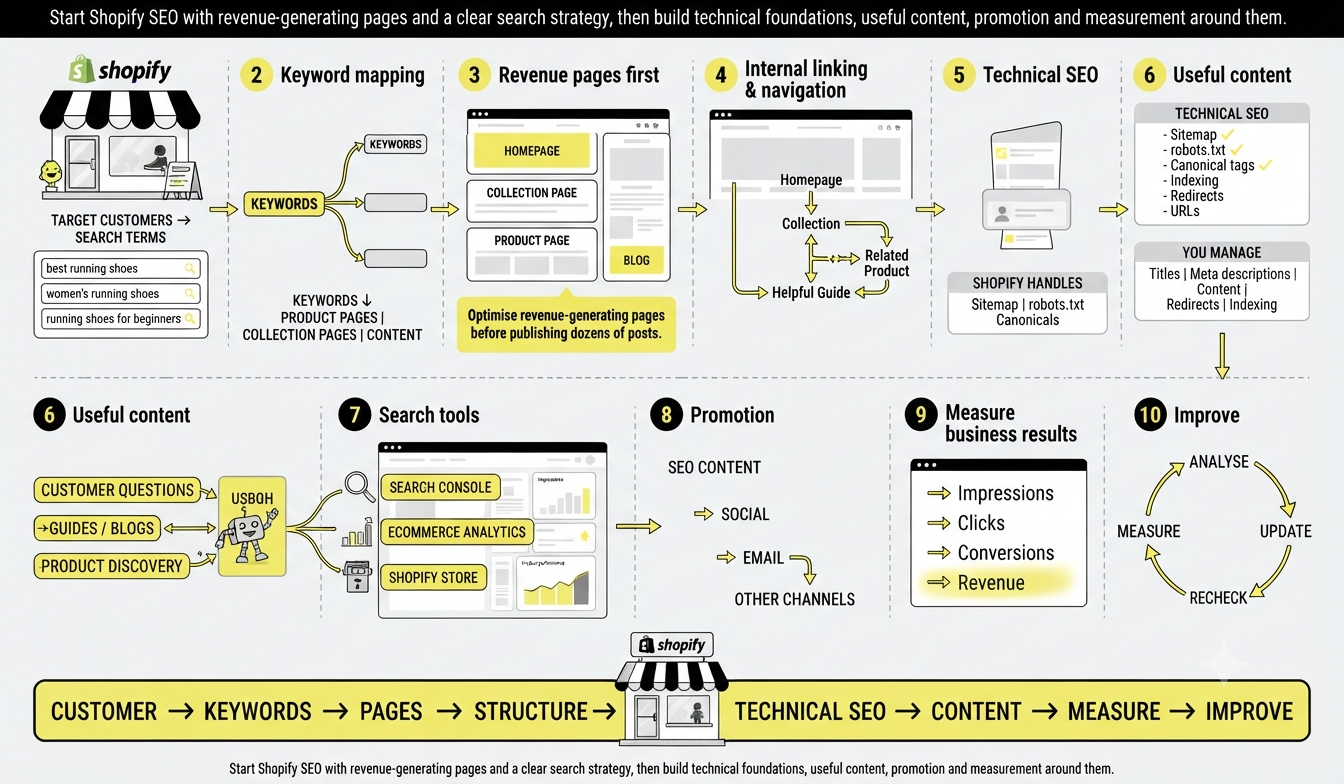
Identify your target customers and search terms.
Map keywords to products, collections and informational content.
Optimise your homepage, collection pages and product pages.
Improve your internal linking and navigation.
Check technical SEO, indexing and redirects.
Create useful content around customer questions.
Connect your store with Google Search Console and relevant ecommerce tools.
Promote your content and products through other marketing channels.
Measure impressions, clicks, conversions and revenue.
Update pages based on actual search and sales data.
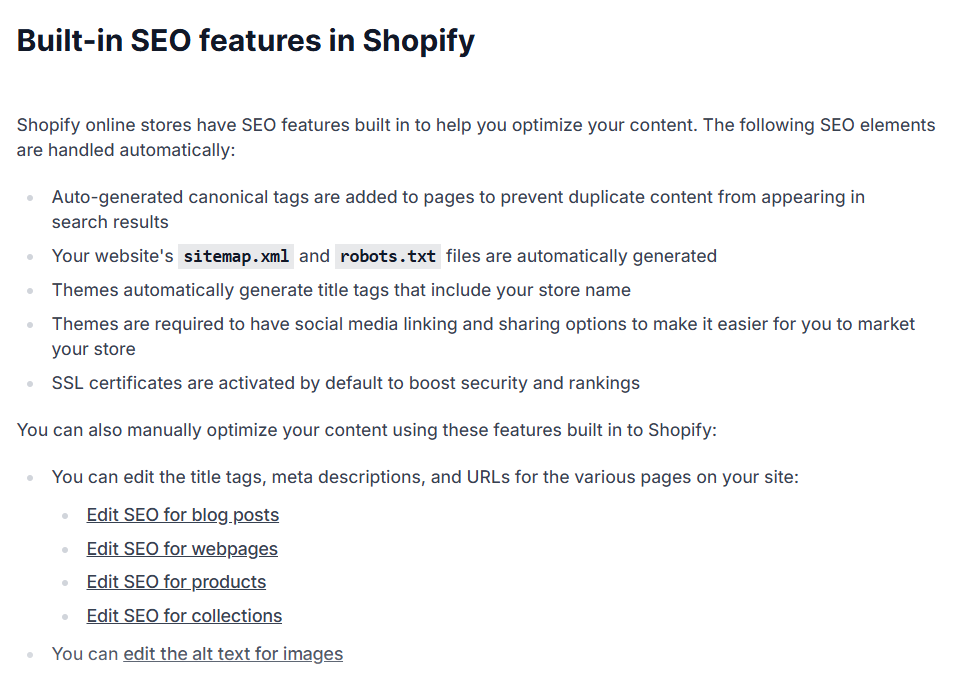
Shopify automatically handles several technical SEO elements, including generating a sitemap and robots.txt file and adding canonical tags. However, store owners still need to manage important areas such as page titles, meta descriptions, URLs, content, redirects and indexing.
How to Do Keyword Research for Shopify SEO?
Keyword research helps you understand the language customers use when looking for your products.
Do not start by choosing the keyword with the highest search volume. Start by understanding what the customer wants to accomplish.
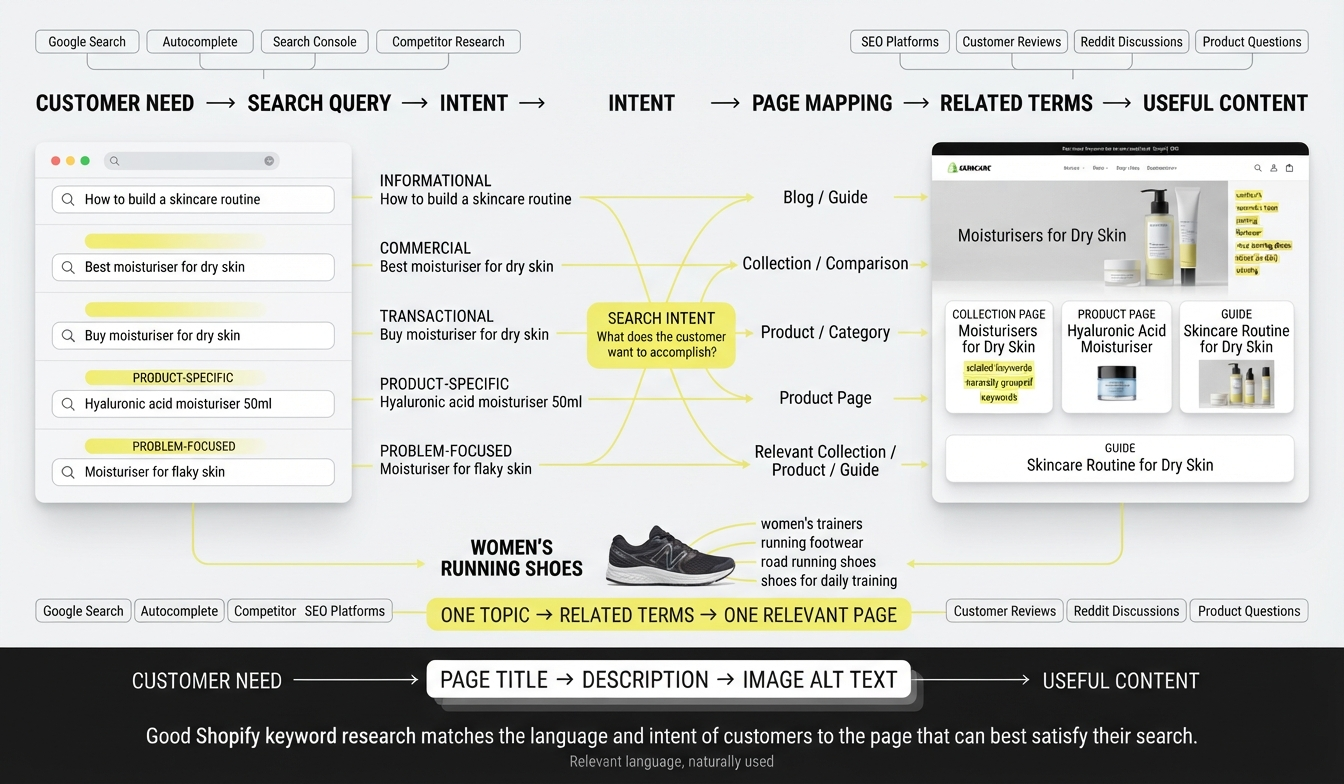
For a skincare store, for example, these queries represent different stages:
Informational: how to build a skincare routine
Commercial: best moisturiser for dry skin
Transactional: buy moisturiser for dry skin
Product-specific: hyaluronic acid moisturiser 50ml
Problem-focused: moisturiser for flaky skin
Map each query to the page that can provide the strongest answer.
Use Google Search, autocomplete, Search Console, competitor research and SEO platforms such as Semrush or Ahrefs to identify related queries. Customer reviews, Reddit discussions and product questions can also reveal language that conventional keyword tools miss.
Then group related terms instead of forcing every variation into one page.
For example, a collection page targeting women's running shoes can naturally cover related concepts such as women's trainers, running footwear, road running shoes and shoes for daily training when those terms genuinely describe the products.
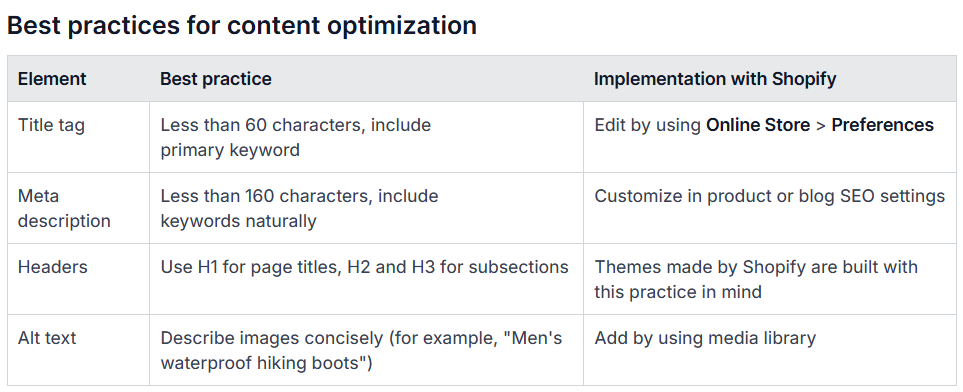
Shopify recommends using relevant keywords in page titles, descriptions and image alt text while keeping the content useful rather than mechanically repeating terms.
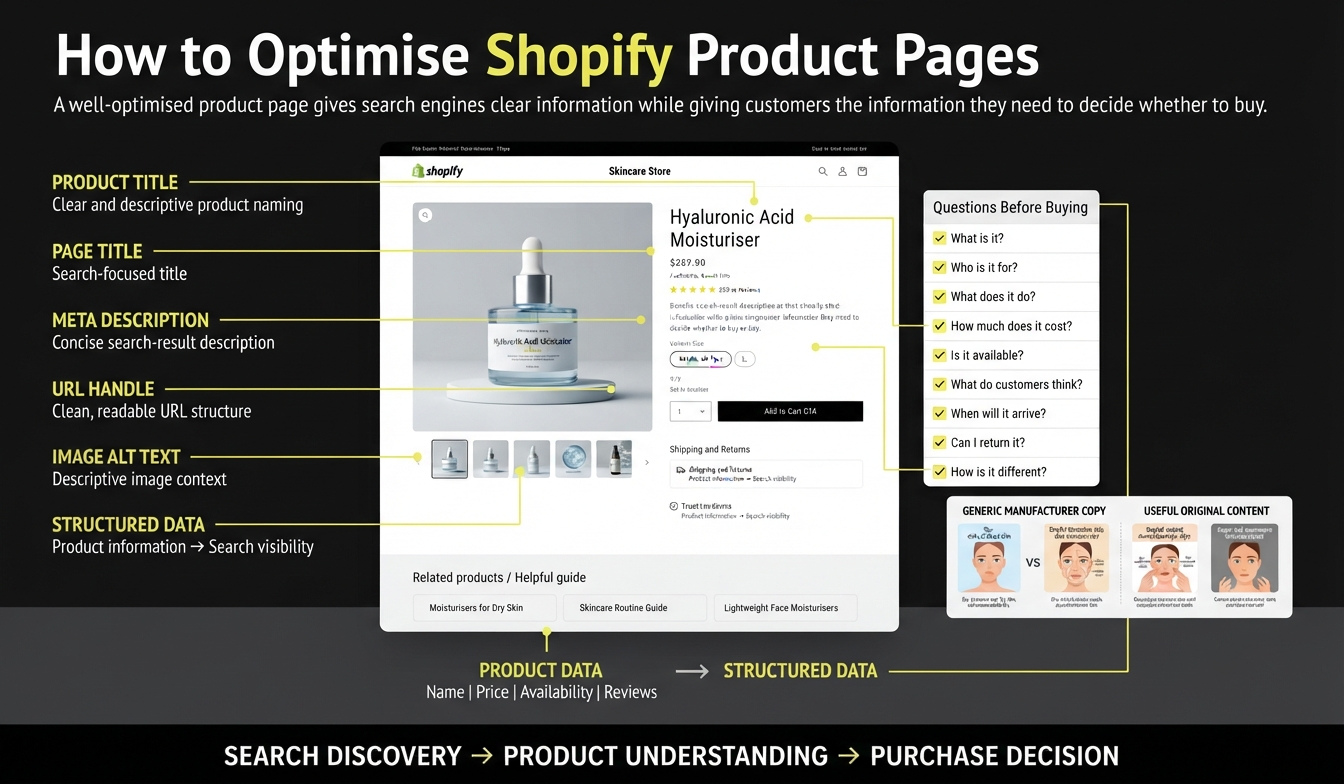
How to Optimise Shopify Product Pages?
Your product page should answer the questions a customer needs answered before purchasing.
Optimise:
Product title
Product description
Page title
Meta description
URL handle
Product images
Image alt text
Price and availability
Reviews
Shipping and returns information
Internal links
Relevant structured data
Avoid copying the manufacturer's description if dozens of other stores use the same text. Instead, explain what makes the product useful, who it suits, how it compares with alternatives and what customers should know before buying.
For example, instead of:
“Premium cotton shirt made from high-quality fabric.”
Explain the actual buying information:
“Lightweight cotton shirt designed for humid weather, with a relaxed fit and machine-washable fabric.”
This is more useful to shoppers and gives search engines more meaningful information about the product.
Google's product documentation states that product structured data can help eligible pages appear with information such as price, availability, shipping and review details.
How Do Shopify Collection Pages Help SEO?
Collection pages are often more important for ecommerce SEO than beginners realise. A product page targets one specific item. A collection page can target a broader commercial category.
For example:
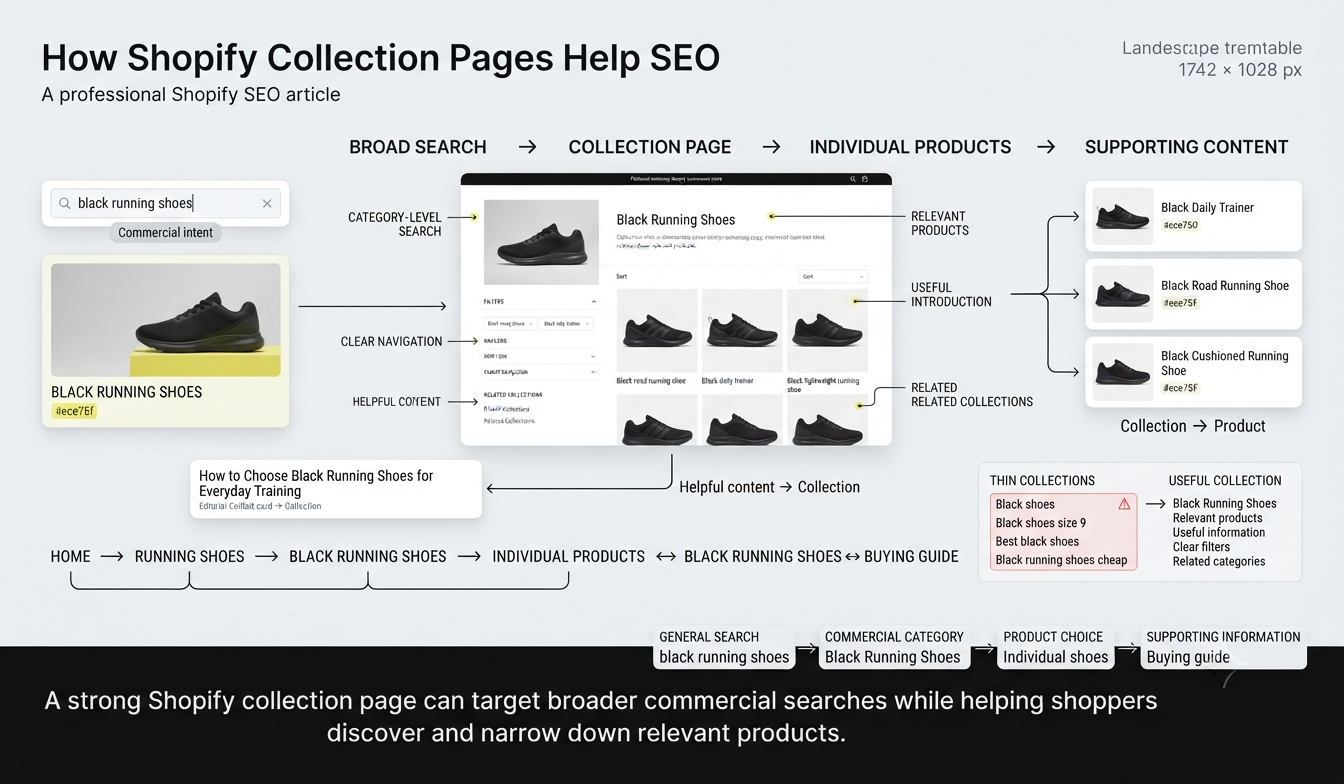
Products: individual black running shoes
Collection: black running shoes
Blog: how to choose black running shoes for everyday training
This creates a logical search journey. A strong collection page should have a descriptive title, useful introductory copy, relevant products, clear navigation and links to related collections.
Do not create dozens of thin collections simply because a keyword exists. Create collections that make sense for shoppers and help them narrow their choices.
Shopify's current ecommerce SEO guidance specifically recommends building collection pages around general searches and using site structure to help search engines understand important pages.
What Technical SEO Should You Check on Shopify?
Shopify handles much of the technical foundation, but that does not mean technical SEO can be ignored.
Check these areas regularly:
SEO area | What to check |
Indexing | Are important pages indexed? |
Sitemap | Is the sitemap accessible and submitted? |
URLs | Are handles descriptive and stable? |
Redirects | Do deleted or changed URLs redirect correctly? |
Canonicals | Are duplicate URL versions handled correctly? |
Mobile experience | Is the store easy to use on phones? |
Images | Are images compressed and descriptive? |
Internal links | Can shoppers and crawlers reach important pages? |
Page speed | Are heavy scripts, apps and images slowing pages? |
HTTPS | Is the entire store secure? |
Shopify automatically generates a sitemap, while Google recommends making ecommerce site structure clear through navigation and internal links. When products or collections are removed or URLs change, redirects can prevent customers from landing on broken pages.
One Shopify-specific problem deserves attention: apps can quietly make a store heavier. An app that adds a useful feature may also introduce scripts, pop-ups or tracking code. Review installed apps periodically and remove anything the store no longer needs.
How to Optimise Shopify Images for SEO?
Images support both product discovery and user experience.
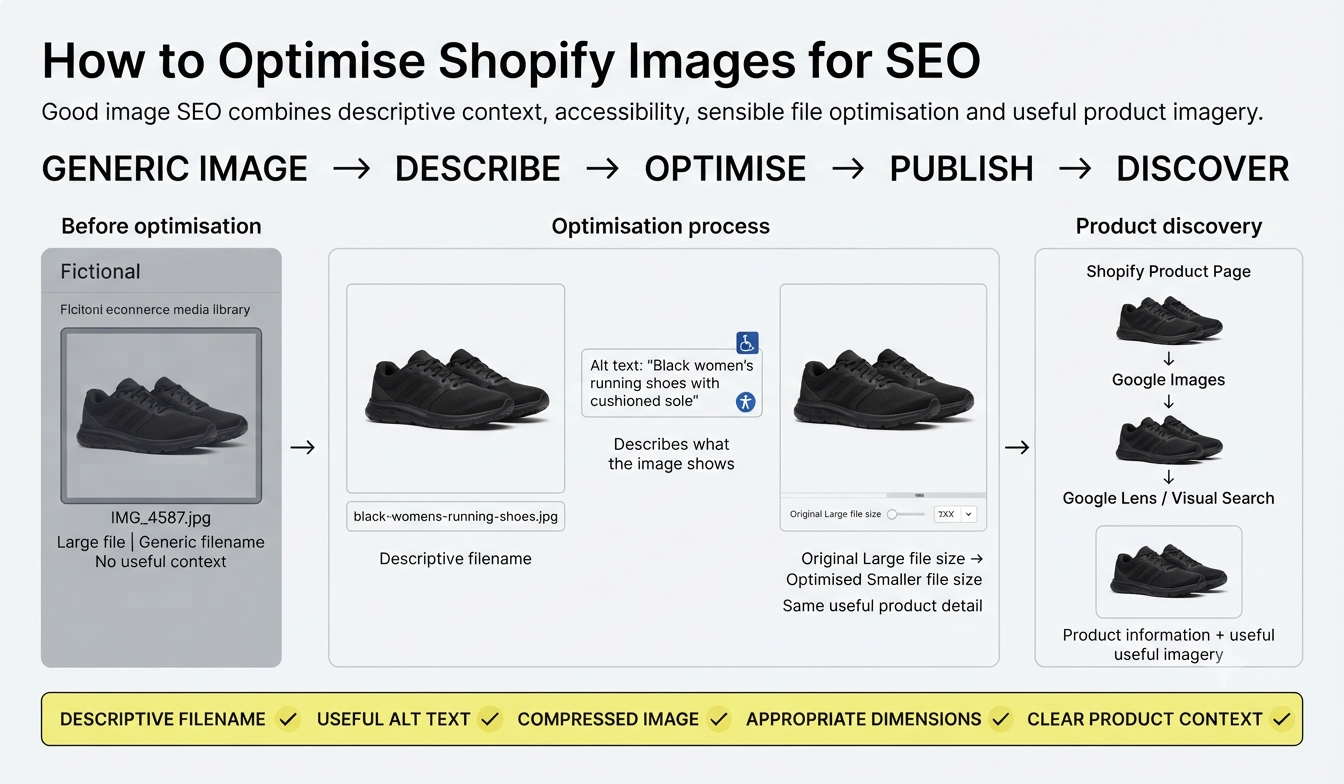
Use descriptive filenames instead of generic names such as: IMG_4587.jpg
A better filename for a product image could be: black-womens-running-shoes.jpg
Write alt text that describes the image naturally. For example:
Alt text: “Black women's running shoes with cushioned sole”
Compress large images before uploading them and use the appropriate dimensions for the placement. This can reduce unnecessary page weight while preserving useful product detail.
Google also supports ecommerce discovery through Google Images and Google Lens, making accurate product imagery and product information useful beyond the standard blue-link search result.
How to Use Content Marketing for Shopify SEO?
A Shopify blog should answer questions that product and collection pages cannot fully address.
Think about the customer's journey. Someone selling coffee equipment could create content around:
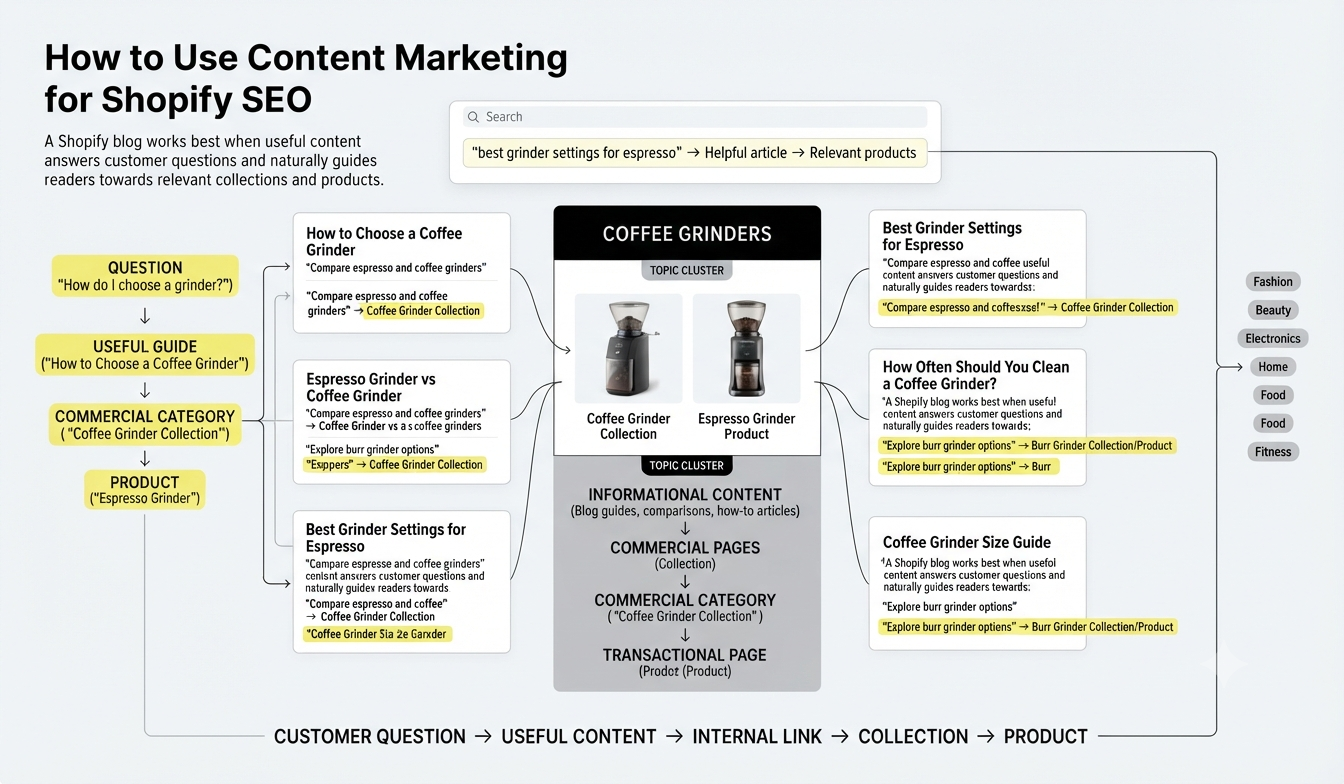
How to choose a coffee grinder
Espresso grinder vs coffee grinder
Best grinder settings for espresso
How often should you clean a coffee grinder?
Burr grinder buying guide
Coffee grinder size guide
Each article can then link naturally to relevant collections or products. This creates a topic cluster rather than a collection of unrelated blog posts.
The same principle applies to fashion, beauty, electronics, home products, food, fitness equipment and other ecommerce categories.
Shopify recommends using blogs and other content channels to create relevant information around products and says content should help customers find the store.
How Can You Use Internal Linking for Shopify SEO?
Internal links connect your homepage, collections, products and content.
A simple structure might look like:
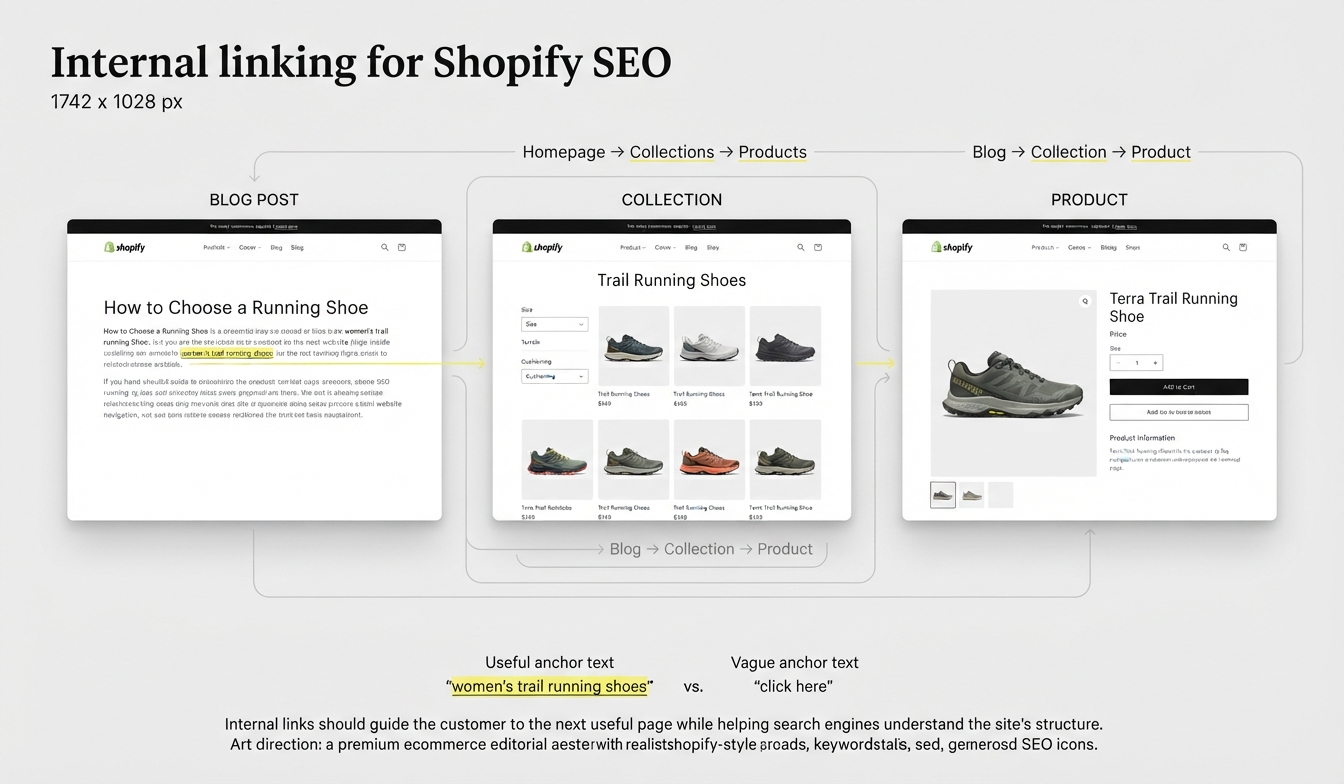
Blog post → Collection → Product
For example:
How to choose a running shoe → Trail running shoes → Specific trail shoe
This gives the reader an obvious next step while helping search engines understand the relationship between pages.
Use descriptive anchor text such as women's trail running shoes instead of vague text such as click here.
The link should exist because it helps the customer, not because a checklist says every paragraph needs a link. Shopify's current SEO guidance makes the same distinction: internal links should prioritise users and accessibility while helping search engines understand site structure.
How Do You Market a Shopify Store Beyond SEO?
SEO is one acquisition channel, not the entire marketing plan. To market a Shopify store effectively, combine channels based on your audience, product and business stage. Digital marketing in e-commerce brings these channels together across the customer journey.
1. Use social media to create demand
Platforms such as Instagram, TikTok, Pinterest and Facebook can introduce products to people who are not actively searching for them.
Instead of posting only product photos, create content around use cases, demonstrations, comparisons, customer questions and behind-the-scenes stories.
Shopify supports social selling integrations that allow merchants to share products across social platforms.
2. Build an email and SMS audience
Do not depend entirely on algorithms to reach previous visitors. Use sign-up forms to build a permission-based customer list and send useful campaigns such as product launches, restocks, educational content and abandoned checkout messages.
Shopify supports forms, email and SMS campaigns through its marketing tools.
3. Work with creators and affiliates
Creator marketing can work particularly well when the product benefits from demonstration or personal recommendation.
For example, a skincare product can be shown in a routine, while a fitness product can be demonstrated during a workout.
Shopify Collabs provides tools for connecting merchants with creators and influencers for affiliate and creator-led marketing.
4. Use paid advertising strategically
Paid ads can generate traffic before SEO has matured. Use them to test product-market fit, promote high-margin products, retarget interested shoppers or support launches.
The mistake is treating paid traffic as a substitute for fixing the store. If visitors consistently arrive but do not understand the product, trust the brand or complete checkout, increasing the ad budget only increases the number of people seeing the same problem.
5. Use Google Merchant Centre and product data
Make product information available to Google's ecommerce ecosystem.
Google explains that ecommerce data can surface across Search, Images and other Google experiences. Product and merchant listing structured data can also communicate information such as price and availability.
This makes product feed quality part of the wider Shopify SEO and marketing strategy, rather than a completely separate task.
What is the Best Shopify SEO and Marketing Strategy for a New Store?
A new Shopify store does not need to launch ten marketing channels at once.
Start with a focused system:
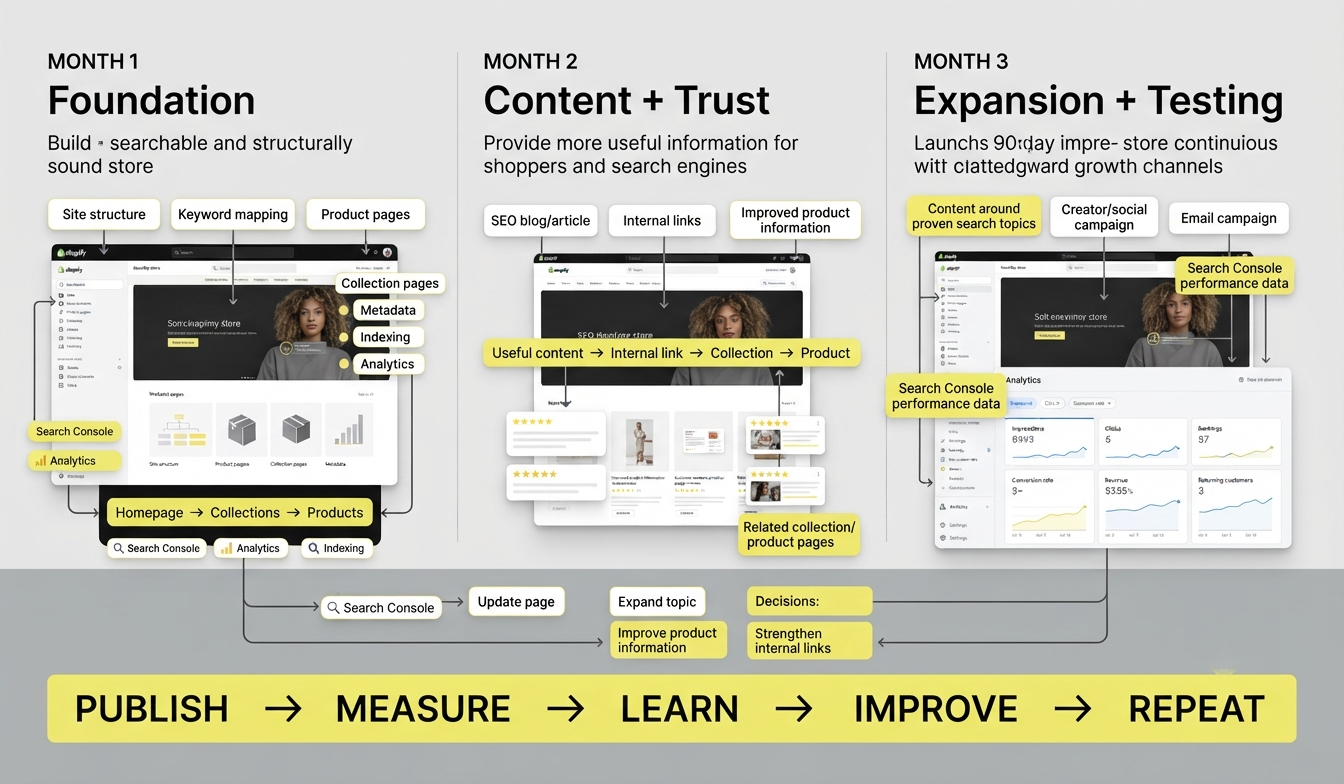
Month 1: Fix site structure, keyword mapping, product pages, collections, metadata, indexing and analytics.
Month 2: Publish useful content, build internal links, improve product information and start collecting customer reviews.
Month 3: Expand content around proven search topics, test creator or social campaigns, build email campaigns and improve pages based on Search Console data.
Then compare organic impressions, clicks, rankings, conversion rate, revenue and returning customers. You can also learn how to measure SEO performance to understand which pages and queries are actually contributing to growth.
What Shopify SEO Mistakes Should Beginners Avoid?
The most common mistakes are usually strategic rather than technical.
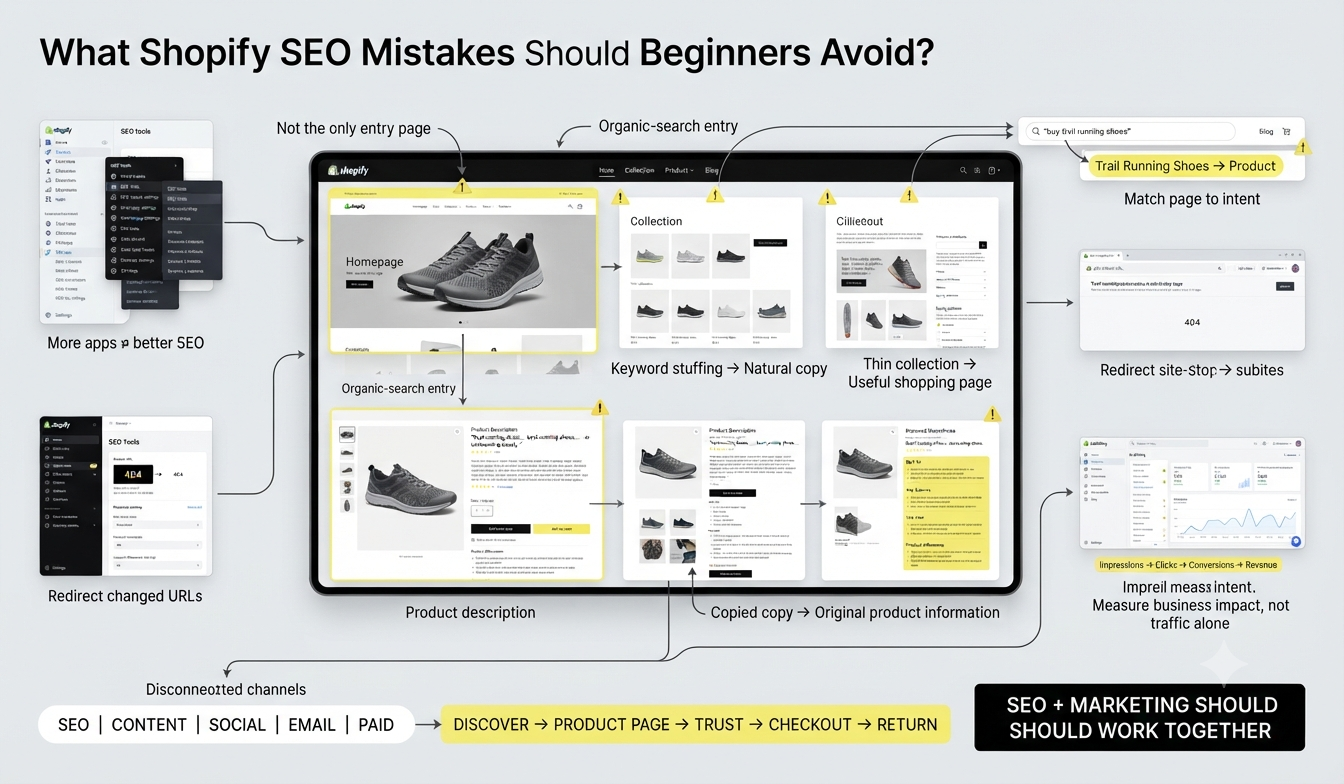
Keyword stuffing: Repeating the same phrase makes copy harder to read and does not create a better product page.
Optimising only the homepage: Customers often enter through product, collection and blog pages.
Creating thin collection pages: A collection should solve a real shopping need.
Ignoring search intent: A blog post cannot always compete with a product or collection page for a transactional query.
Copying supplier descriptions: Duplicate descriptions give shoppers little reason to choose your store.
Installing too many SEO apps: More apps do not automatically mean better SEO.
Ignoring redirects: Changed URLs can create broken paths and lost traffic.
Publishing without measurement: Traffic alone does not tell you whether SEO contributes to revenue.
Treating SEO and marketing as separate: Search, content, social, email and paid campaigns work better when they point customers towards a clear buying journey.
Shopify SEO Beginner Checklist
Before considering your basic Shopify SEO setup complete, check:
Primary keywords mapped to important pages
Homepage title and meta description optimised
Product titles and descriptions improved
Collection pages mapped to commercial search intent
Clean URL handles
Descriptive image filenames and alt text
Internal links between related content, collections and products
Sitemap submitted to Google Search Console
Important pages indexed
Redirects checked after URL changes
Mobile shopping experience tested
Page speed reviewed
Product data connected to Google where appropriate
Blog content built around genuine customer questions
Email/SMS capture implemented with consent
Social and creator promotion planned
Organic traffic and conversions measured
Final Insights
A successful Shopify store needs more than a well-designed website. It needs a clear structure, relevant keywords, optimised product and collection pages, useful content and a technical foundation that makes the store easy for search engines to understand. SEO helps bring the right people to the store, while content, social media, email, paid campaigns and other marketing channels help turn that visibility into actual customers.
For beginners, the important thing is to understand how these areas work together. Learning how to build a Shopify store, optimise it for search and promote it across different channels gives you a more complete understanding of ecommerce marketing.
If you want to develop these skills in a structured way, HACA's Advanced Digital Marketing Course in Kerala also covers Shopify store building along with other areas of digital marketing. This can help you understand the process beyond just optimising an existing store, from building the store to learning how different marketing channels can support its growth.