
ChatGPT is becoming another place where people discover businesses, compare products and explore services. To help businesses manage their presence on the platform, OpenAI introduced Businesses in ChatGPT and Business Hub in beta on 10 November 2026.
If you own a business or manage one on behalf of an organisation, you can claim its profile through ChatGPT Business Hub. Once your claim and identity verification are approved, you can manage your business information, share product details and view insights into how people discover your business through ChatGPT.
Claiming a business involves finding your listing, verifying your connection to the business and completing an additional identity check through Persona. The available verification methods include a business phone number, business email, website domain or Shopify store.
This guide explains how to claim your business in ChatGPT Business Hub, the documents you may need, the verification process and what you can do after approval.
What Is ChatGPT Business Hub?
ChatGPT Business Hub is a dashboard that allows eligible businesses to claim and manage their business presence in ChatGPT.
OpenAI introduced it to give businesses more control over the information they share with ChatGPT. Instead of relying only on information available across the web, businesses can provide their official details, product information and other relevant updates directly through the platform.
Once a business completes the required verification, its authorised representatives can manage several aspects of its profile.
Key features of ChatGPT Business Hub include:
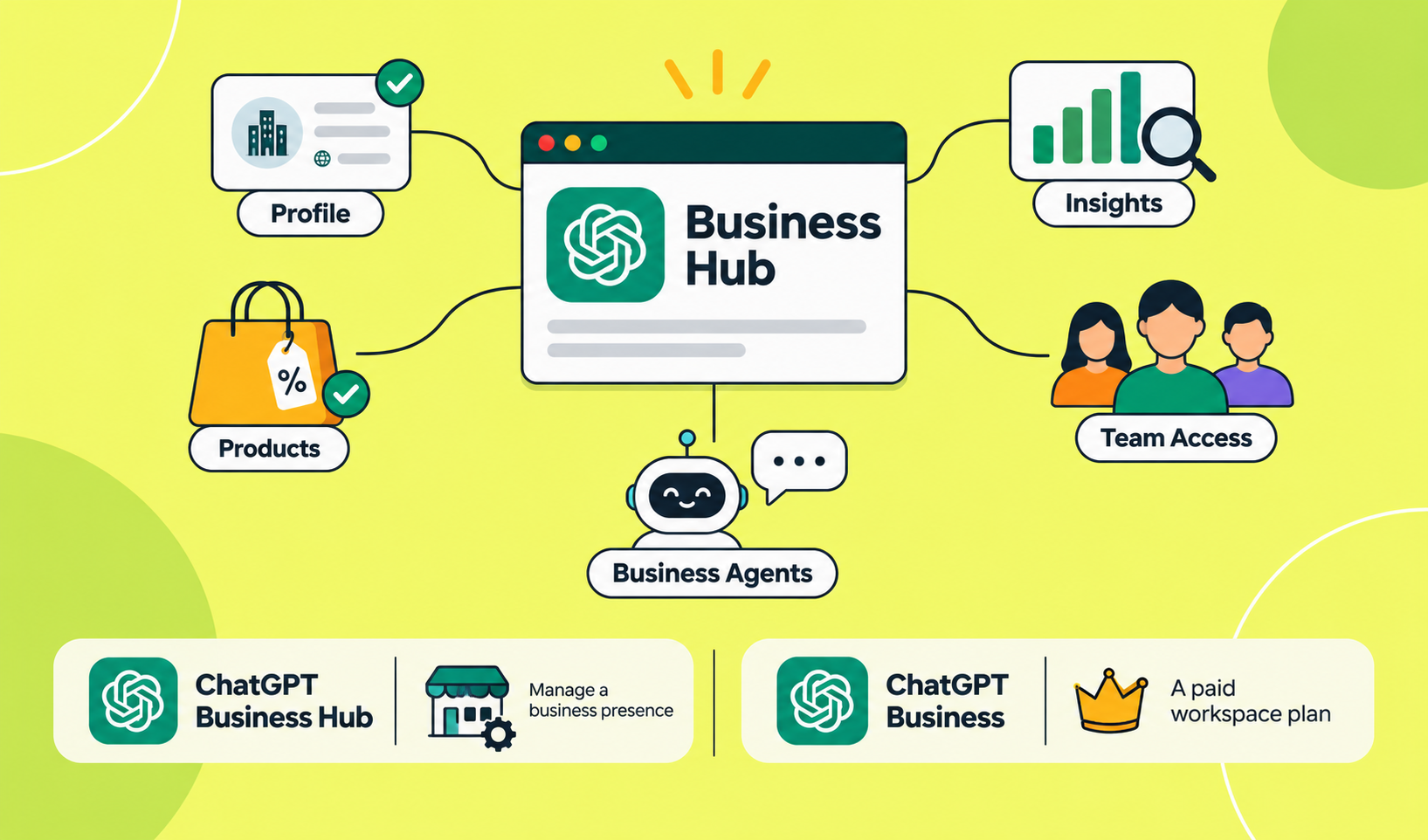
Business profile management: Add or update your official website, business description, category, logo and other details.
Product information: Connect a product feed to share product prices and availability.
Business insights: View aggregated information about business mentions, website clicks and discovery topics.
Team access: Allow authorised team members or agencies to manage the business.
Business Agents: Eligible US-based ecommerce and online service businesses can create an agent to answer customer questions.
Business Hub is part of OpenAI's Businesses in ChatGPT initiative. It is different from ChatGPT Business, which is a paid workspace plan for organisations.
Who Can Claim a Business on ChatGPT?
Any eligible business operating in a location where ChatGPT is available can claim its business through Business Hub, subject to the available verification options and business-type requirements.
You must either own the business or have permission to represent it. You also need access to at least one of the verification methods offered for your listing.
The availability of certain features depends on your business location and category.
Business type | Claiming availability |
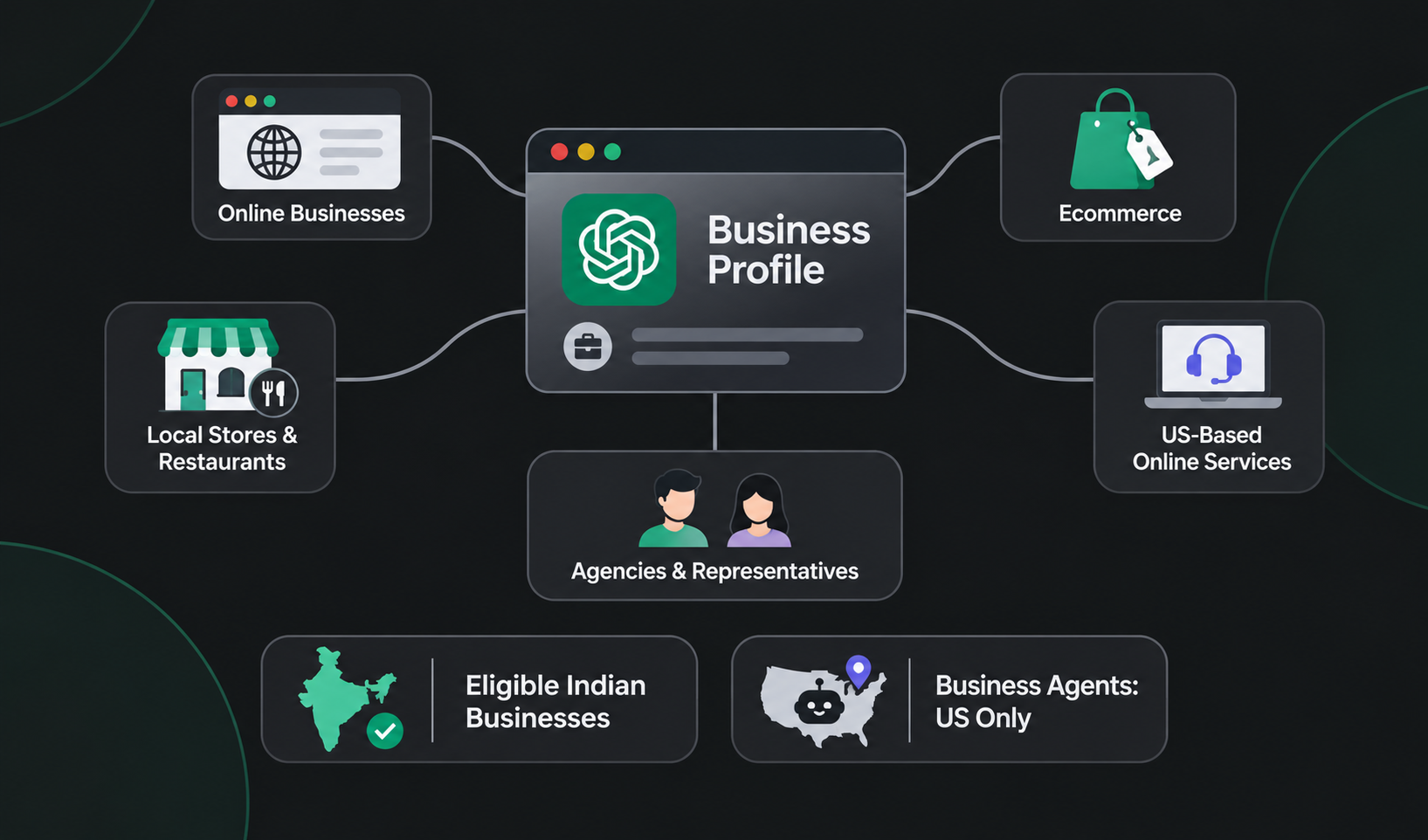
Online businesses | Eligible businesses can claim an existing listing or add a business where the option is available. |
Ecommerce businesses | Eligible businesses can claim their profiles and connect supported product feeds. |
Local stores and restaurants | Currently limited to claiming existing US listings. |
US-based online services | Eligible businesses can claim profiles and may qualify for Business Agents. |
Agencies and representatives | Can manage a business when authorised by its owner or administrator. |
Can Indian businesses claim their profiles?
Yes, businesses in India are eligible to claim their profiles because OpenAI allows eligible businesses in locations where ChatGPT is available to use Business Hub.
However, there is an important distinction between claiming a business profile and using Business Agents. Business Agents are currently available to eligible ecommerce and online service businesses in the United States.
Therefore, an Indian business may be able to claim and manage its profile without having access to the Business Agent feature.
You can check the official OpenAI Business Hub guide for the latest eligibility requirements.
Businesses managing their local online presence should also understand how to maintain accurate business information across platforms. Here's a helpful guide to optimising and managing a Google Business Profile.
How to Claim Your Business in ChatGPT Business Hub
You can claim your business by signing in to ChatGPT, finding your business listing and completing one of the available verification methods.
Follow these steps to get started.
Step 1: Open ChatGPT Business Hub
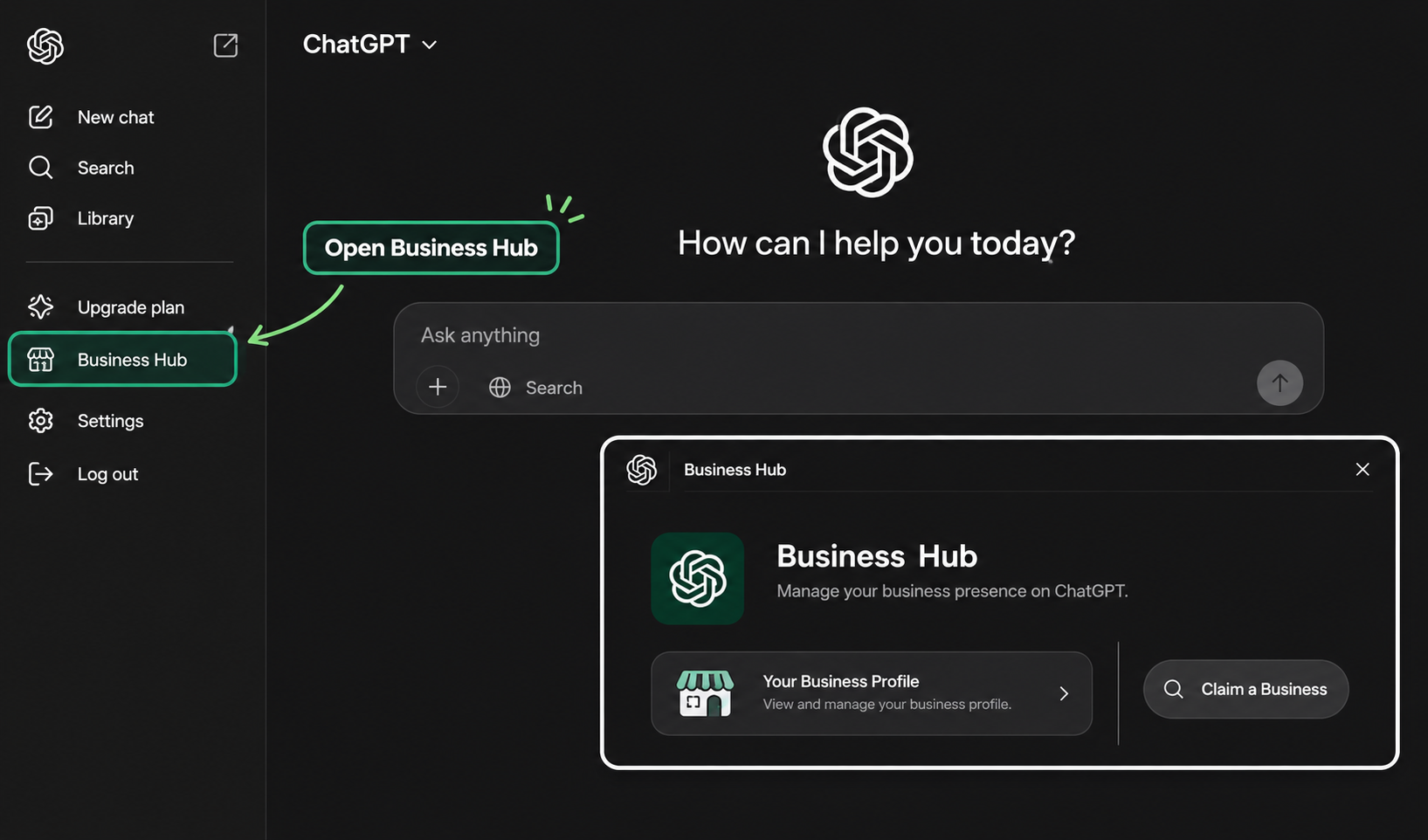
Visit chatgpt.com/business-hub and sign in to your ChatGPT account, or you can also access Business Hub from the sidebar in ChatGPT.
Use an account that you intend to use for managing your business. This account will be associated with your business claim and administration.
Step 2: Search for Your Business
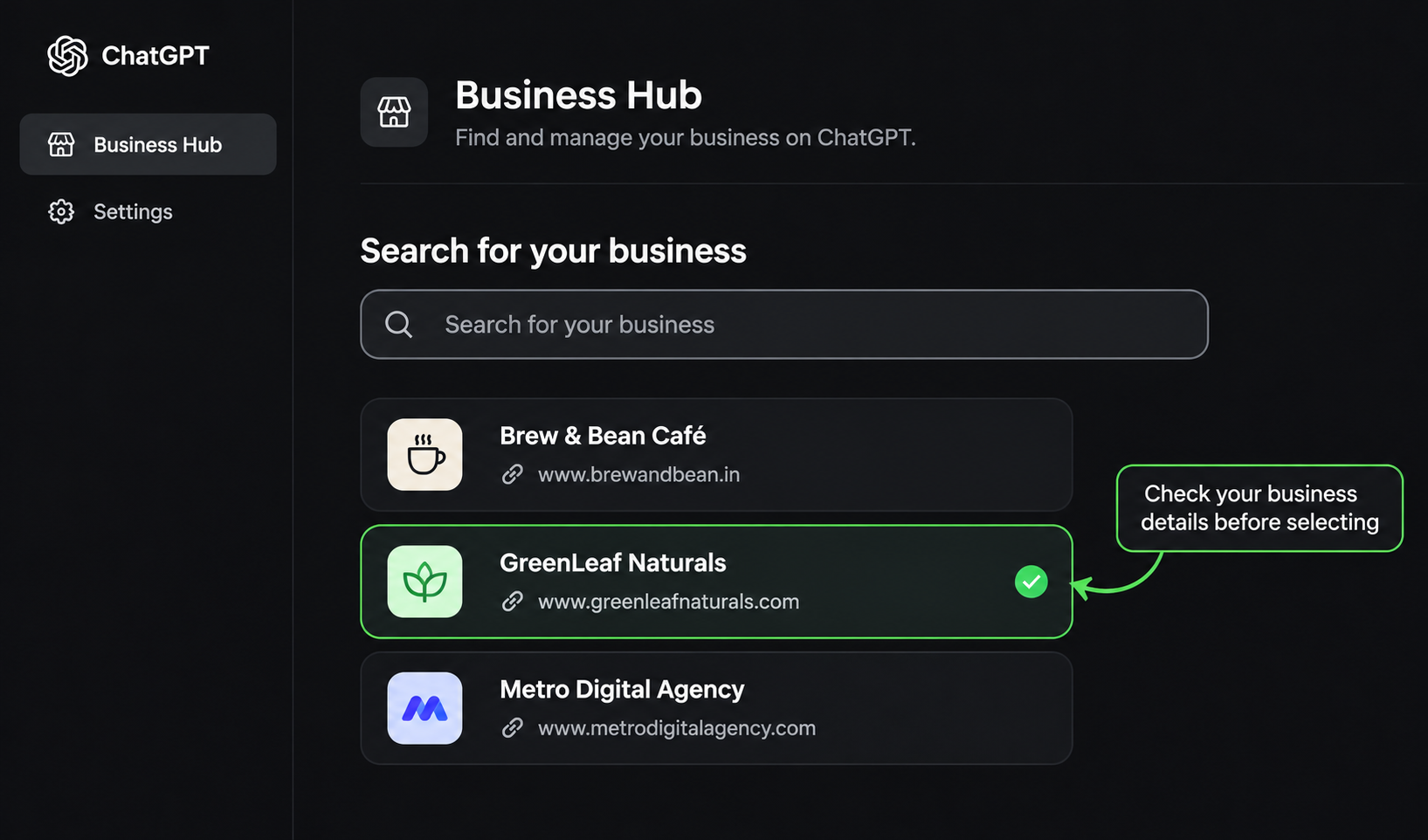
Once you open Business Hub, search for your business using its official name.
Check the available listings carefully before selecting one. Make sure the business name and other identifying information match the organisation you represent.
If you find the correct listing, select it and confirm the ChatGPT account you want to use to manage it. ( If your business does not appear, an option to add a new business may be available if your business type is eligible.)
Step 3: Choose a Verification Method
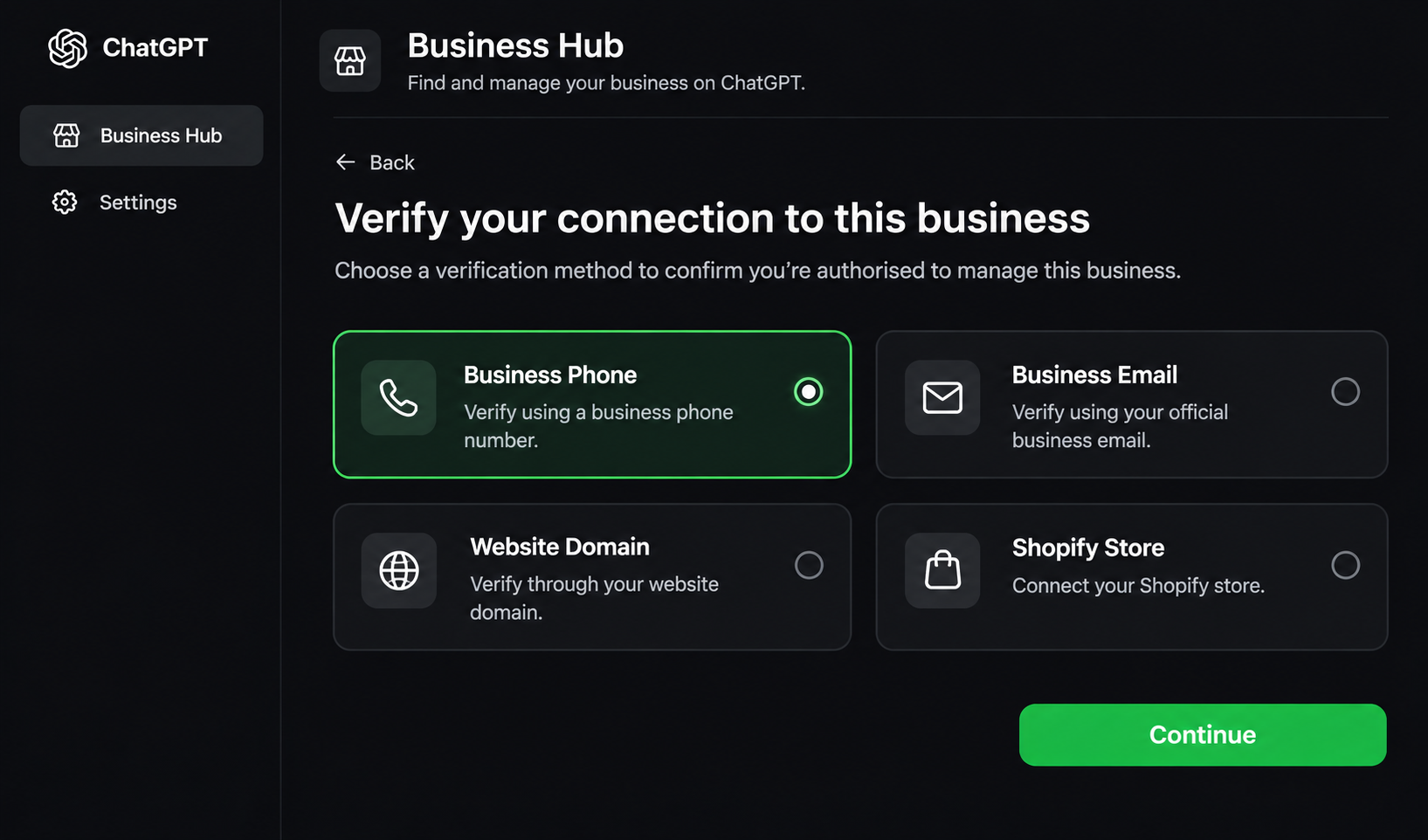
After selecting your business, Business Hub will show the verification methods available for that listing.
You can verify your connection to the business through one of the following methods: (The options available may differ depending on your business and account.)
Business phone
Business email
Website domain
Shopify store
Choose a method you can access and follow the instructions displayed on the screen.
Step 4: Submit Your Business Claim
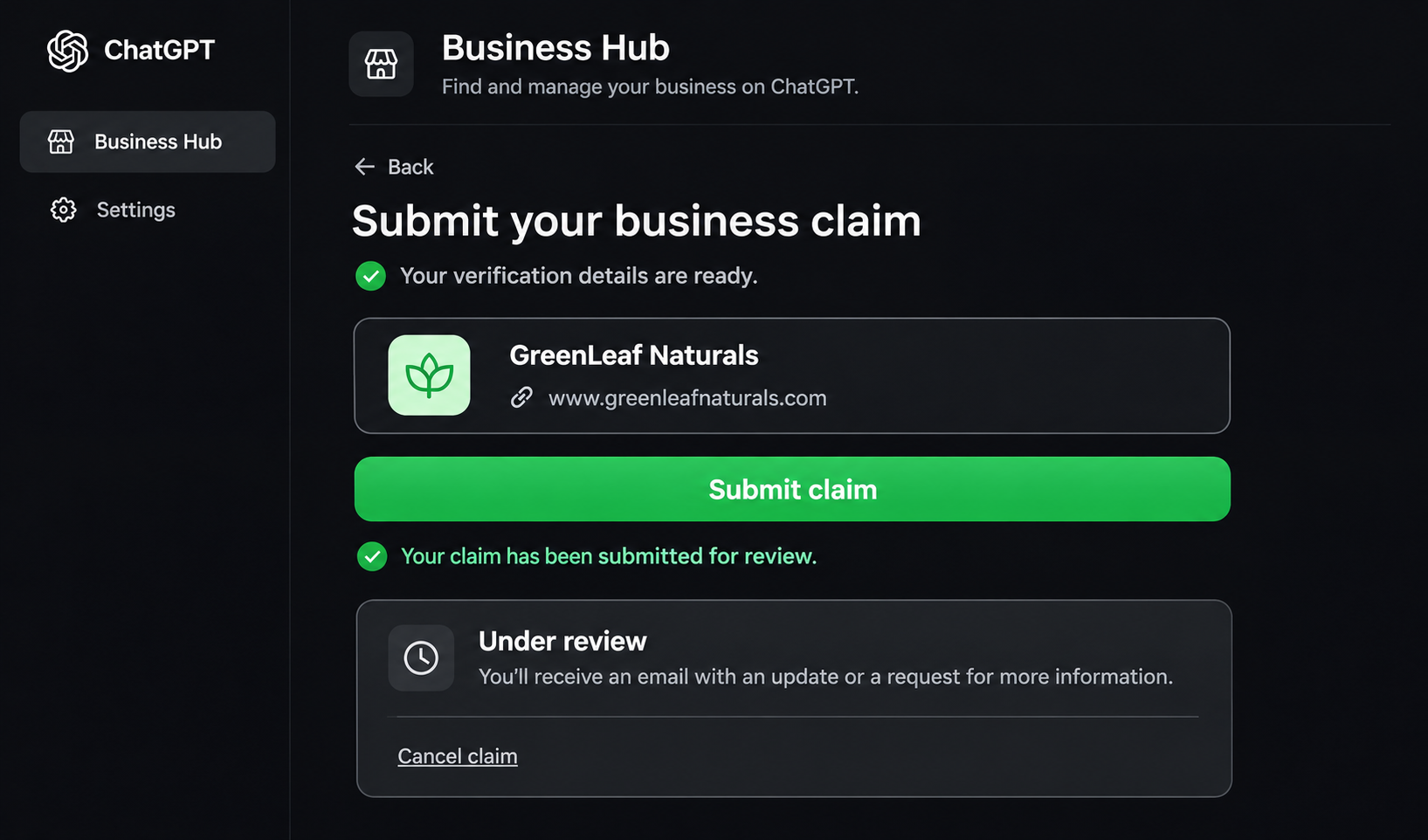
Complete the selected verification process and submit your claim.
OpenAI reviews the information and sends an email with its decision or a request for additional details.
You may need to wait for the review to finish before accessing your claimed business in Business Hub.
If your claim is still under review, you can cancel it through the available option in the dashboard.
Step 5: Complete Identity Verification Through Persona
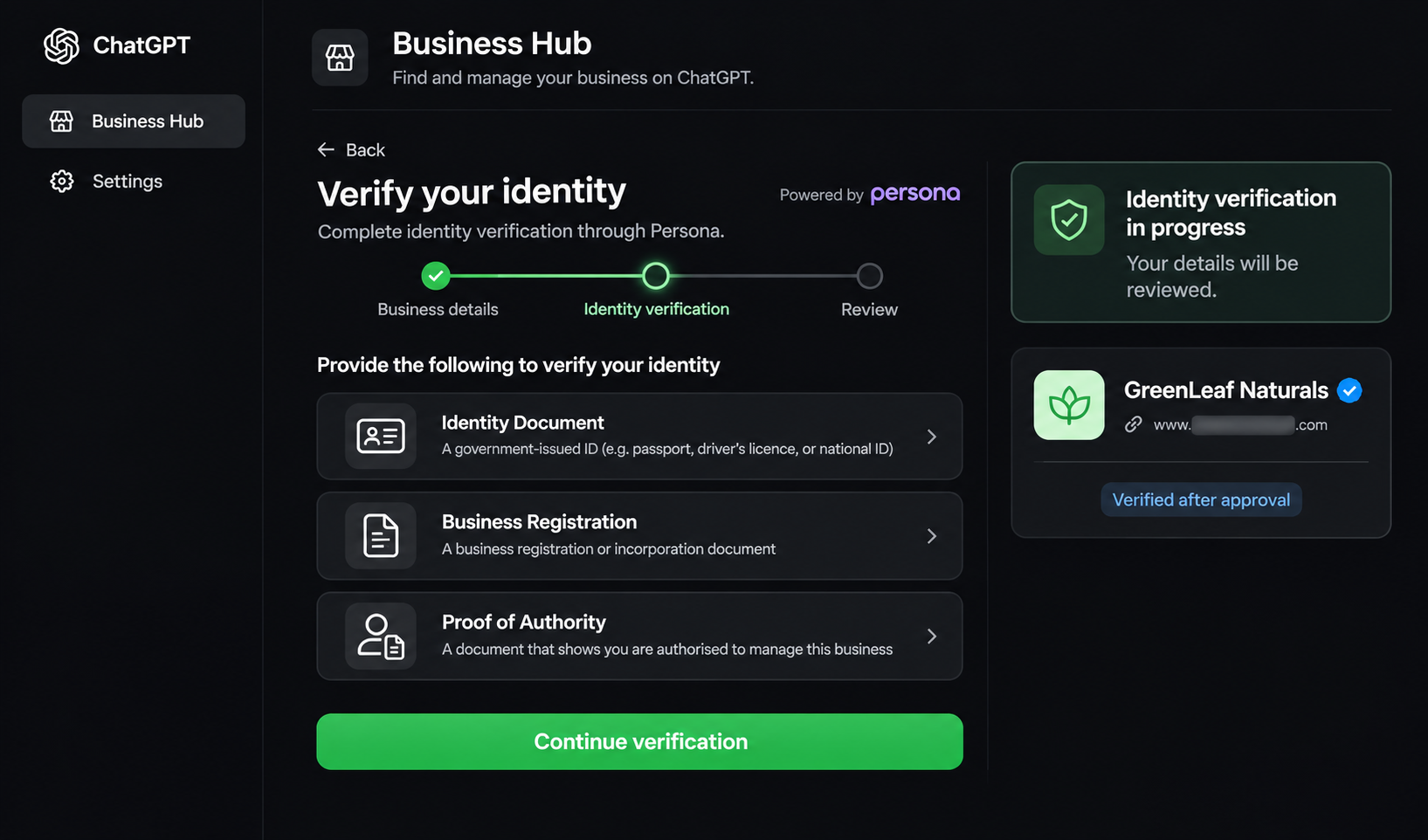
Once your initial business claim is approved, you must complete an additional identity verification process through Persona. This step confirms that the person managing the profile has the authority to represent the business.
You may need to provide:
A government-issued identity document.
Official business registration information.
Proof that you are authorised to represent the organisation.
Follow the instructions provided by Persona and make sure the information matches your official business records.
OpenAI reviews the submitted details and sends an email with the verification decision or any request for additional information.
Important: Completing the initial business claim does not automatically give your business a verified badge. The blue verification check appears after Persona verification is approved.
Step 6: Access Your Verified Business Profile
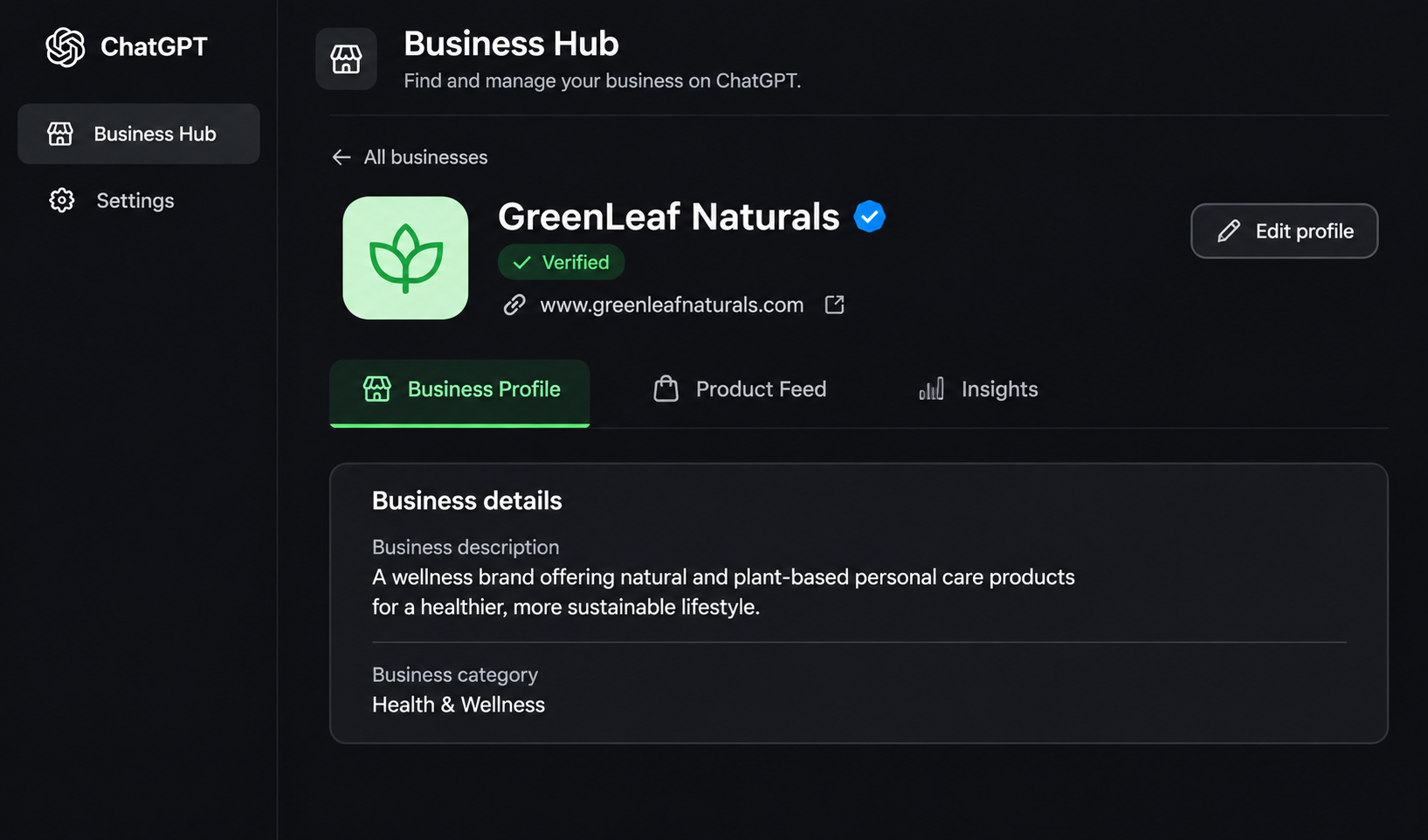
After the required approvals, you can access your business profile through Business Hub.
You can now manage the information available for your business, connect supported product feeds and view the insights provided by the platform.
Review your profile before publishing any changes. Check that your website, business description, category and other details are accurate.
What Are the Verification Methods Available in ChatGPT Business Hub?
ChatGPT Business Hub provides different ways to confirm your connection to a business. The available options include phone, email, website domain and Shopify verification.
Here is how each method works.
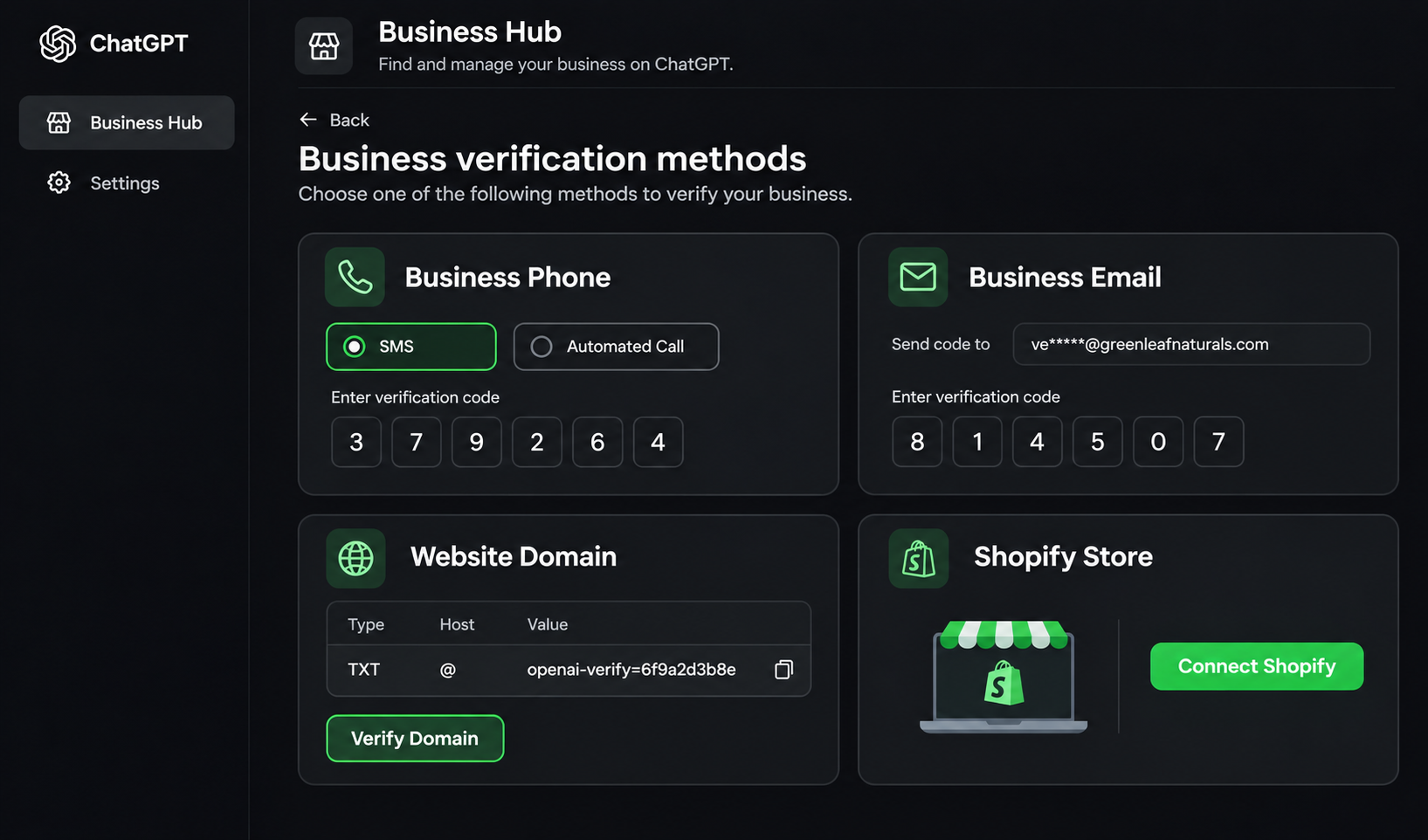
1. Business Phone Verification
If you select business phone verification, ChatGPT sends a verification code to the registered business phone number.
You can receive the code through:
SMS
Automated phone call
Select your preferred option, choose Get code and enter the code you receive.
Make sure you can access the phone number displayed during verification.
2. Business Email Verification
Business email verification confirms your connection through an email address associated with the business.
Select Business email and choose Get code.
Open the verification email, copy the code and enter it in Business Hub to complete the process.
Use an official business email address that you can access. Avoid using an unrelated personal email account for business verification.
3. Website Domain Verification
Website domain verification allows you to confirm your connection to a business through its website domain.
This method involves adding a TXT record to your domain's DNS settings.
Follow these steps:
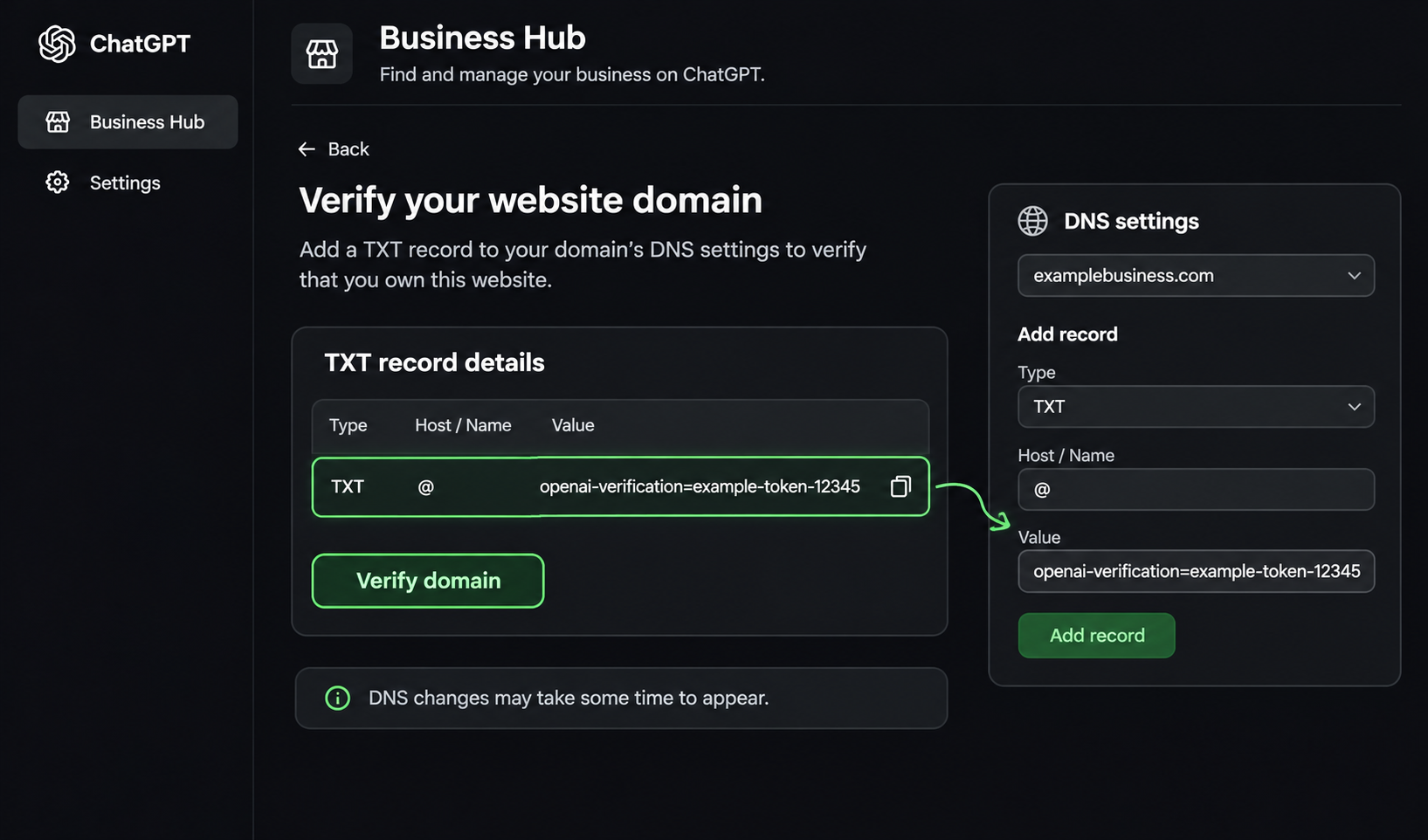
Select Website domain in the verification options.
Copy the TXT record provided by ChatGPT.
Log in to your domain registrar or DNS management platform.
Open the DNS settings for your website.
Add the TXT record using the exact type, host or name, and value provided.
Save the changes.
Return to ChatGPT Business Hub and select Verify domain.
DNS changes may take some time to appear. If another person manages your website or domain, ask them to add the record for you.
4. Shopify Store Verification
Businesses using Shopify can connect their online store to Business Hub. This method uses your Shopify account to confirm your connection to the business.
Follow these steps:
Select Shopify store in the verification options.
Choose Connect Shopify.
Review the permissions requested.
Select the option to log in to Shopify.
Sign in using the account associated with your business.
Follow the instructions to complete the connection.
Shopify merchants can also connect their store through the Shopify admin where supported.
OpenAI has also integrated eligible Shopify products into ChatGPT through Shopify Catalogue. Connecting a store through Business Hub provides another way to manage supported business and product information.
What Happens After You Claim Your Business in ChatGPT?
Claiming your business is the first step towards managing its information through Business Hub. However, you need approved Persona verification to unlock important management features.
After completing the required verification, you can:
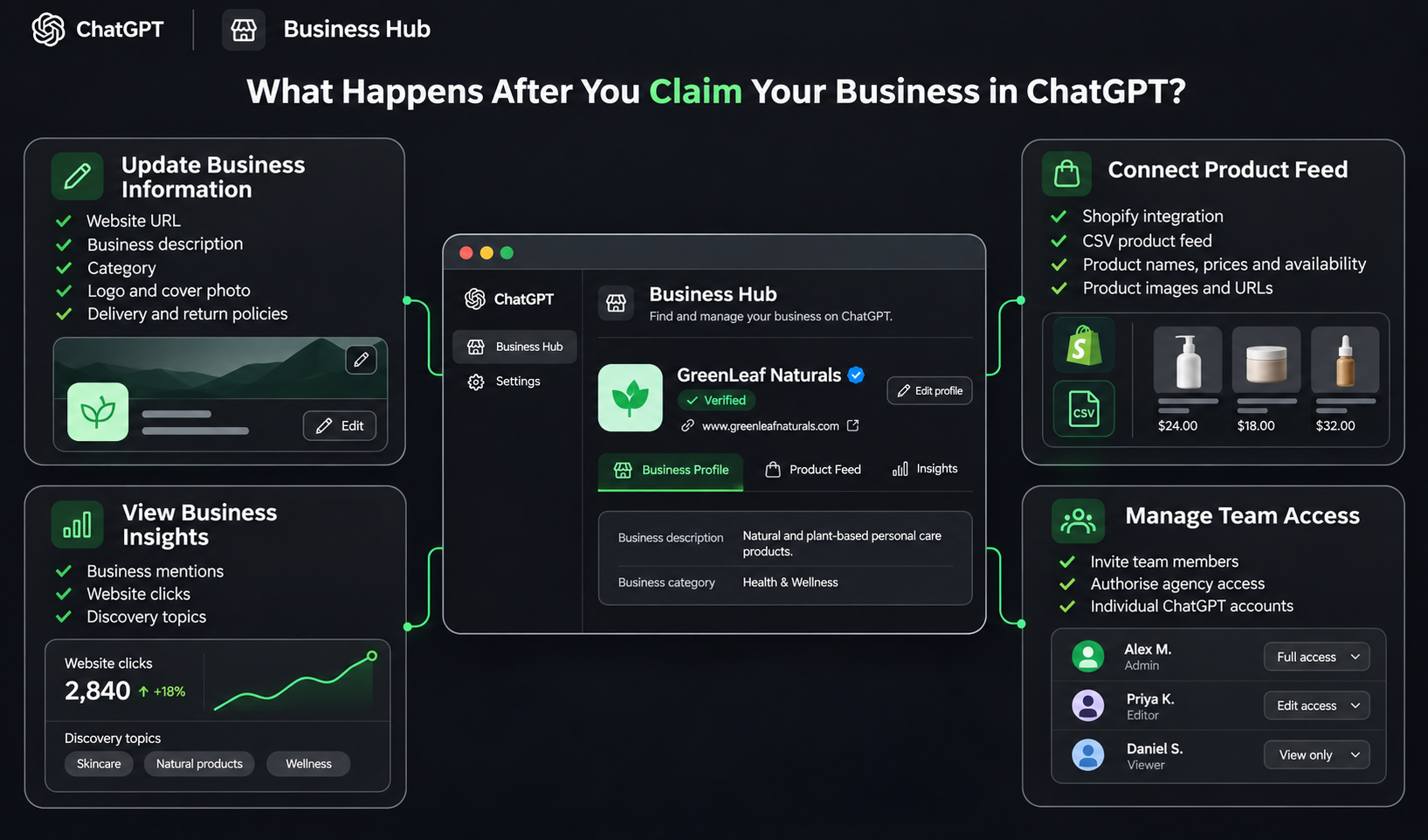
Update Your Business Information
You can add or edit important details about your organisation, including:
Official website URL
Business description
Business or service category
Brand logo
Cover photo
Delivery policies
Return policies
Keep these details accurate and consistent with the information available on your official website.
OpenAI reviews submitted changes before publishing them. Updates may take time to appear, and ChatGPT may continue to use other available web sources when answering questions about your business.
Connect Your Product Feed
If you operate an ecommerce business, you can share product information through a supported product feed.
Business Hub supports product feed integration through Shopify or a CSV file that follows OpenAI's product feed specifications.
A product feed can contain important details such as:
Product name
Product description
Product price
Product availability
Product URL
Product images
This helps provide ChatGPT with more current product information when people explore products and compare options.
Make sure your feed follows OpenAI's product feed requirements and Commerce policies.
( Note: Connecting a product feed does not automatically publish a Business Agent or guarantee that ChatGPT will recommend your products.)
View Business Insights
Business Hub also provides aggregated insights into how people discover and engage with your business on ChatGPT.
You can explore information such as:
Business mentions
Website clicks
Discovery topics
These insights help businesses understand how their website appears in ChatGPT answers and identify areas where their business information may need improvement.
Manage Team Access
If multiple people manage your business, you can provide access to authorised team members or an agency through Business Hub.
Each person should use their own ChatGPT account to access the business.
If you work with an external marketing agency, you can grant access where the available account and workspace requirements allow it. Never share your personal claim invitation link as a substitute for proper access permissions.
What Do ChatGPT Business Hub Insights Measure?
Business Hub provides aggregated insights that help businesses understand how people interact with their information in ChatGPT.
The dashboard includes four important areas.
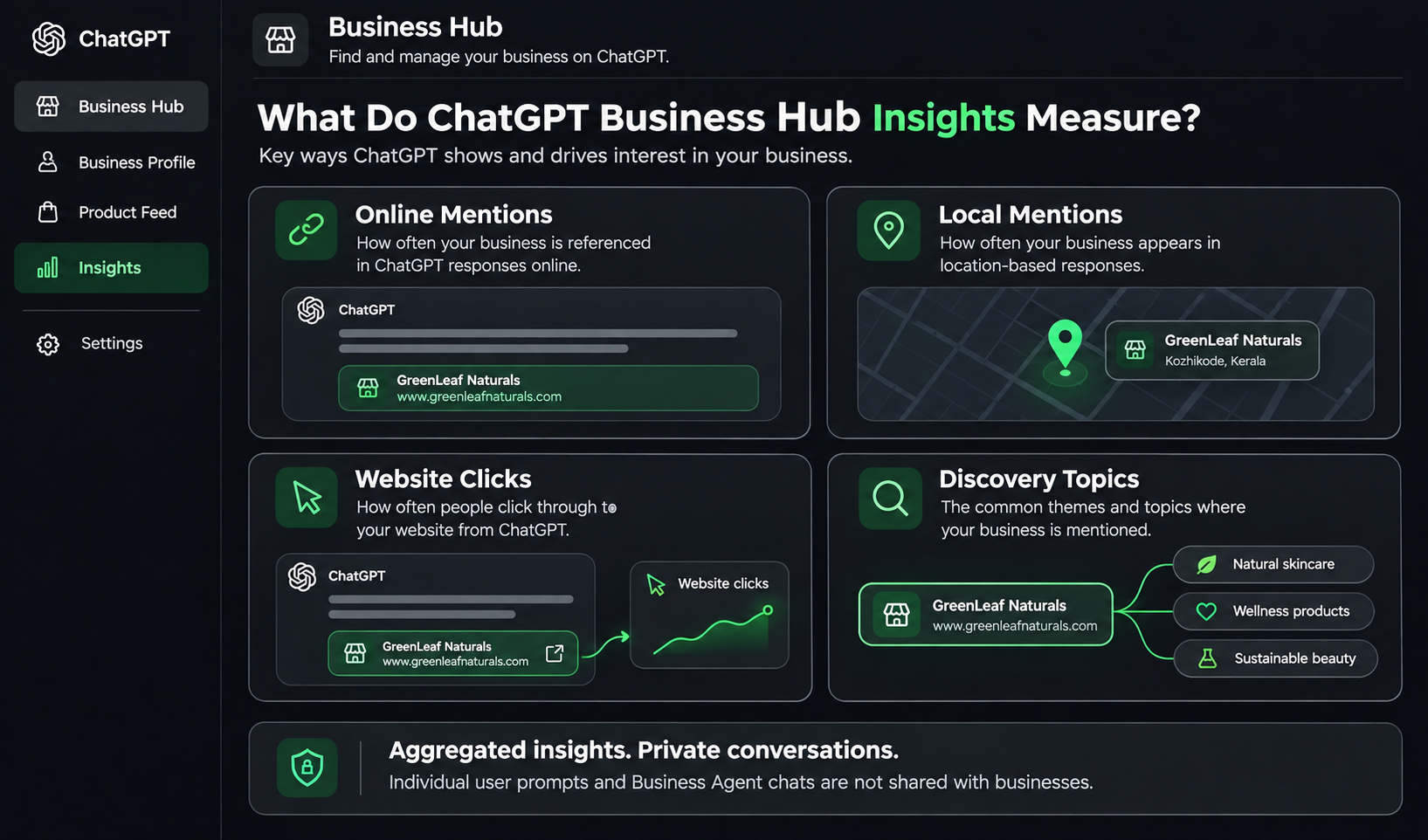
Insight | What it measures |
Online mentions | Mentions recorded when ChatGPT cites your business website. |
Local mentions | Impressions of a business location in relevant ChatGPT results. |
Website clicks | Clicks that take users from ChatGPT to your website. |
Discovery topics | Common themes across conversations where your website is cited. |
These metrics offer a different way to understand business discovery compared with traditional website analytics.
For example, a business may notice that its website receives clicks from ChatGPT when people explore a particular product category or service.
This information can help the marketing team review its website content, product descriptions and business information.
Privacy is an important part of these insights. OpenAI does not share individual user conversations or Business Agent chats with businesses. The information is aggregated and only made available when enough interactions meet the required reporting thresholds.
This means Business Hub is not a tool for viewing individual customer prompts or reading private conversations.
Does Claiming Your Business Improve Its Visibility on ChatGPT?
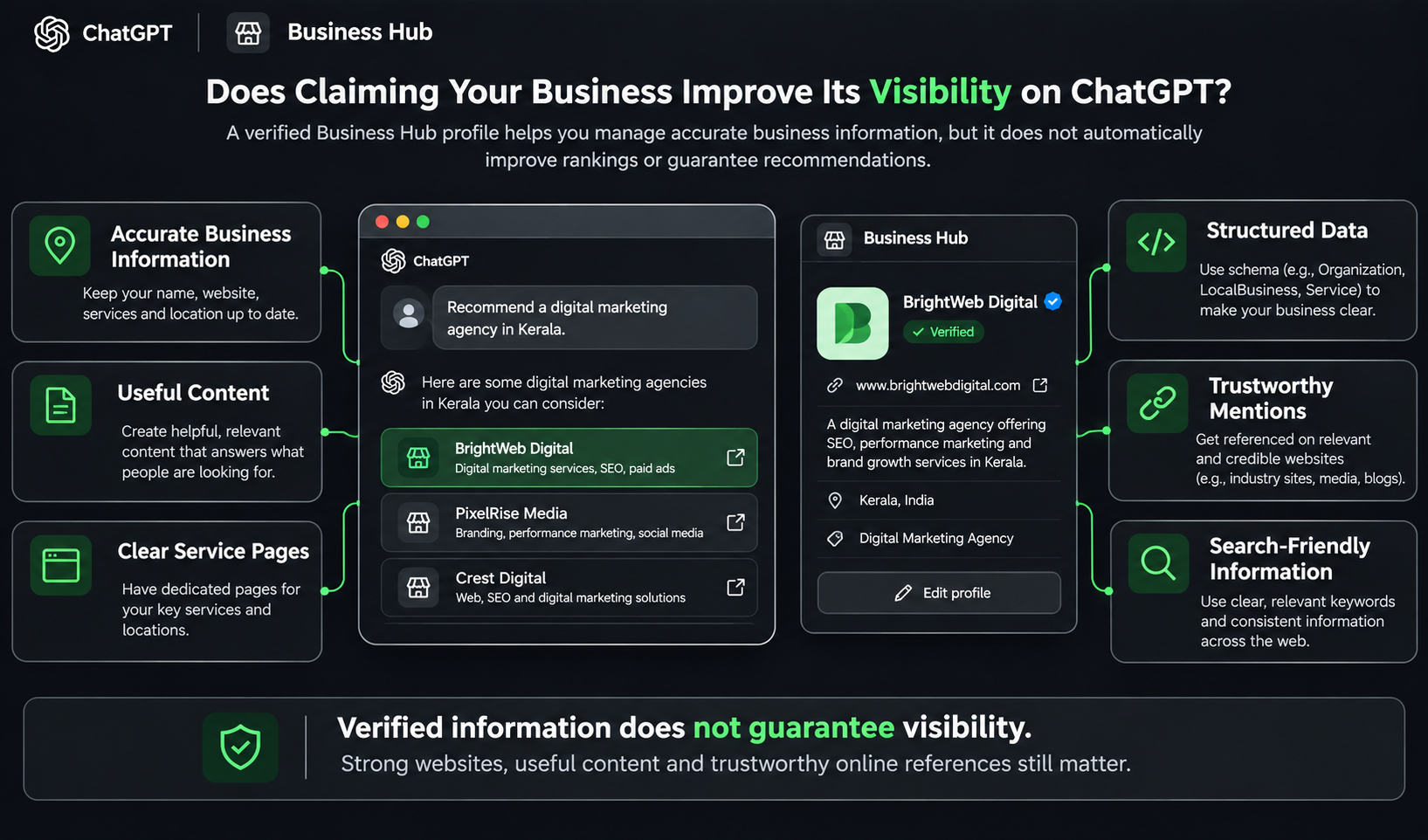
Claiming your business gives you a way to manage the official information you provide to ChatGPT. However, it does not guarantee that your business will appear more frequently in recommendations or rank higher in AI-generated answers.
ChatGPT continues to make independent recommendations using information from different sources.
This distinction matters for businesses investing in SEO and Generative Engine Optimisation (GEO).
To understand how businesses can improve their presence across AI-powered search platforms, explore our guide to AI search optimisation, including AEO and GEO.
A verified business profile can help provide accurate business information, but it is not a replacement for a well-maintained website, useful content or a consistent online presence.
Businesses should continue to focus on:
Maintaining accurate business information across their website and relevant platforms.
Publishing useful content that answers customer questions.
Creating clear service and product pages.
Using appropriate structured data on their websites.
Building relevant mentions and references from trustworthy sources.
Making important business information easy for search engines and AI systems to understand.
For example, if a customer asks ChatGPT to recommend a digital marketing agency in Kerala, having an accurate Business Hub profile is useful. However, the quality and relevance of the agency's website information and other available sources also matter.
What Are ChatGPT Business Agents?
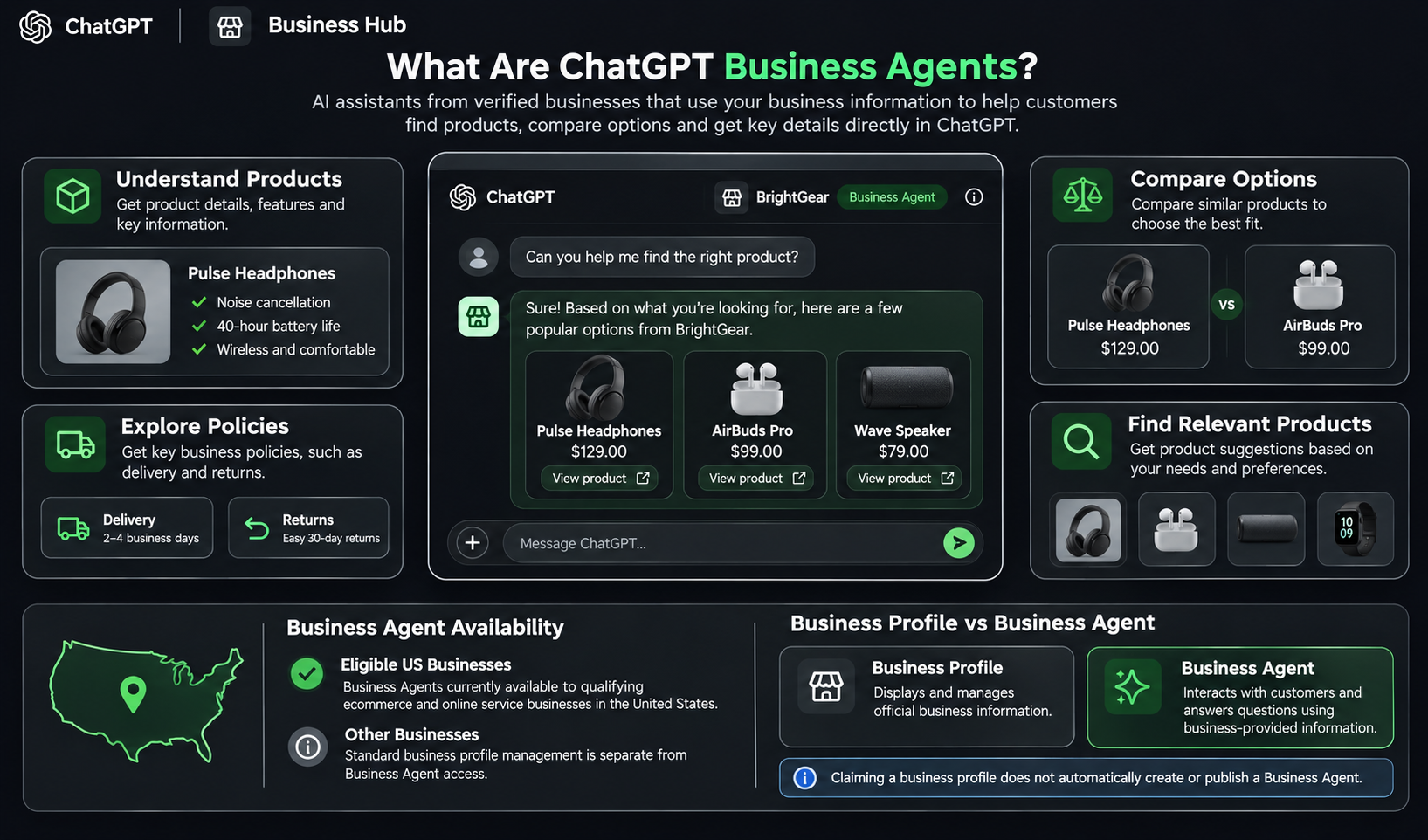
Business Agents are a separate feature within OpenAI's Businesses in ChatGPT initiative.
They allow eligible businesses to create an interactive agent that answers customer questions using information supplied by the business.
For example, an ecommerce business could use a Business Agent to help customers:
Understand product features.
Compare different products.
Explore delivery and return policies.
Find relevant products based on their requirements.
Customers can choose to start a conversation with an available Business Agent from the business profile.
However, Business Agents are currently available to eligible ecommerce and online service businesses in the United States. Businesses must also meet OpenAI's category and website requirements.
Business Agents are different from the standard business profile. Claiming your profile does not automatically create or publish an agent.
You can learn more about the requirements in OpenAI's Business Agents Policy.
Common Problems When Claiming a Business on ChatGPT
You may face a few issues while claiming or verifying your business. Here are some common situations and what you can do.
Problem | What you can do |
Business not appearing in search | Check the business name. If you operate an eligible online business, look for the option to add a business. |
Listing shows Contact support | Contact OpenAI Support to request access to the locked listing. |
Verification code not received | Check the phone number or email address and try the available verification option again. |
Domain verification not working | Check the TXT record details and allow time for DNS changes to appear. |
Persona verification failed | Review OpenAI's email, correct any mismatched details and use Try again if available. |
Business already claimed | Open the listing, select the three-dot menu and choose Dispute ownership. |
Claim still pending | Wait for OpenAI's decision or any request for additional information by email. |
What If Someone Else Has Already Claimed Your Business?
If another person has claimed your business without permission, you can raise an ownership dispute.
Open the business listing and select the three-dot menu. Choose Dispute ownership and follow the instructions to verify your identity and authority through Persona.
OpenAI reviews the dispute before deciding who can manage the business.
What If You Cannot Find Your Business?
If your business does not appear in the search results, check whether the name is entered correctly.
Eligible online businesses may have the option to add a new profile if no existing listing matches.
However, local stores and restaurants can currently claim only existing US listings. This restriction is important for businesses operating in other countries.
Final Thoughts
ChatGPT Business Hub gives eligible businesses a new way to manage how they provide official information to ChatGPT. By claiming and verifying your business profile, you can keep your business information updated, share product details and understand how people discover your business through the platform. While this can support your online presence, it is equally important to keep your website, content and other digital channels up to date.
Changes like these also show how quickly the digital world is evolving. New platforms, tools and technologies continue to create different ways for businesses and professionals to work. Keeping up with these developments means being open to learning and building skills that remain relevant.
If you're curious about what comes next in the digital world, explore your interests in Digital Marketing, Technology or Design. HACA offers learning opportunities across these fields, helping you understand emerging trends and develop practical skills along the way.
“Because staying updated starts with staying open to learning.”
