What Is Google Business Profile?
Google Business Profile is a free tool from Google that helps businesses manage how they appear on Google Search and Google Maps. It allows businesses to display important information such as location, phone number, working hours, services, photos, and customer reviews when people search for them online.
When customers search for a local service, they rarely visit multiple websites before making a decision. They usually check Google results, compare ratings, view photos, find directions, and contact a business directly.
For example, someone searching for "digital marketing course in Kerala" or "digital marketing agency in Kozhikode" will see local business listings along with details that help them choose.
A complete and optimised Google Business Profile helps businesses:
Improve local visibility
Appear on Google Maps
Build customer trust
Receive calls and enquiries
Share updated business information
According to Google, local results are mainly influenced by relevance, distance, and prominence. A well-maintained business profile helps Google understand what a business offers and when it should appear for relevant searches.
This guide explains everything about Google Business Profile, including how it works, how to create one, and how businesses can optimize it for better local visibility.
Understanding Google Business Profile in Detail
Earlier known as Google My Business, Google renamed the platform to Google Business Profile in 2021. The purpose remains the same: helping businesses manage their presence in Google’s local search results.
A Google Business Profile can display:
Information | Purpose |
Business name | Helps customers identify the business |
Category | Tells Google what type of business it is |
Address | Helps customers find physical locations |
Phone number | Allows direct communication |
Website | Drives visitors to the business website |
Business hours | Shows when customers can visit or contact |
Photos | Gives customers a visual understanding |
Reviews | Builds trust through customer experiences |
Products and services | Explains available offerings |
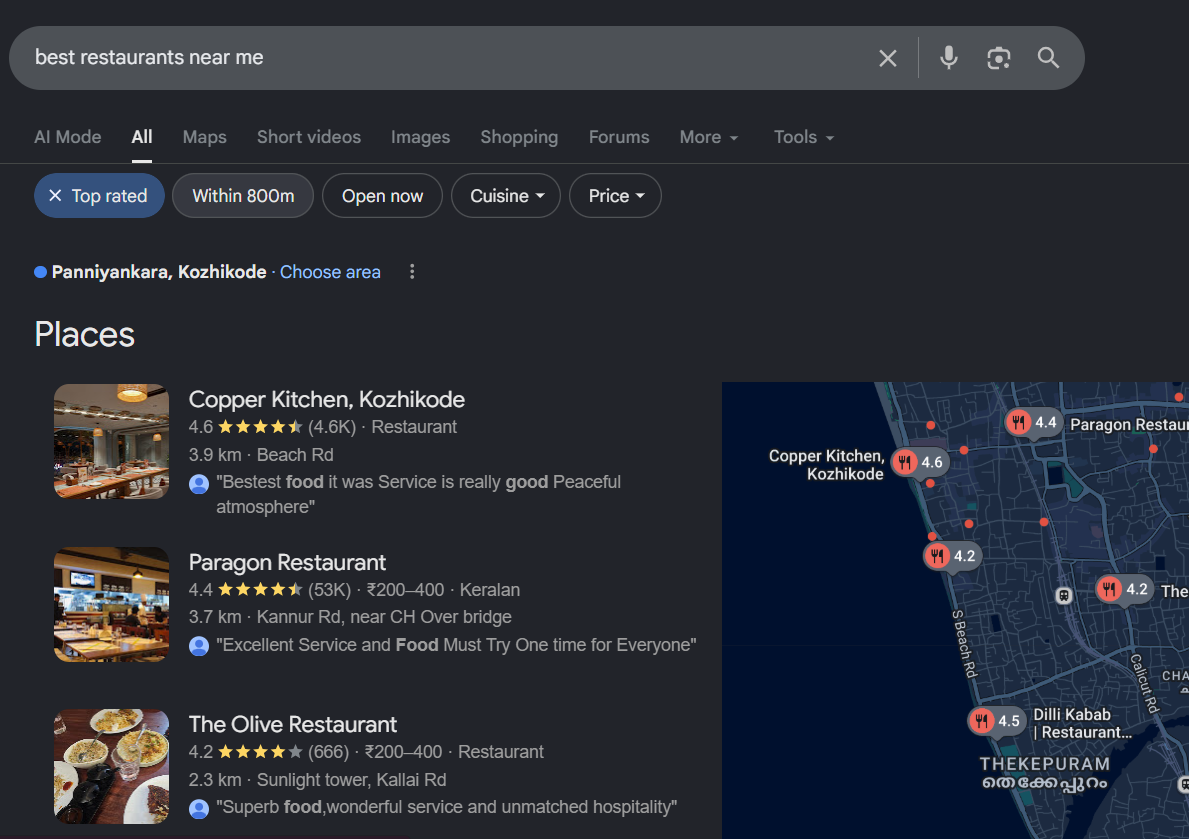
For example, when someone searches for "dentist near me," Google may show nearby dental clinics with ratings, locations, photos, and contact options. This information comes from businesses that have created and verified their Google Business Profiles.
A Google Business Profile is not a replacement for a website. Instead, it works alongside a website by helping customers discover a business through local searches.
Why Is Google Business Profile Important for Businesses?
Google Business Profile is important because it helps customers find accurate business information at the exact moment they are searching for products or services. It improves local visibility, builds trust, and creates direct communication opportunities.
Local searches often show strong buying intent.
For example:
Someone searching for "restaurant near me" may want to visit immediately.
Someone searching for "SEO agency in Kerala" may be looking for service providers.
Someone searching for "AC repair near me" may need immediate assistance.
A properly optimised Google Business Profile helps businesses appear during these decision-making moments.
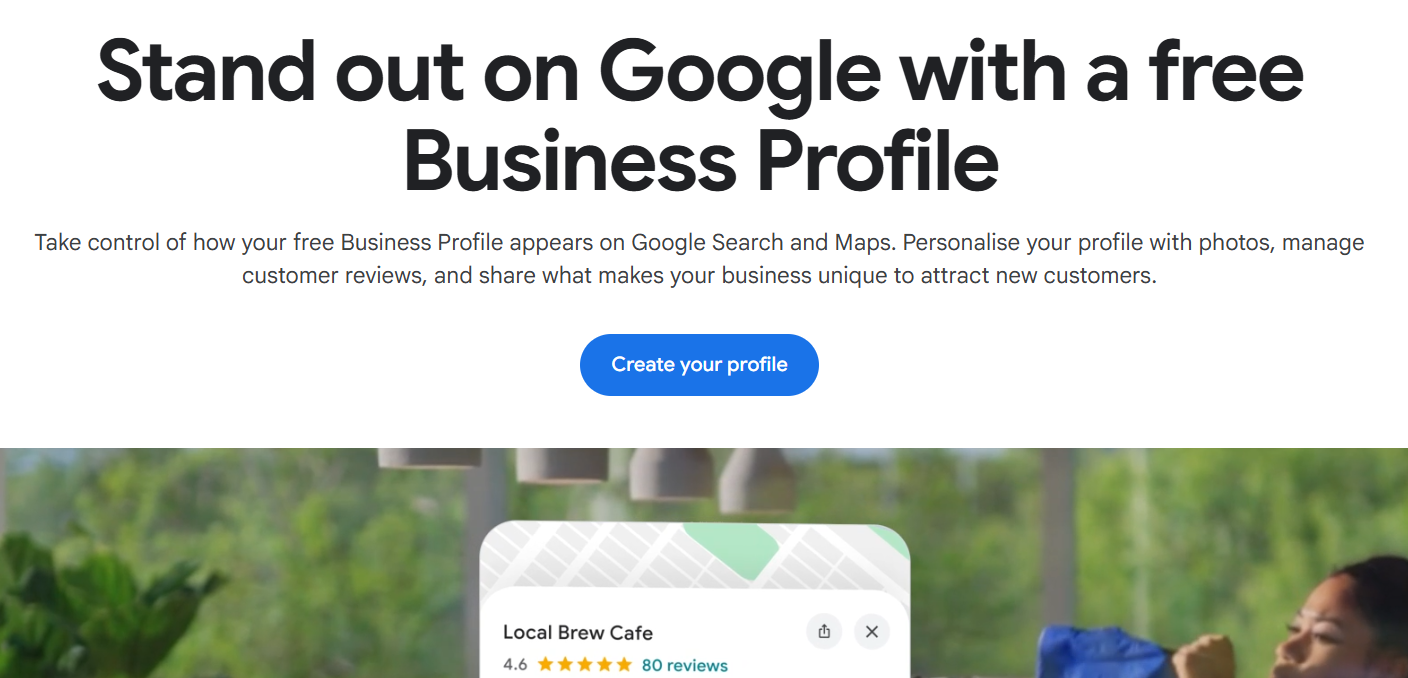
Improves Local Search Visibility
A Google Business Profile helps businesses appear in local search results and Google Maps listings.
When Google understands a business’s location, category, services, and customer feedback, it can match that business with relevant searches.
For example:
A furniture store in Kannur with:
Correct business category
Updated address
Customer reviews
Product photos
Complete business details
has stronger signals compared to a profile with incomplete information.
Helps Customers Find Important Information Quickly
Customers do not want to search through multiple pages to find basic details. Google Business Profile provides essential information in one place.
Customers can quickly check:
Business location
Opening hours
Phone number
Website
Reviews
Photos
Available services
This reduces friction and helps customers take action faster.
Builds Customer Trust Through Reviews
Customer reviews play an important role in local decision-making.
A profile with genuine reviews gives potential customers more confidence because they can understand previous customer experiences.
Businesses can use Google Business Profile to:
Receive reviews
Respond to customer feedback
Answer questions
Address concerns
Responding to reviews also shows that a business actively engages with customers.
Supports Google Maps Discovery
Google Maps has become an important search platform for local businesses.
People use Maps to find:
Restaurants
Shops
Hospitals
Educational institutions
Service providers
A verified Google Business Profile allows businesses to appear on Maps with accurate information.
With the growing use of voice assistants for local searches, businesses should also understand how voice search optimisation can improve SEO in 2026
Who Should Create a Google Business Profile?
Any eligible business that interacts with customers directly can create a Google Business Profile. It is useful for both businesses with physical locations and businesses that provide services in specific areas.
Google Business Profile is commonly used by:
Local Stores
Retail businesses can use profiles to attract nearby customers.
Examples:
Clothing stores
Electronics shops
Furniture stores
Grocery stores
Bookstores
Customers can check location, reviews, and opening hours before visiting.
Restaurants and Food Businesses
Restaurants, cafes, bakeries, and food outlets benefit significantly from Google Business Profile because customers often search before visiting.
A restaurant profile can include:
Menu information
Food photos
Customer reviews
Location
Opening hours
For example, a customer searching "best cafe in Kochi" can compare multiple cafes before choosing one.
Healthcare Businesses
Healthcare providers can use Google Business Profile to help patients discover their services.
Examples:
Hospitals
Clinics
Dentists
Physiotherapists
Diagnostic centres
Patients often consider location, reviews, and availability before contacting healthcare providers.
Educational Institutions
Schools, colleges, training centres, and coaching institutes can use Google Business Profile to improve discoverability. Students and parents often search online before choosing an institution.
A profile can showcase:
Courses
Photos
Location
Reviews
Contact details
Service-Based Businesses
Businesses that travel to customers can also use Google Business Profile.
Examples:
Plumbers
Electricians
Home cleaning services
Interior designers
Digital marketing agencies
These businesses can define their service areas instead of displaying a customer-facing address.
Freelancers and Professionals
Some independent professionals can also create Google Business Profiles if they meet Google's eligibility requirements.
Examples:
Photographers
Consultants
Designers
Architects
Marketing professionals
A professional profile can help potential clients discover their services through local searches.
Also Read: How to Promote Your Business Locally: 8 Proven Strategies
How Does Google Business Profile Work?
Google Business Profile works by helping Google understand a business and match it with relevant local searches. Google considers factors such as relevance, distance, and prominence when displaying local results.
Relevance
Relevance shows how closely a business matches a customer’s search.
Google analyzes information such as:
Business category
Description
Services
Products
Website information
For example, if someone searches for "graphic design agency," Google is more likely to show businesses categorized as design agencies rather than unrelated businesses.
Distance
Distance refers to how close a business is to the location of the searcher.
For example, someone searching for: "coffee shop near me" will usually see coffee shops located nearby.
Businesses cannot control the searcher’s location, but they can ensure Google has accurate location information.
Prominence
Prominence refers to how well-known and trusted a business appears online.
Google may consider factors such as:
Number and quality of reviews
Website presence
Online mentions
Business information consistency
Customer engagement
A business with complete information and positive customer experiences can build stronger local search signals.
How to Create a Google Business Profile?
Creating a Google Business Profile involves adding accurate business information, verifying ownership, and completing all available sections. A complete profile gives customers reliable information and helps Google understand the business.
Step 1: Sign In With a Google Account
The first step is signing in with a Google account that will be used to manage the business profile. Businesses should use an account they can access regularly because this account manages important business information.
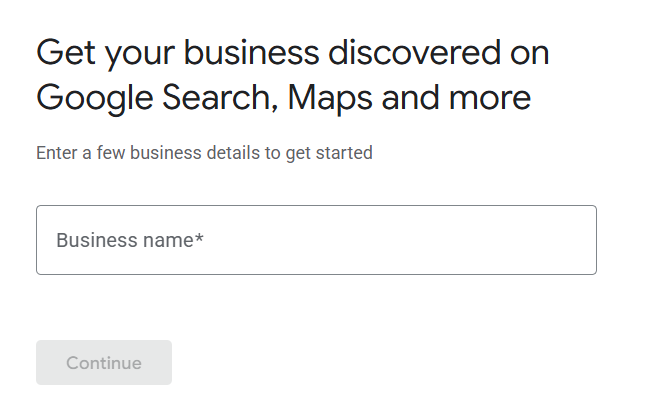
Step 2: Add Your Business Name
Enter the official business name that customers recognize. Avoid adding extra keywords to the business name.
Correct:
HACA Marketing School
Incorrect:
HACA Marketing School Best Digital Marketing Course in Kerala
Google requires businesses to use their real-world business name.
Step 3: Select the Right Business Category
Choosing the correct category helps Google understand the type of business. The primary category should represent the main service or product.
Examples:
Business | Primary Category |
Bakery | Bakery |
Dental clinic | Dentist |
Marketing company | Marketing Agency |
Clothing store | Clothing Store |
Fitness centre | Gym |
Businesses can add secondary categories if they provide additional relevant services.
Step 4: Add Business Location
Businesses with physical locations should add their complete address.
The address should match information across:
Website
Social media profiles
Business directories
Consistent information helps customers find the correct location.
Step 5: Add Contact Details
Businesses should include:
Phone number
Website
Booking link (if available)
Customers use these details to contact the business directly.
Step 6: Verify the Business Profile
Google requires verification to confirm that a business is genuine.
Verification methods may include:
Postcard
Phone
Email
Video verification
After verification, businesses can manage their profile and appear in Google Search and Maps.
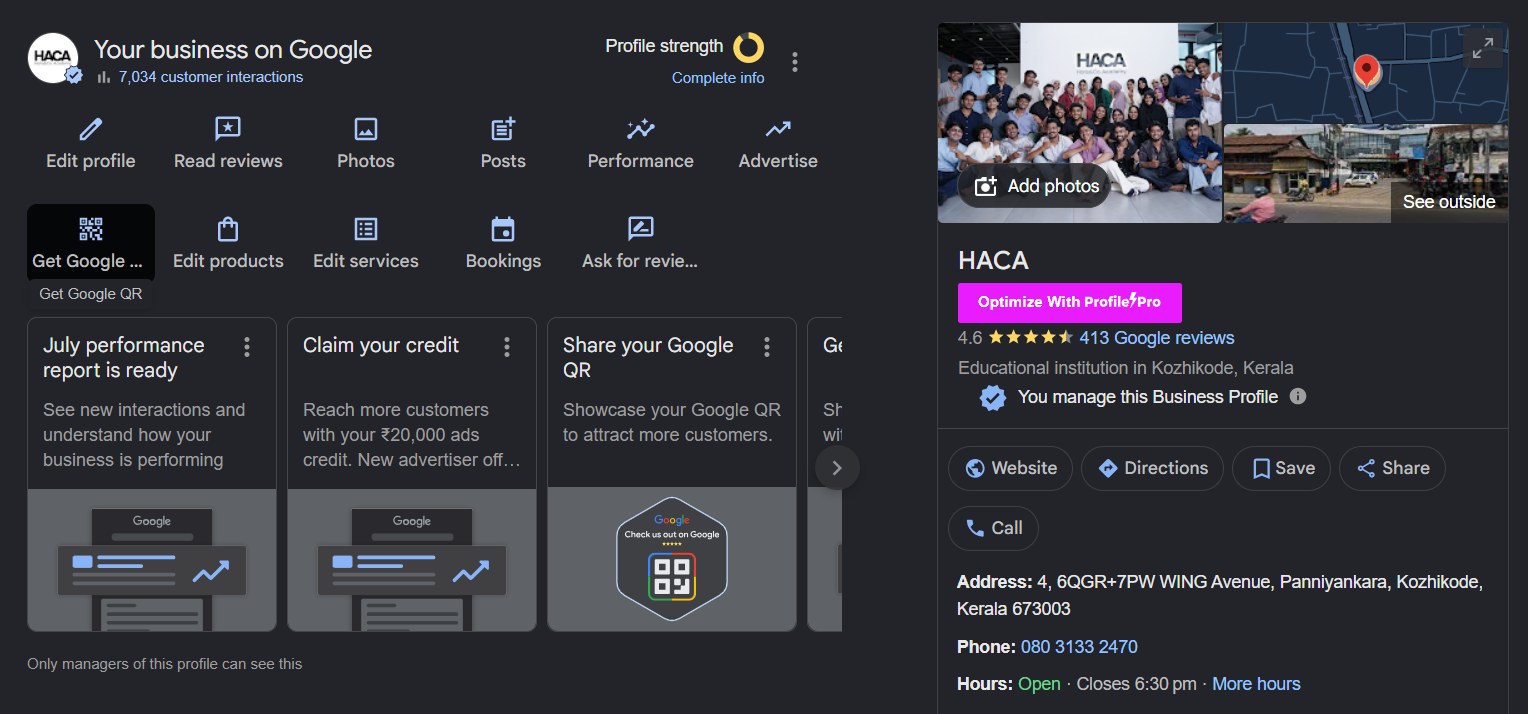
How to Optimise Google Business Profile After Verification
Google Business Profile optimisation means improving your business listing with accurate information, useful content, photos, reviews, and updates so customers can easily find and trust your business.
Verification only confirms that your business exists. Optimisation helps Google understand your services and helps customers make better decisions.
Many businesses create a profile but stop after verification. This leaves valuable sections incomplete and reduces the amount of information available to customers.
A well-optimised Google Business Profile should include:
Optimization Area | Why It Matters |
Complete business information | Helps customers find accurate details |
Correct category selection | Helps Google understand your business |
Quality photos | Builds customer trust |
Reviews | Shows customer experiences |
Services and products | Explains what your business offers |
Regular updates | Keeps information fresh |
What Information Should Every Google Business Profile Include?
Every Google Business Profile should include complete and accurate business information because missing details can create confusion for both customers and Google.
A complete profile improves user experience and gives Google more context about your business.
Business Name
Your business name should match your real-world business name.
Google recommends avoiding unnecessary keywords, locations, or promotional phrases in the business name.
For example:
Correct:
ABC Furniture
Incorrect:
ABC Furniture Best Sofa Shop in Kochi
Keyword stuffing in the business name can create trust issues and may violate Google's guidelines.
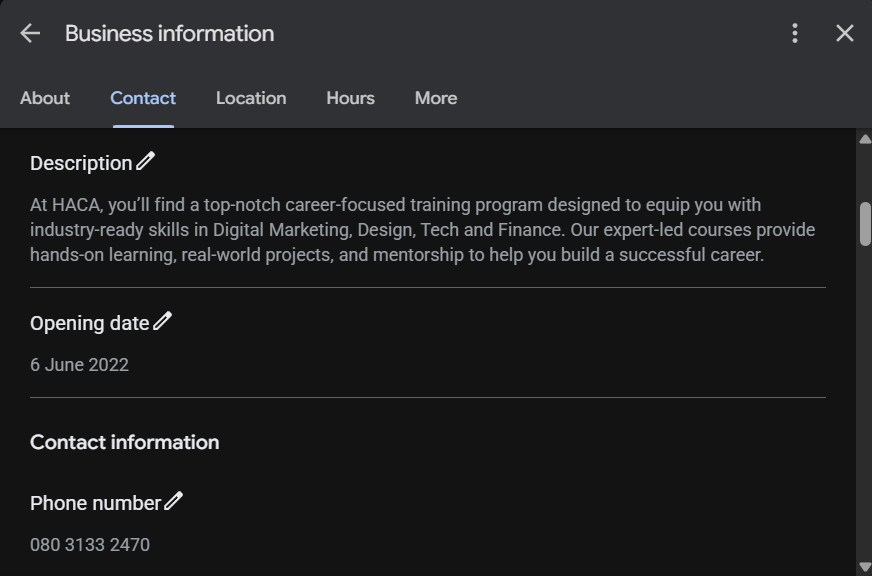
Business Description
The business description explains what your company offers and helps customers understand your services.
A good description should mention:
Main products or services
Location served
Business speciality
Experience or unique offerings
Example:
"A digital marketing agency in Kerala helping businesses improve their online visibility through SEO, content marketing, and paid advertising services."
The description should inform customers instead of simply repeating keywords.
Business Hours
Business hours tell customers when they can visit or contact your business.
Always update:
Regular working hours
Holiday hours
Temporary closures
Special timings
Incorrect business hours can create a poor customer experience.
Photos and Videos
Photos help customers understand your business before they visit.
Businesses should regularly upload:
Storefront images
Interior photos
Product images
Team photos
Service-related images
Customer experience photos
For example, a restaurant should upload food images, seating areas, and menu items. A salon should upload workspace images and service examples.
Products and Services
Adding products and services helps customers understand what your business provides.
A product or service section can include:
Name
Description
Price (optional)
Relevant details
For example:
A bakery can add:
Birthday cakes
Custom cakes
Pastries
Cookies
A digital marketing agency can add:
SEO services
Google Ads management
Social media marketing
Content writing
How to Choose the Right Google Business Profile Category?
The right Google Business Profile category helps Google understand your business type and connect your listing with relevant local searches.
A primary category should describe the main service or product your business provides. Secondary categories should only include additional services that accurately represent your business.
Choosing the wrong category can affect your visibility because Google may show your business for unrelated searches or miss relevant ones.
Why Are Google Business Profile Categories Important?
Categories help Google answer one important question: What type of business is this?
For example:
A user searching for:
"Best dentist near me"
expects to see dental clinics, not general healthcare businesses.
If a dental clinic chooses "Dentist" as its primary category, Google can better match it with relevant searches.
How to Select Your Primary Category?
Your primary category should represent your main business activity.
Follow these steps:
Identify Your Main Service
Ask:
"What do customers mainly visit my business for?"
Examples:
Business | Primary Category |
Coffee shop | Coffee Shop |
Dental clinic | Dentist |
Training institute | Training Centre |
Furniture showroom | Furniture Store |
Photography studio | Photographer |
Research Similar Businesses
Look at successful businesses in your industry.
Check:
Their categories
Services listed
Customer reviews
Profile information
This can help you understand how businesses in your category present themselves.
Avoid Choosing Too Many Categories
Adding unrelated categories can confuse Google and customers.
For example:
A bakery should not add categories like:
Restaurant
Hotel
Grocery Store
Cafe
unless those services are genuinely part of the business. Accuracy is more important than selecting multiple categories.
What Is NAP Consistency in Local SEO?
NAP consistency means keeping your business Name, Address, and Phone number identical across all online platforms. It helps search engines verify business information and improves trust in local search results.
NAP stands for:
Name
Address
Phone Number
For example:
A business website lists:
HACA (Haris&Co. Academy),
Second Floor, 4 Wing Avenue, Panniyankara, Kozhikode, Kerala 673003
+91 08031332470
But another directory lists:
HACA (Haris&Co. Academy),
Second Floor, 4 Wing Avenue, Panniyankara, Calicut, Kerala 673003
+91 08031332470
These differences create confusion.
Why Does NAP Consistency Matter?
Search engines use business information from multiple sources to understand whether a business is legitimate.
Consistent information helps:
Google verify business details
Customers find accurate information
Avoid confusion between similar businesses
NAP consistency is especially important for local businesses that depend on Google Maps visibility.
Common NAP Mistakes Businesses Make
Businesses often create inconsistencies by:
Changing phone numbers without updating listings
Using different business names
Adding old addresses
Creating duplicate profiles
Using different formatting
Examples:
Incorrect:
HACA
HACA Academy
Haris&Co Academy
Correct:
HACA
What Are Local Citations?
Local citations are online mentions of a business that include important details such as the business name, address, and phone number. These mentions help search engines understand that a business exists and operates in a specific location.
A citation does not always need to include a backlink. A business mention on a directory, local website, or industry platform can still act as a citation.
Examples of local citations include:
Business directories
Industry listings
Local websites
Chamber of commerce pages
Review platforms
Types of Local Citations
Local citations are mainly divided into two categories.
Structured Citations
Structured citations appear on organized business directories.
Examples:
Platform Type | Example |
Search platforms | Google Business Profile |
Business directories | Justdial |
Social platforms | Facebook Business Page |
Review websites | Industry review platforms |
These platforms usually display business information in a fixed format.
Unstructured Citations
Unstructured citations are natural mentions of a business on websites, blogs, news articles, or online publications.
Example:
"A popular digital marketing agency in Kerala, ABC Digital Solutions, recently helped local businesses improve their online presence."
This mention does not follow a directory format but still creates an online reference.
Why Do Local Citations Matter for Local SEO?
Local citations matter because they help search engines confirm business information and understand a business’s location and relevance.
They support local SEO by creating additional signals about a business.
Benefits include:
Improved Business Trust
When Google finds consistent business information across multiple sources, it can develop more confidence in the accuracy of the listing.
Better Local Discovery
Citations help customers discover businesses through different platforms.
For example, someone may find a restaurant through:
Google Maps
Food directories
Local blogs
Review platforms
Stronger Online Presence
Multiple accurate mentions create more opportunities for customers to discover a business.
However, quality matters more than quantity. A few relevant and trustworthy citations are more valuable than hundreds of low-quality directory listings.
How to Build Local Citations for Better Rankings?
Businesses can build local citations by listing their information on trusted platforms that are relevant to their industry and location.
The goal is not to create hundreds of listings. The goal is to create accurate and useful references.
Start With Google Business Profile
Google Business Profile should be the first citation every local business creates.
Ensure that:
Business name is correct
Address is accurate
Phone number is active
Category matches the business
Website information is updated
Add Business Information to Relevant Directories
Businesses can create listings on platforms related to their industry.
Examples include:
Local business directories
Industry-specific websites
Professional associations
Review platforms
For Indian businesses, relevant platforms may include:
Justdial
Sulekha
IndiaMART
TradeIndia
The right platforms depend on the industry.
Maintain Consistent Information
Every citation should use the same:
Business name
Address
Phone number
Website
Avoid creating multiple variations.
Remove Duplicate Listings
Duplicate business listings can confuse customers and search engines.
Businesses should regularly check for:
Duplicate profiles
Old addresses
Incorrect phone numbers
Removing outdated information keeps online data accurate.
How Do Customer Reviews Affect Google Business Profile Rankings?
Customer reviews influence Google Business Profile performance because they help customers evaluate a business and provide Google with signals about reputation and relevance. Reviews do not guarantee higher rankings, but consistent positive feedback can support a stronger local presence.
When customers search for a business, reviews are often one of the first things they notice.
For example, when comparing two restaurants:
Restaurant A
4.8-star rating
500 reviews
Recent customer responses
Restaurant B
3.5-star rating
20 reviews
No responses
Many customers are more likely to choose Restaurant A because the reviews create more confidence.
Google considers several review-related factors, including:
Review quantity
Review quality
Review freshness
Customer responses
Overall rating

Why Are Google Reviews Important for Businesses?
Google reviews help businesses build credibility because they show real customer experiences. They influence customer decisions and provide useful feedback about products, services, and customer satisfaction.
Reviews help businesses:
Build trust with potential customers
Understand customer expectations
Improve reputation
Increase customer engagement
Stand out from competitors
For local businesses, reviews are especially important because customers often compare businesses before making contact.
A person searching for:
"Best salon near me"
will usually check:
Star ratings
Customer comments
Photos
Business responses
before choosing a service provider.
How to Get More Reviews on Google Business Profile?
Businesses can increase reviews by creating simple opportunities for satisfied customers to share their experiences. The best approach is to request genuine feedback after providing a good product or service.
Businesses can encourage reviews by:
Ask Customers Directly
A simple request after a successful interaction can encourage customers to leave feedback.
Examples:
After completing a service
After delivering a product
After receiving positive customer feedback
Share a Review Link
Google Business Profile allows businesses to create a direct review link.
Businesses can share this link through:
Email
WhatsApp
SMS
Social media
This makes the review process easier for customers.
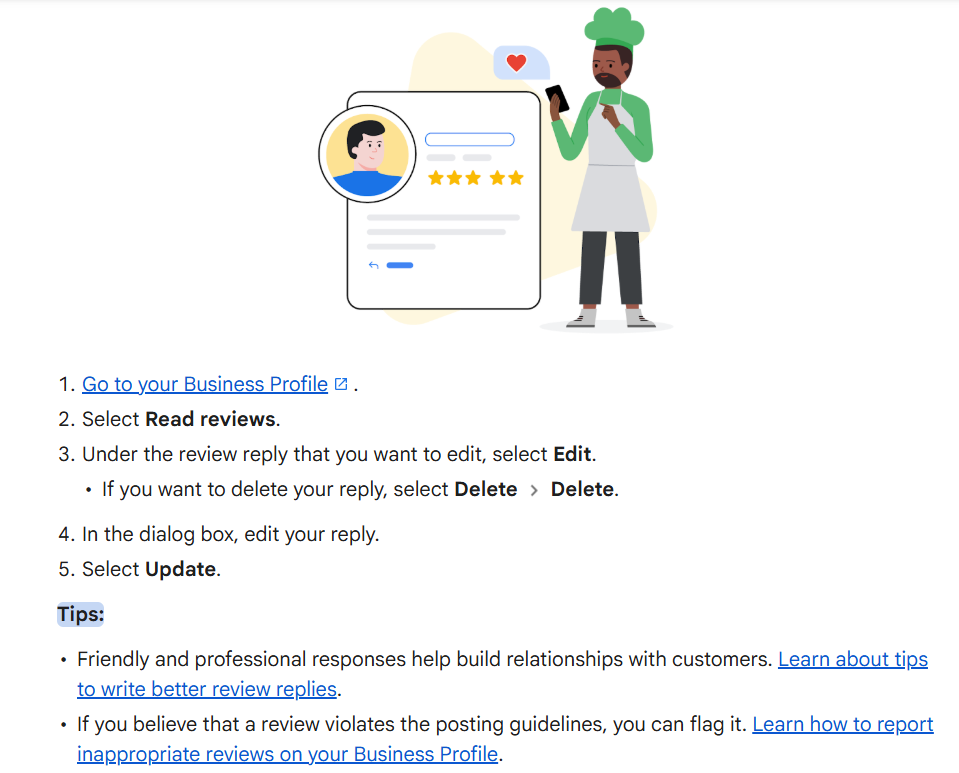
Respond to Existing Reviews
Responding to reviews encourages more engagement because customers see that the business values feedback.
Businesses should:
Thank customers for positive reviews
Address complaints professionally
Avoid arguments or defensive replies
Common Google Business Profile Mistakes to Avoid
Many businesses create Google Business Profiles but fail to maintain them properly. Incorrect information, poor optimization, and inactive management can reduce customer trust.
Here are common mistakes businesses should avoid.
Using the Wrong Business Category
Choosing an incorrect category can prevent your profile from appearing for relevant searches.
For example:
A photography studio should not select "Advertising Agency" just because it offers promotional photography.
The category should represent the main service customers search for.
Adding Keywords to the Business Name
Adding extra keywords to the business name violates Google's guidelines.
Incorrect:
"Best Digital Marketing Agency in Kerala - ABC"
Correct:
"ABC Digital Marketing"
Businesses should optimize their profile through accurate information, services, photos, and reviews instead of keyword stuffing.
Incomplete Business Information
A profile with missing details can create uncertainty.
Common missing information includes:
Website
Phone number
Working hours
Services
Photos
Business description
Businesses should complete every available section.
Ignoring Customer Reviews
Ignoring reviews can make a business appear inactive. Businesses should regularly monitor and respond to reviews. Even negative reviews provide an opportunity to show professionalism.
Uploading Low-Quality Photos
Photos strongly influence customer perception. Poor-quality images can reduce trust.
Businesses should upload:
Clear images
Real business photos
Updated visuals
Service examples
Avoid using only stock images because customers want to see the actual business.
Creating Multiple Profiles for the Same Location
Duplicate profiles can confuse Google and customers. Businesses should maintain one accurate profile for each eligible location.
Google Business Profile Best Practices Checklist
A well-maintained Google Business Profile requires regular updates and monitoring.
Businesses should follow these practices:
Best Practice | Action |
Complete profile information | Fill every available section |
Update business hours | Keep timings accurate |
Add photos regularly | Upload fresh business images |
Manage reviews | Respond to customer feedback |
Update services | Add new offerings |
Check information accuracy | Review details regularly |
Monitor insights | Understand customer actions |
How Often Should You Update Google Business Profile?
Businesses should update Google Business Profile whenever important information changes. Regular updates also help keep the profile accurate and useful for customers.
Businesses should update their profile when they:
Change working hours
Add new services
Launch new products
Move locations
Change phone numbers
Run special offers
Add new photos
For many businesses, uploading fresh photos and reviewing profile information every few weeks is a good practice.
Final Thoughts
Google Business Profile is one of the most valuable free tools for improving a business's local online presence. It helps businesses appear in Google Search and Google Maps with accurate information, making it easier for potential customers to discover, evaluate, and contact them. A well-maintained profile not only increases visibility but also builds credibility through customer reviews, updated business details, and engaging photos.
However, simply creating a Google Business Profile is not enough. To achieve consistent results, businesses need to keep their information up to date, respond to customer reviews, add fresh content, and continuously optimise their profile as part of a broader Local SEO strategy. Regular management ensures your business remains relevant, trustworthy, and competitive in local search results.
If you'd like to learn how to optimise Google Business Profiles, improve Local SEO, master keyword research, create high-performing content, and implement other digital marketing strategies that drive real business growth, consider enrolling in HACA's Digital Marketing Course in Calicut. Through hands-on training, live projects, and guidance from industry experts, HACA equips students, entrepreneurs, and professionals with the practical skills needed to build successful careers and grow businesses in the digital world.