Creating social media content consistently can be challenging when you manage multiple platforms, campaigns and audience expectations. A social media calendar helps you organise content ideas, decide what to publish, assign dates and track upcoming posts in one place.
To create a social media calendar, define your marketing goals, identify your target audience, choose relevant platforms, establish content pillars and set a realistic posting schedule. Then organise your topics, captions, creative assets and publishing dates using tools such as Google Sheets, Notion or a social media scheduling platform.
However, filling every date with a post idea does not automatically create an effective strategy. You also need to understand which content matters to your audience and how each post supports your business goals.
This guide explains how to create a social media calendar with practical planning steps, an original content selection framework, an EdTech example and a reusable template.
What Is a Social Media Calendar?
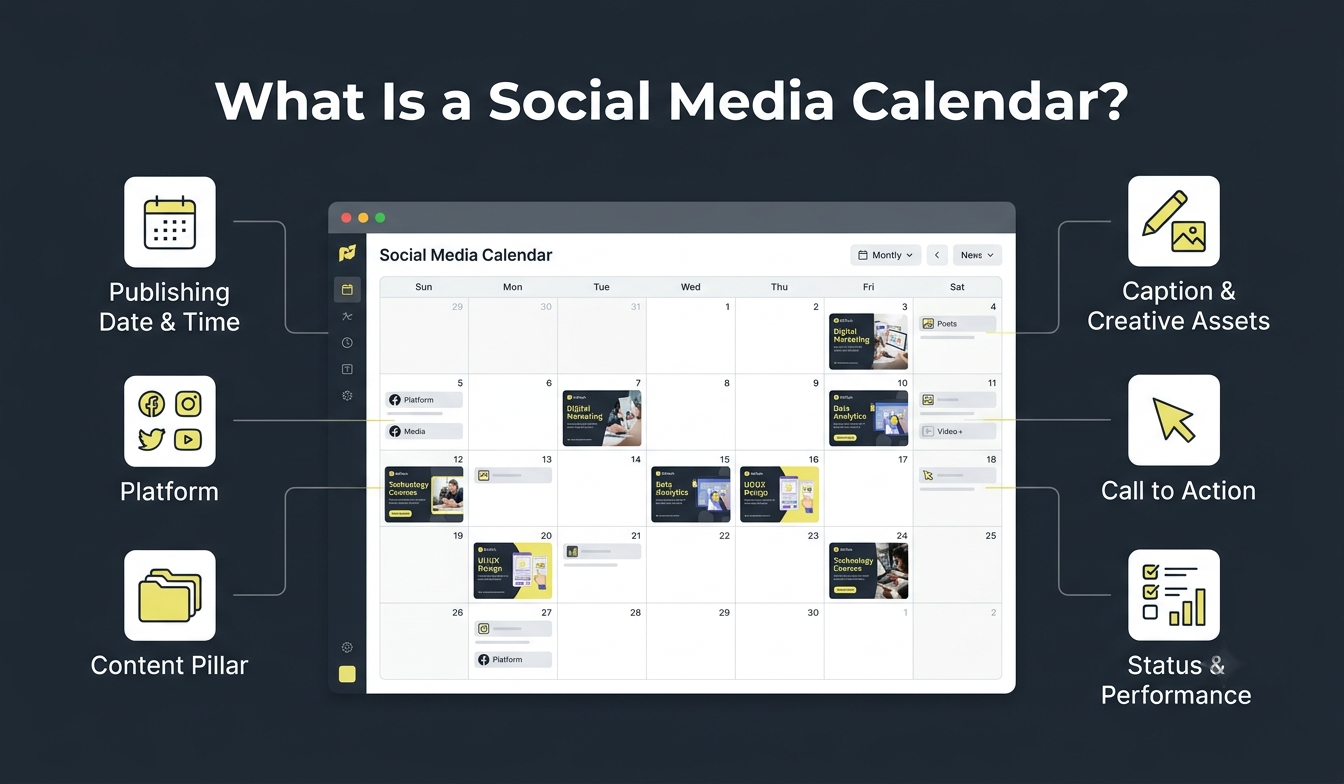
A social media calendar is a planning document that organises upcoming posts by date, platform, topic and content format. It helps individuals and marketing teams manage publishing activities without deciding what to post at the last minute.
A typical social media calendar includes:
Publishing date and time: When the content goes live.
Platform: Instagram, Facebook, LinkedIn or YouTube.
Content pillar: The main theme of the post.
Topic and format: The subject and whether it is a Reel, carousel, image or video.
Caption and creative assets: The written copy and supporting visuals.
Call to action (CTA): The action you want the audience to take.
Publishing status: Whether the post is planned, in progress, approved or published.
Performance metrics: Reach, engagement, clicks and conversions.
For example, an EdTech institute offering Digital Marketing, Data Analytics, UI/UX Design and Technology courses can use a calendar to organise educational posts, career guidance, student projects and course announcements.
The calendar gives its marketing team a clear view of upcoming content and the work required to publish it.
Why Does Your Business Need a Social Media Calendar?
A business can publish regularly and still struggle with repetitive topics, inconsistent messaging and unclear marketing objectives. A social media calendar connects content ideas with audience needs and business goals.
Here are five important benefits:
Consistent publishing: Plan posts in advance instead of brainstorming every day.
Better organisation: Manage content across multiple platforms from one place.
Less last-minute work: Give writers and designers enough time to prepare content and creative assets.
Balanced content: Distribute educational, interactive and promotional posts instead of focusing only on sales.
Improved collaboration: Assign responsibilities and track approvals when several people manage an account.
For example, an EdTech institute can schedule educational content on Mondays, student experiences on Wednesdays and career guidance on Fridays. This creates a balanced publishing routine without requiring the team to develop new ideas every day.
What Should a Social Media Calendar Include?
The fields depend on your workflow, but the following structure is a practical starting point.
Calendar field | What to include |
Publishing date | Planned publishing date |
Platform | Instagram, Facebook, LinkedIn, etc. |
Content pillar | Educational, promotional or entertaining |
Topic | Main subject of the post |
Format | Reel, carousel, Story or video |
Caption and asset | Copy and creative file link |
CTA | Desired audience action |
Content owner | Person responsible |
Status | Draft, approved, scheduled or published |
Performance | Reach, engagement, clicks or conversions |
Beginners can start with just the date, platform, topic, format, caption and status. Add more fields as your workflow develops.
How to Create a Social Media Calendar Step by Step
Follow these 11 steps to plan, organise and manage your social media content.
1. Define Your Social Media Marketing Goals
Before adding ideas to your calendar, decide what you want your social media activity to achieve; it also helps to understand how individual posts fit into a broader social media strategy, including your objectives, audience and content approach.
Common goals include:
Brand awareness
Audience engagement
Website traffic
Lead generation
Sales and conversions
Community building
For example, an EdTech institute may prioritise course awareness and student enquiries. Its content should help prospective students explore career options, understand relevant skills and evaluate learning opportunities.
A real estate company, on the other hand, may focus on property enquiries and buyer education. Your goals should determine the topics and metrics you prioritise.
2. Identify Your Target Audience
Your calendar should reflect what your audience wants to know, not simply what your business wants to promote.
Understand their interests, common questions, challenges, preferred platforms and content preferences.
An EdTech institute may target students, recent graduates and working professionals. Students may look for beginner-friendly explanations of digital skills, while graduates may be more interested in career opportunities and industry requirements.
Collect these insights from social media comments, direct messages, customer enquiries, reviews, website analytics and student feedback.
For example, if prospective students frequently ask whether coding knowledge is necessary to learn data analytics, turn that question into an educational post.
3. Choose the Right Social Media Platforms
Select platforms based on your audience, objectives and content production capabilities.
Platform | Suitable content | Common purpose |
Reels, Stories and carousels | Visual discovery and engagement | |
Videos, community posts and announcements | Community interaction | |
Industry insights and professional updates | Professional credibility and B2B marketing | |
TikTok | Short-form videos and tutorials | Content discovery |
YouTube | Tutorials and long-form videos | Education and detailed demonstrations |
For example, an EdTech institute can use Instagram for student experiences and learning tips, LinkedIn for industry insights and Facebook for course announcements.
Start with two or three relevant platforms. Adapt the content to each platform instead of publishing identical posts everywhere.
Once you have selected your platforms, learn more about social media optimisation to understand how to improve your content and make your social media presence more effective.
4. Establish Your Content Pillars
Content pillars are the main themes that guide your social media content. They help you maintain variety and avoid repetitive or overly promotional posts.
An EdTech institute offering Digital Marketing, Data Analytics, UI/UX Design and Technology courses can use these six pillars.
Content pillar | Example topics | Purpose |
Educational | Marketing tips, analytics concepts and design tutorials | Educate audiences |
Career guidance | Career options and industry skills | Support career decisions |
Industry insights | AI updates and technology trends | Build credibility |
Student experiences | Projects and learning journeys | Build trust |
Mentor insights | Expert advice and beginner mistakes | Demonstrate expertise |
Course promotion | Course details and curriculum | Generate enquiries |
For example, an educational carousel can explain data analytics, while a student project video can demonstrate how learners apply analytical concepts.
5. Research Content Ideas and Topics
Once you establish your content pillars, research topics that address audience interests and questions.
Useful research sources include:

Google Search: Explore related searches and People Also Ask questions.
Reddit and Quora: Identify recurring questions and concerns.
Social media comments: Find questions under relevant posts.
Competitor accounts: Review popular topics and content formats.
Customer feedback: Turn enquiries and reviews into content ideas.
Industry updates: Follow relevant news and developments.
An EdTech institute may discover questions such as:
Is data analytics suitable for beginners?
What skills are required to become a UI/UX designer?
How can students build a project portfolio?
What does a digital marketer do?
Each question can become a carousel, Reel or educational video.
AI tools such as ChatGPT and Claude can help brainstorm ideas, but verify their relevance and accuracy before adding them to your calendar.
6. Use the 4R Content Filter to Select the Right Ideas
A long list of ideas does not automatically create a useful content strategy. Evaluate each idea before assigning it a publishing date.
The 4R Content Filter, a practical framework introduced in this guide, helps you assess content ideas.
Filter | Question to ask | EdTech example |
Relevance | Does it address an audience interest or problem? | Does a data analytics post answer a beginner's question? |
Relationship to goals | Does it support a marketing objective? | Does it support awareness or course enquiries? |
Right format | Is the format suitable for the idea? | Would a student project work better as a Reel? |
Readiness | Can the team produce it properly? | Are project visuals and approvals ready? |
For example, a student project walkthrough may demonstrate practical learning and work well as a video. A career guidance topic may be more suitable for a carousel.
This framework helps social media managers prioritise relevant ideas instead of simply filling empty calendar slots.
7. Decide Your Posting Frequency
Your posting schedule should depend on your audience, content quality, available resources and platform requirements.
An EdTech institute may begin with the following illustrative schedule:
Platform | Example weekly schedule |
3–4 feed posts and regular Stories | |
2–3 posts | |
2–3 posts | |
TikTok | 2–4 short-form videos |
YouTube | 1 video or a few Shorts |
These are starting examples, not guaranteed growth formulas. Choose a schedule your team can maintain and adjust it after reviewing performance.
8. Assign Content Formats and Publishing Dates
Choose a format that communicates each idea effectively.
Reels and short-form videos: Explain concepts, demonstrate processes or share quick tips.
Carousels: Break educational topics into smaller sections.
Stories: Share updates, polls and behind-the-scenes activities.
Static graphics: Communicate announcements and important information.
Long-form videos: Explain complex topics in detail.
For example, a short Reel can explain what a data analyst does, while a carousel can compare different career pathways.
Assign publishing dates and use platform analytics to understand when your audience is active.
9. Create and Organise Your Social Media Calendar
Organise your topics, platforms, formats and publishing dates in one central document.
You can use Google Sheets, Excel or Notion. Create columns for the date, platform, content pillar, topic, format, caption, creative asset, CTA and approval status.
For teams, assign responsibilities to writers, designers and social media managers. Use simple status labels such as:
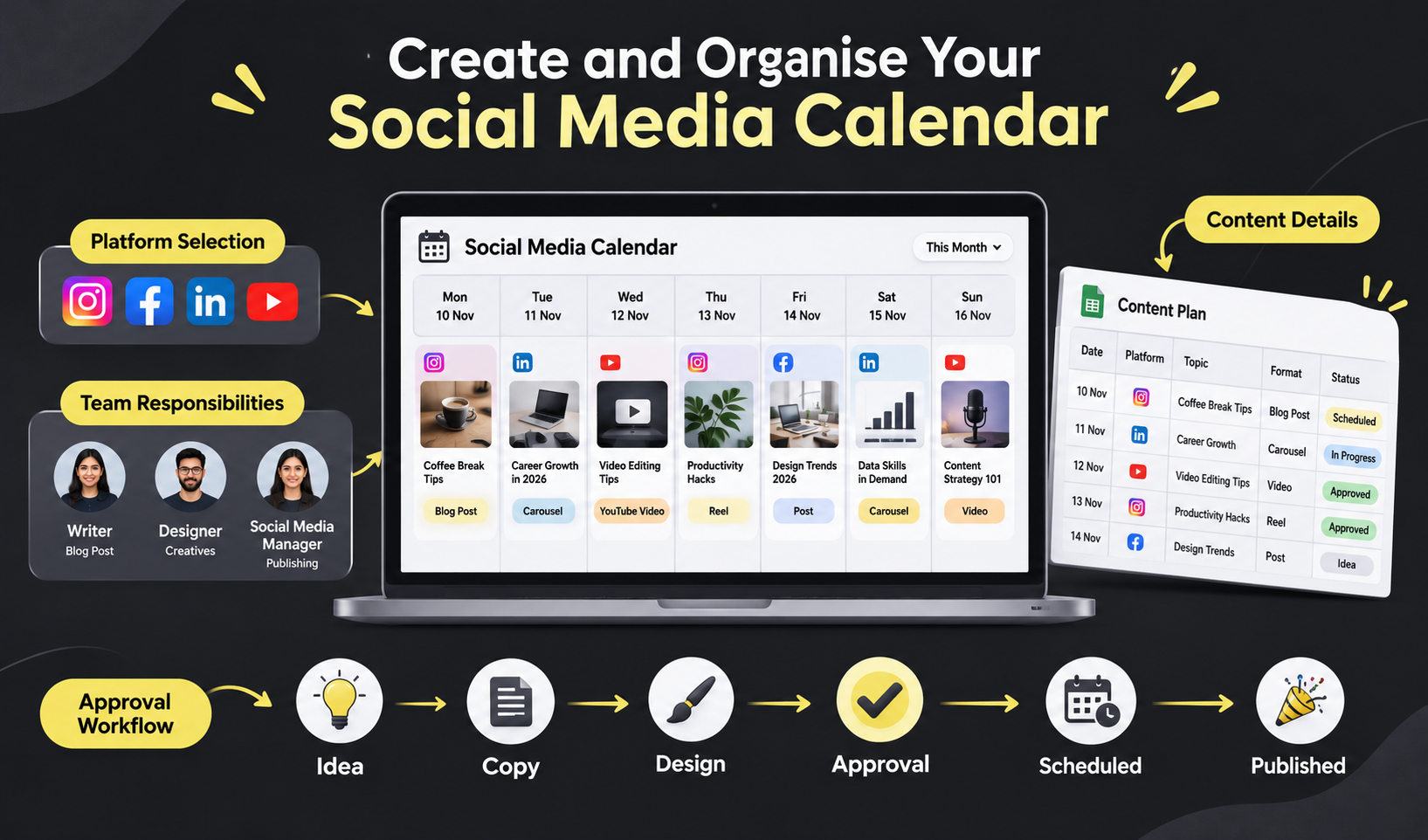
Idea
Copy in progress
Design pending
Awaiting approval
Approved
Scheduled
Published
This makes it easier to track each post from planning to publication.
10. Schedule and Publish Your Content
Once the content is approved, schedule it using a suitable tool or the platform's native publishing feature.
Useful options include Meta Business Suite for Facebook and Instagram, LinkedIn's native scheduling feature, and tools such as Buffer and Hootsuite.
Check current account eligibility and feature availability before choosing a scheduling workflow.
Scheduling does not replace account management. Monitor published posts, respond to comments and handle relevant enquiries.
11. Track Performance and Update Your Calendar
Review social media analytics to understand which topics and formats perform well.
Metric | What it measures |
Reach | Unique accounts that see your content |
Impressions | Total content displays |
Engagement | Likes, comments, saves and shares |
Link clicks | Clicks on content links |
Leads | Enquiries generated |
Conversions | Desired actions completed |
Choose metrics that match your goals. If your objective is course enquiries, track enquiries and conversions rather than relying on likes alone.
Use performance insights to improve your next calendar.
How to Use Social Media Analytics to Improve Your Next Calendar
Performance tracking becomes useful when you turn observations into planning decisions.
Consider this illustrative EdTech example:
Previous content | Observation | Next planning decision |
Generic marketing tips | Few saves and shares | Create more actionable tutorials |
Data analytics carousel | Higher saves | Develop a related series |
Course promotional graphic | Few website clicks | Review the CTA and landing page |
Student project video | More meaningful comments | Plan more student-led content |
Mentor Q&A Reel | Repeated questions | Create an FAQ series |
Compare similar posts, identify patterns and add relevant follow-up topics to your next calendar. These examples are hypothetical and demonstrate how performance insights can guide future planning.
Sample Monthly Social Media Content Calendar for an EdTech Company
An EdTech company should balance educational content, career guidance, student experiences, industry insights and course promotions.
The following is an illustrative four-week schedule for an institute offering Digital Marketing, Data Analytics, UI/UX Design and Technology courses.
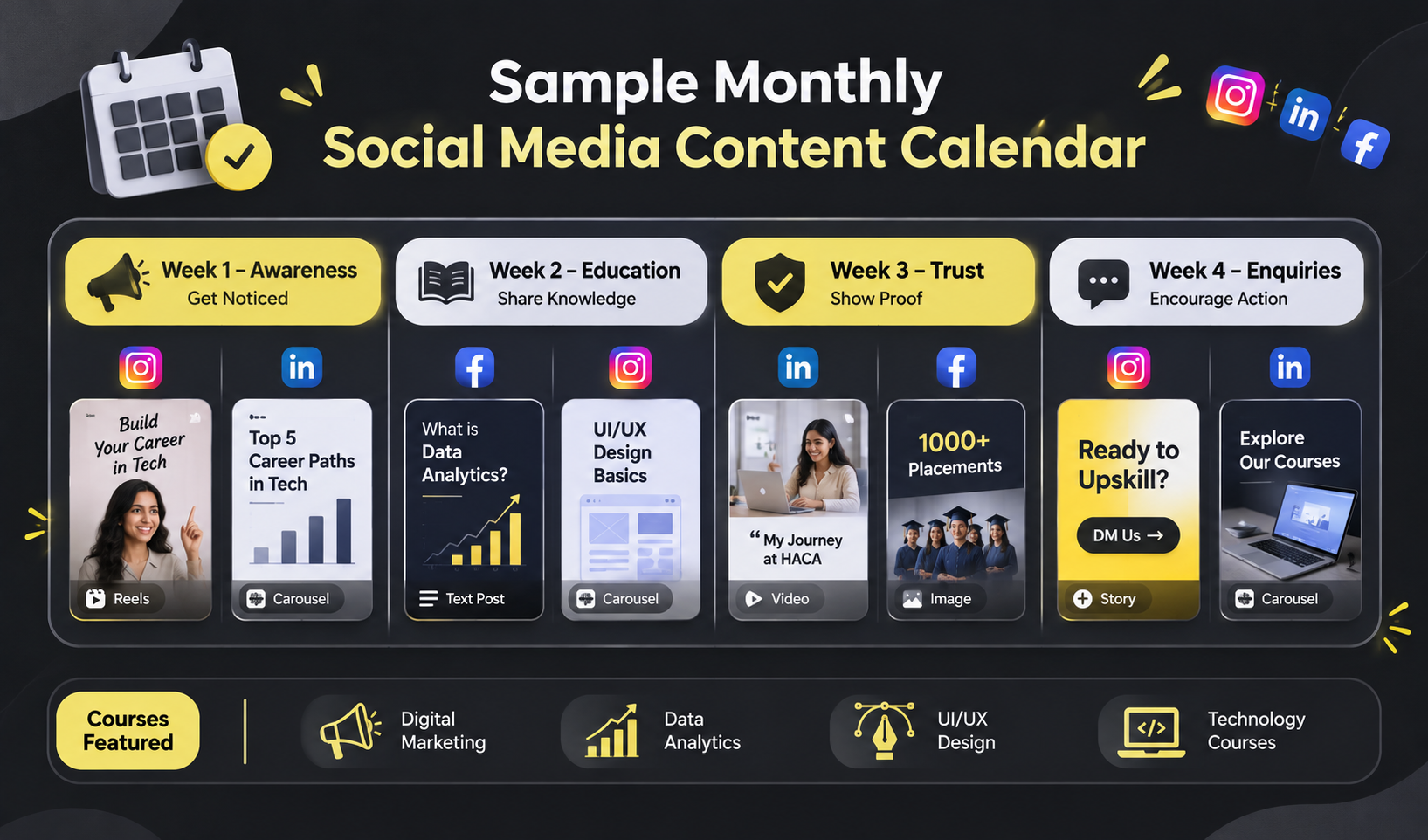
This schedule is a sample, not a fixed publishing formula. Adjust the topics and frequency based on audience interests, campaign priorities and available resources.
How Each Content Pillar Supports the Student Journey
Content pillar | Example post | Student's likely question |
Educational | What is data analytics? | What will I learn? |
Career guidance | Career options after learning UI/UX | What can I do with this skill? |
Industry insights | How AI is changing marketing | Is this skill relevant? |
Student experiences | Project walkthrough | What will I learn in practice? |
Mentor insights | Common beginner mistakes | Can I learn this? |
Course promotion | Course curriculum | Where can I learn this? |
This approach helps an EdTech institute educate prospective students instead of using social media only for course promotions.
Best Tools to Create a Social Media Calendar
Several free and paid tools help organise content ideas, prepare creative assets and schedule posts.
Tool | Main features | Suitable for |
Google Sheets | Spreadsheets and collaboration | Beginners and small teams |
Notion | Databases, calendar and task views | Content creators and teams |
Canva | Visual templates and content design | Individuals and design teams |
Meta Business Suite | Facebook and Instagram management | Businesses using Meta platforms |
Buffer | Social media scheduling | Creators and small businesses |
Hootsuite | Publishing, monitoring and analytics | Marketing teams |
Google Sheets is a simple starting point. Notion is useful for managing content and tasks in one workspace, while Canva helps create visual plans. Meta Business Suite, Buffer and Hootsuite offer publishing and scheduling features.
Choose a tool based on your workflow, budget and team size. More advanced software does not automatically create a better content strategy.
Social Media Calendar Template: A Practical Example
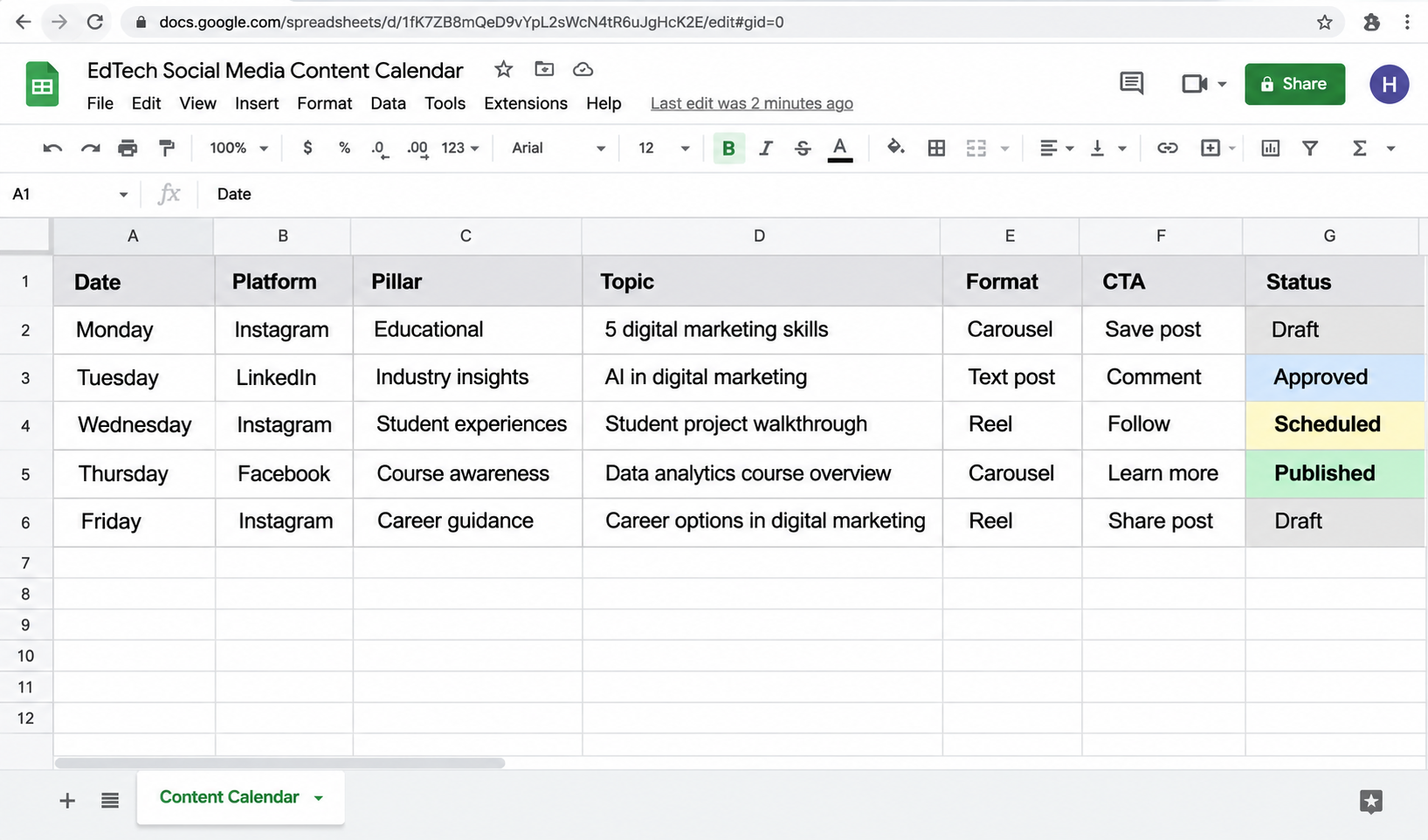
Use this simple weekly structure in Google Sheets, Excel or Notion.
How to Use the Template
Replace the sample topics with ideas relevant to your audience.
Add publishing dates and preferred times.
Assign a content pillar and format to each post.
Attach captions and creative assets.
Update the status as content moves through production.
Record performance after publication.
How to Audit Your Social Media Calendar Before Publishing
Before finalising your calendar, check whether the planned content supports your goals and provides value to your audience.
Use this checklist:
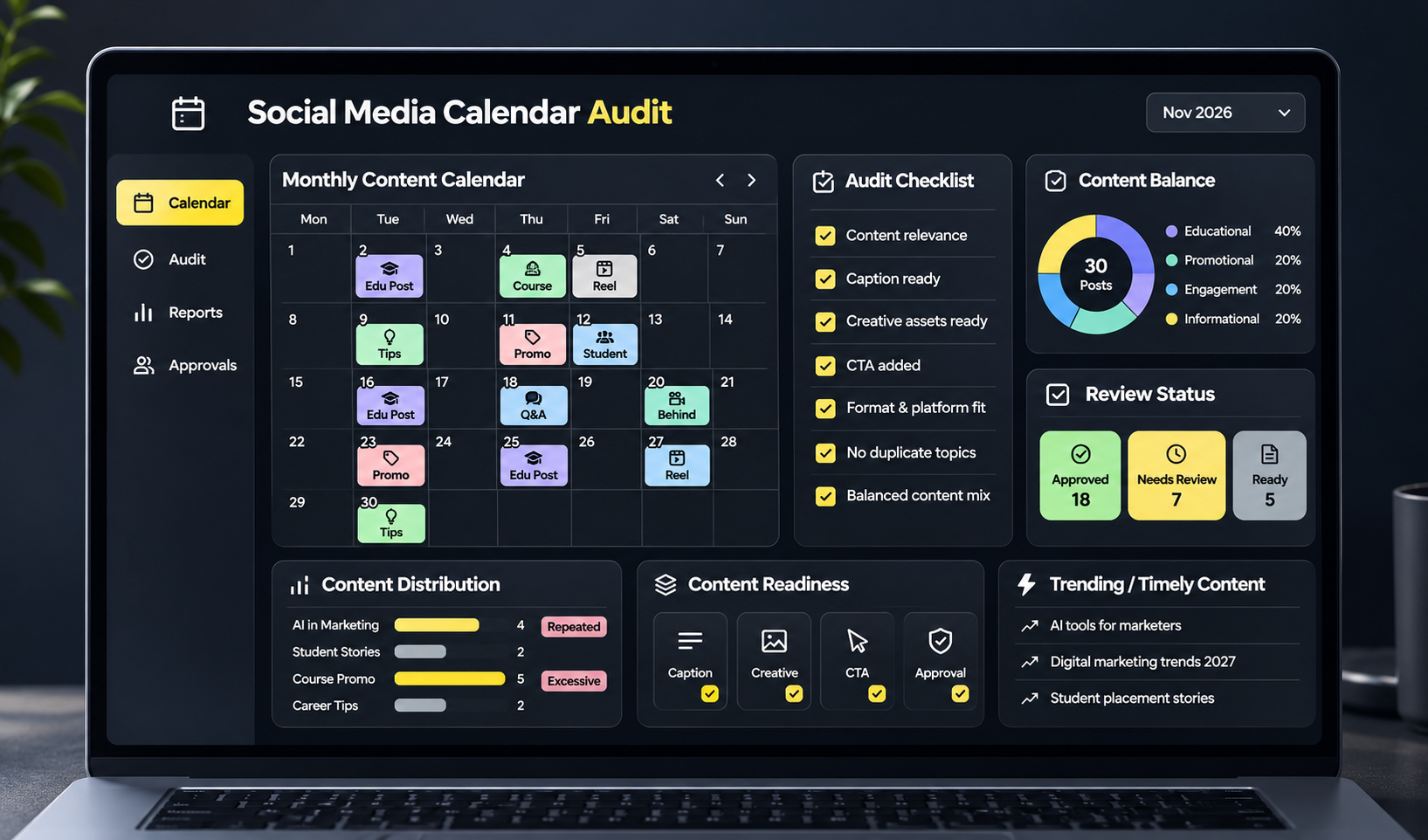
Does every post have a clear purpose?
Does the topic address an audience interest or problem?
Is the format suitable for the platform?
Are the content pillars distributed appropriately?
Are there too many promotional posts?
Are similar topics repeated too often?
Are captions and creative assets ready?
Are all required approvals in place?
Does every promotional post have an appropriate CTA?
Is there room for timely content?
For example, if your EdTech calendar contains several course promotions but very little educational content, review whether the content mix reflects prospective students' needs.
Conclusion
Creating a social media calendar involves more than deciding what to post every day. It requires you to understand your audience, define marketing goals, build content pillars and organise publishing activities around a realistic schedule.
Start with a simple calendar using Google Sheets or Notion. Add content ideas, publishing dates, formats and captions. As your workflow develops, introduce content approvals, scheduling and performance tracking to make your planning more effective.
For an EdTech company, a well-planned calendar should do more than promote courses. It should help prospective students explore career opportunities, understand industry-relevant skills and make informed learning decisions.
If you want to build these skills into a career, explore the Digital Marketing Course in Calicut at HACA. Go beyond social media planning and explore different areas of digital marketing, including SEO, social media marketing, content creation, paid advertising, Shopify, web development and more. Learn how these skills work together through practical training and build the knowledge to plan, execute and manage digital marketing activities with confidence.