SEO performance is measured by tracking how well your website gains organic visibility, attracts relevant search traffic, and turns that traffic into meaningful actions. The core metrics include clicks, impressions, click-through rate, average position, organic traffic, conversions, indexed pages, and technical SEO health.
However, measuring SEO performance is not simply about checking whether a keyword moved from position 10 to position 5. A useful SEO measurement process connects search visibility, website traffic, user behaviour and conversions.
Google Search Console provides search performance data such as clicks, impressions, CTR, and average position, while analytics tools help you understand what visitors do after they reach your website.
This guide explains how to measure SEO performance, which SEO metrics matter, how to use Google Search Console, how to identify the reason behind a ranking drop, and how to recover from it.
What Is SEO Performance?
SEO performance refers to how effectively a website attracts visibility and relevant visitors from unpaid search results.
A website can have good SEO performance in several different ways. It might rank for a large number of relevant keywords, generate consistent organic traffic, attract visitors from target locations, or generate leads and sales through organic search.
For most businesses, SEO performance should be evaluated across four areas:
Area | Metrics to monitor | What it tells you |
Search visibility | Impressions, rankings | How often your website appears |
Organic traffic | Clicks, sessions, users | How much traffic search generates |
User behaviour | Engagement, landing-page activity | Whether visitors find the content useful |
Business results | Leads, sales, enquiries | Whether SEO contributes to business goals |
This distinction is important because traffic alone does not prove SEO success.
For example, a website may receive thousands of visitors from an informational keyword but generate very few enquiries. Another website may receive fewer visitors but attract people searching for a specific service and generate several qualified leads.
The second website may have a stronger commercial SEO outcome even though its traffic is lower.
Why Should You Measure SEO Performance?
SEO involves continuous changes to content, technical elements, internal links, backlinks, search behaviour, competitors, and search engine algorithms. Without measurement, you cannot confidently determine which changes are improving your website and which ones are not.
Regular SEO measurement helps you:
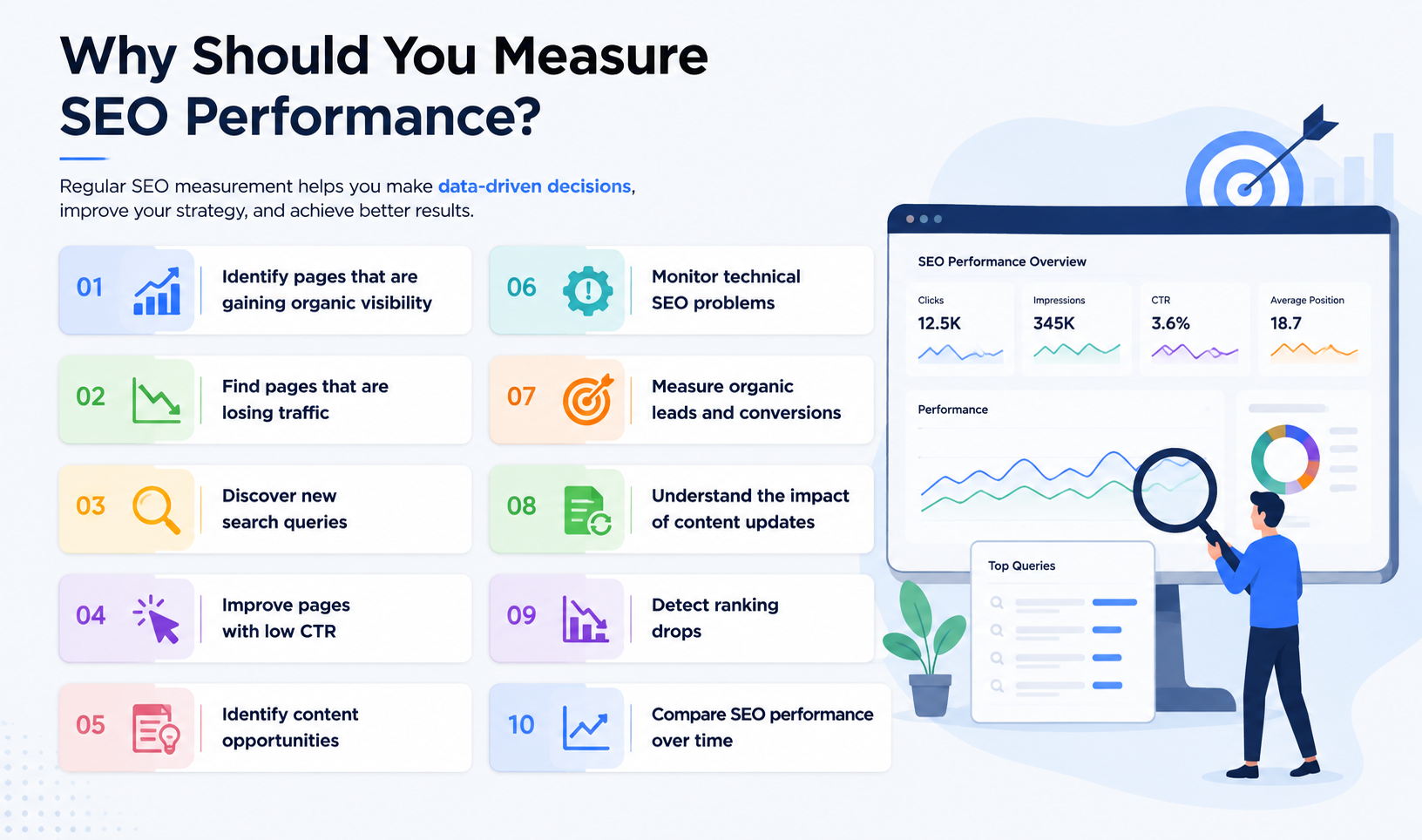
Identify pages that are gaining organic visibility
Find pages that are losing traffic
Discover new search queries
Improve pages with low CTR
Identify content opportunities
Monitor technical SEO problems
Measure organic leads and conversions
Understand the impact of content updates
Detect ranking drops
Compare SEO performance over time
It also helps you make SEO decisions based on evidence rather than assumptions.
For example, if a page has 50,000 impressions but only 500 clicks, the problem may not be a lack of visibility. The page is already appearing in search. The opportunity may be improving its ranking, search intent alignment, title, snippet, or overall relevance.
Which SEO Metrics Should You Track?
There are dozens of SEO metrics available in different tools. You do not need to monitor all of them. The right metrics depend on what you are trying to achieve.
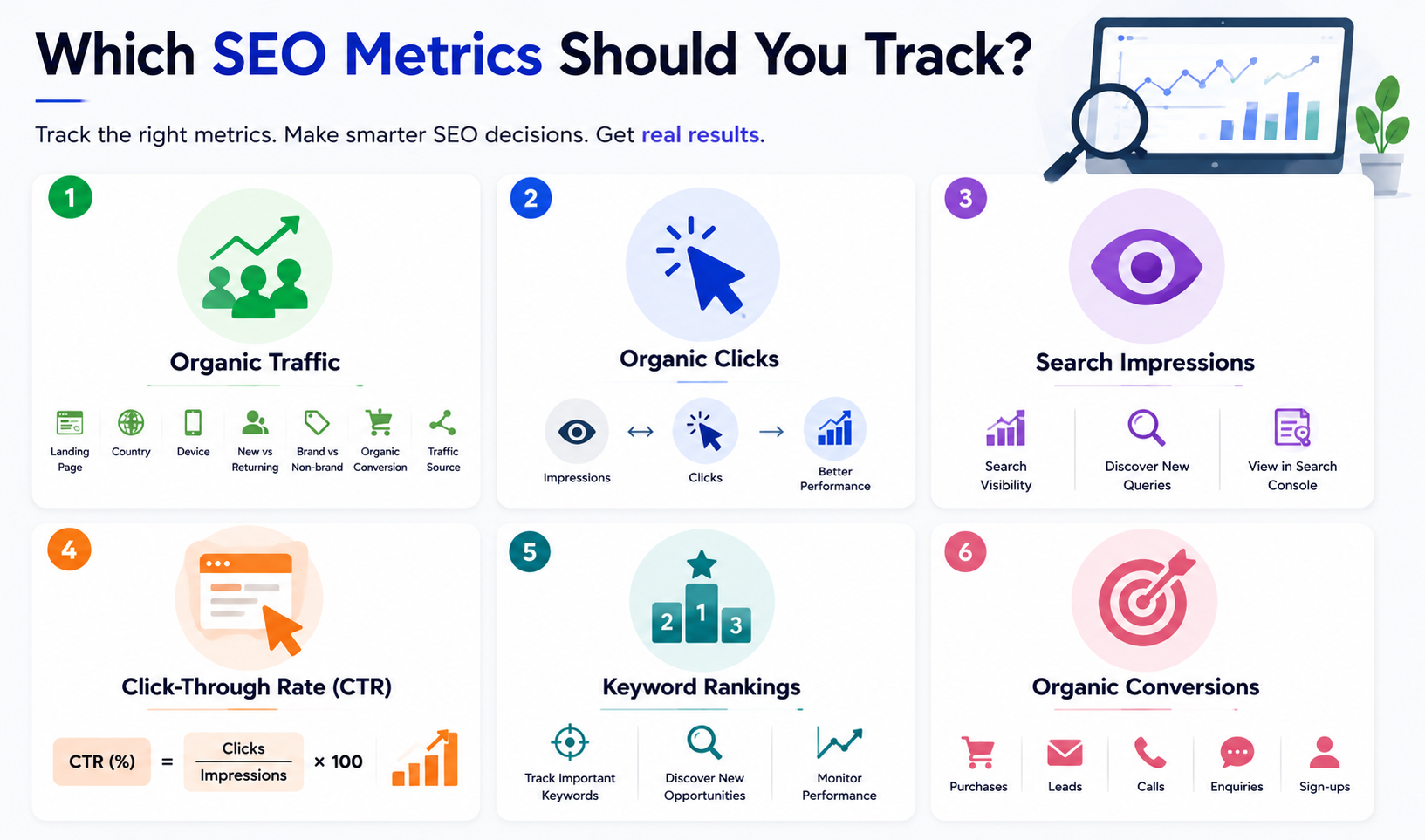
1. Organic Traffic
Organic traffic refers to visitors who reach your website through unpaid search results.
It is one of the most common metrics used to measure SEO performance because increasing relevant search traffic is a primary objective of many SEO campaigns.
When measuring organic traffic, don't look only at the total number.
Break it down by:
Landing page
Country
Device
New and returning users
Brand and non-brand traffic
Organic conversion
Traffic source
This helps you understand whether traffic growth is actually useful.
For example, if a business wants customers from Kerala but most of its organic growth comes from unrelated international searches, an increase in traffic may not represent meaningful SEO progress.
2. Organic Clicks
Clicks tell you how many times users clicked your website from Google Search.
Google Search Console reports clicks as one of its primary Search performance metrics. It also lets you examine which queries and pages generate those clicks.
Clicks are especially useful when compared with impressions.
Consider this example:
Change | Possible interpretation |
Impressions increase + clicks increase | Search visibility and traffic are improving |
Impressions increase + clicks remain flat | CTR may need attention |
Impressions decrease + clicks decrease | Visibility may be falling |
Impressions stable + clicks decrease | Investigate CTR and SERP changes |
This is why looking at one metric in isolation can lead to the wrong conclusion.
3. Search Impressions
An impression occurs when your website appears in Google Search results. Impressions help you understand how much search visibility your website receives.
A page with increasing impressions may be gaining visibility for more queries even before that visibility produces substantial traffic.
This can happen when a new page begins ranking for related long-tail searches. Search Console lets you view impressions alongside clicks, CTR, and average position.
4. Click-Through Rate
Click-through rate, or CTR, shows how frequently people click your result after it receives an impression.
The formula is:
CTR = Clicks ÷ Impressions × 100
For example, if a page receives 10,000 impressions and 300 clicks:
300 ÷ 10,000 × 100 = 3% CTR
CTR should not be treated as a universal pass-or-fail number.
A page ranking near the top of the results generally has a different click opportunity from a page appearing much lower down. Search features, query type, brand familiarity, and search intent can also affect CTR.
Instead of asking whether a CTR is "good", compare it with:
Previous performance
Similar queries
Similar pages
Ranking position
Search intent
If a page has strong impressions but consistently low CTR, reviewing its title and other SERP elements can be a useful starting point. Learn more about title tag optimisation and how it can influence how your pages appear in search results.
5. Keyword Rankings
Keyword rankings show where your website appears for particular search queries. Rank tracking can be useful for monitoring important commercial and informational keywords.
However, keyword rankings should not be the only measurement method.
A single page can appear for hundreds or thousands of related searches. Search Console's Queries report can reveal searches that you may not have included in your original keyword list.
For example, a page targeting SEO performance measurement may also receive impressions for searches related to:
SEO KPIs
SEO metrics
SEO reporting
measuring organic traffic
SEO performance tracking
Google Search Console SEO
SEO ranking performance
These related queries can reveal new content and optimisation opportunities.
6. Organic Conversions
Conversions connect SEO performance with business outcomes. A conversion can be different for every website.
For an ecommerce business, it may be a purchase.
For a digital marketing agency, it could be a consultation request.
For an education company, it could be a course enquiry or application.
Other examples include:
Contact form submissions
Phone calls
WhatsApp enquiries
Demo requests
Newsletter registrations
Account registrations
Product purchases
This is why SEO reporting should eventually move beyond:
How much traffic did SEO generate?
and toward:
What did that organic traffic accomplish?
How Do You Measure SEO Performance Step by Step?
A simple SEO measurement process can be divided into six stages.
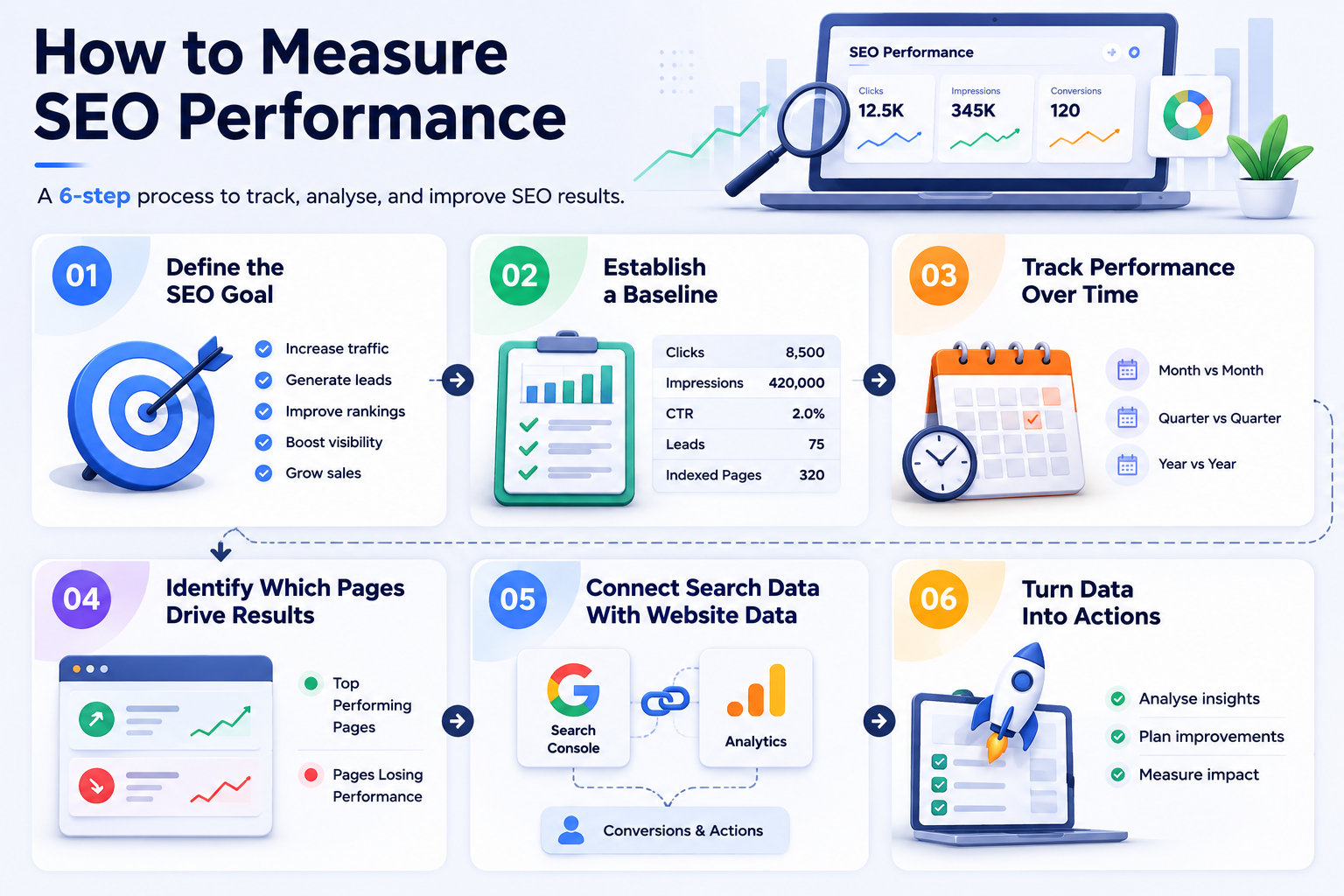
Step 1: Define the SEO Goal
Start by identifying what the website needs SEO to accomplish.
A goal could be:
Increase non-branded organic traffic
Generate more course enquiries
Increase product sales
Improve visibility for local searches
Grow traffic to important service pages
Increase rankings for commercial keywords
The goal determines which metrics deserve the most attention.
Step 2: Establish a Baseline
Before making major SEO changes, record your current performance.
For example:
Metric | Current performance |
Organic clicks | 8,500/month |
Impressions | 420,000/month |
CTR | 2.0% |
Organic leads | 75/month |
Indexed pages | 320 |
You can then compare future performance against this baseline.
Step 3: Track Performance Over Comparable Periods
SEO data becomes more useful when you compare equivalent periods.
For example:
September vs August
Q3 vs Q2
September 2026 vs September 2025
Seasonality can make month-to-month comparisons misleading for some industries. Google recommends using weekly or monthly views to smooth short-term fluctuations and identify broader trends.
Step 4: Identify Which Pages Drive Results
Find the pages generating the most organic traffic and conversions. Then identify pages losing performance.
This gives you two different optimisation opportunities:
Growth pages: protect and expand what is already working.
Declining pages: investigate and improve what is losing visibility.
Step 5: Connect Search Data With Website Data
Search Console tells you what happens in Google Search. Analytics data helps you understand what happens after the visitor reaches your website.
Together, they provide a more complete picture.
For example:
Search Console: 5,000 organic clicks
Analytics: 4,200 organic sessions
Conversion tracking: 85 enquiries
That tells you much more than knowing that your website ranks for 500 keywords.
Step 6: Turn the Data Into Actions
The final step is often ignored. Your SEO report should not simply contain numbers. It should explain what those numbers mean and what you plan to change.
For example:
Page A has strong impressions but below-average CTR. Test a more relevant title and improve the introduction to match the dominant search intent.
That is much more useful than:
Page A received 30,000 impressions.
How to Use Google Search Console to Measure SEO Performance
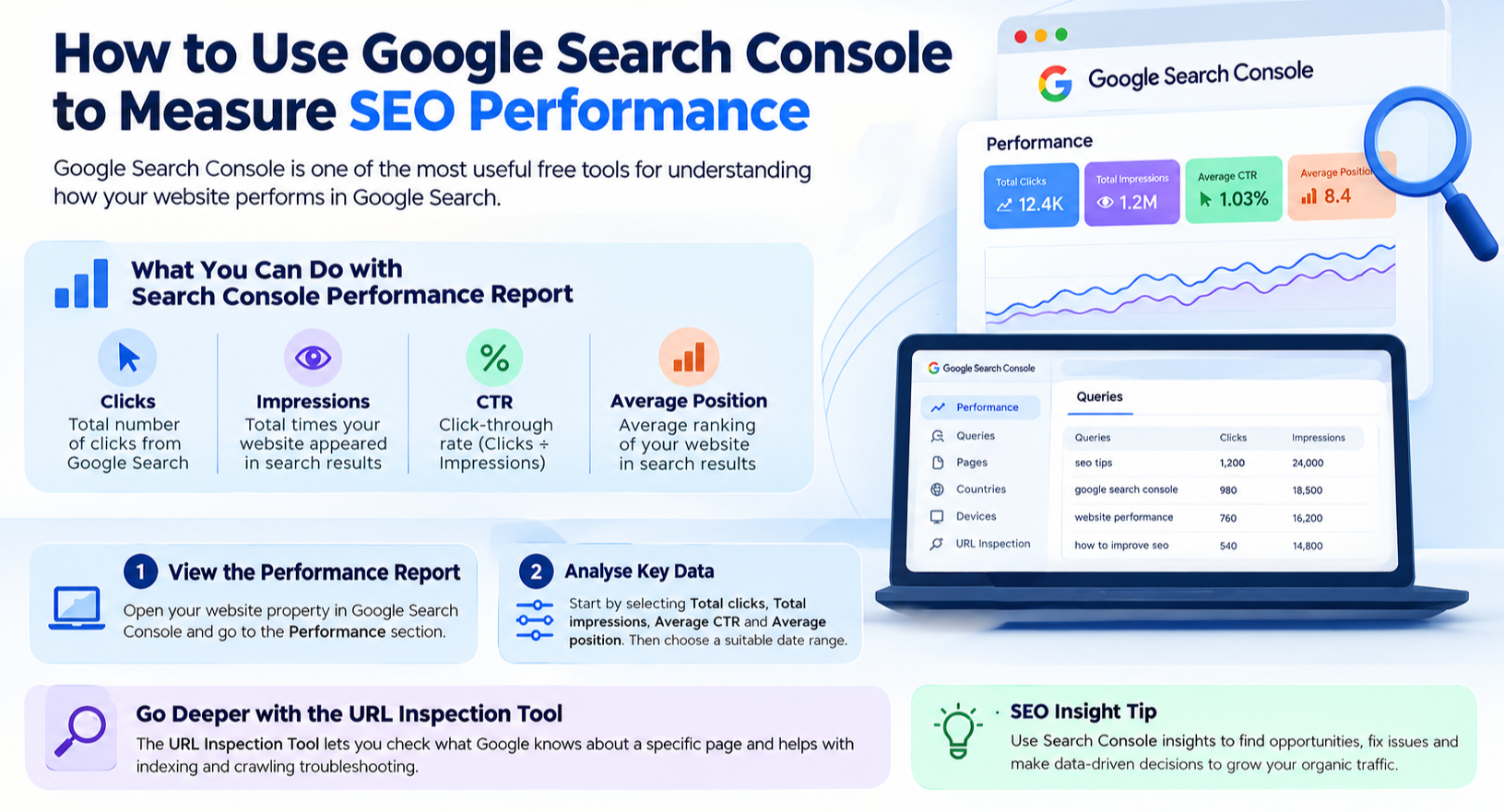
Google Search Console is one of the most useful free tools for understanding how your website performs in Google Search.
Its Performance report provides clicks, impressions, CTR, and average position, and lets you analyse data by dimensions such as queries, pages, countries, and devices.
How Do You Use the Performance Report?
Open your website property in Google Search Console and go to the Performance section.
Start by selecting:
Total clicks
Total impressions
Average CTR
Average position
Then select a suitable date range.
Search Console's default Performance report displays recent search data, and you can change the date range and comparison period.
How Do You Find the Keywords Bringing Traffic?
Open the Queries tab. This report shows the search queries that led users to your website.
Look for three groups:
High-click queries: These already drive traffic.
High-impression queries: These offer visibility opportunities.
Queries with meaningful impressions but low CTR: These may need better optimisation.
Search Console does not display every query. Google removes some anonymised queries from the table for privacy reasons, and the displayed data can also be subject to data limitations.
How Do You Find Your Best SEO Pages?
Open the Pages tab.
Sort pages by clicks to identify your strongest organic landing pages.
Then compare them with pages receiving high impressions but fewer clicks.
This helps you identify pages where existing search visibility can potentially be converted into more traffic.
How Do You Analyse SEO Performance by Country?
The Countries dimension helps you understand where your organic visibility comes from. This is particularly useful for businesses targeting specific geographical markets.
For example, an education business serving Calicut and the UAE can analyse whether its organic visibility is coming from the locations it actually wants to reach.
Location-level analysis can also reveal whether a page is attracting searches from an unintended market.
What Is the URL Inspection Tool Used For?
The URL Inspection Tool allows you to investigate an individual page.
It provides information about how Google sees that URL and can help with indexing and crawling troubleshooting. Google describes it as a tool for checking what Google knows about a specific page and testing the live version of the URL.
Use it when:
A new page isn't appearing in Google
An important page suddenly loses visibility
You suspect an indexing problem
You changed a page and want to inspect its current status
You need to investigate canonicalisation
How Do You Interpret Google Search Console Data?
The most useful approach is to look for relationships between metrics.
Situation | What it may indicate | What to investigate |
High impressions, low clicks | CTR opportunity | Title, snippet, intent |
Low impressions, low clicks | Limited visibility | Rankings, indexing, content relevance |
High clicks, low conversions | Traffic may not match business intent | Landing page and audience |
Falling clicks and impressions | Visibility decline | Rankings, demand, indexing |
Falling clicks but stable impressions | CTR issue | SERP, title, snippet |
Ranking decline on one page | Page-specific issue | Content, competitors, technical SEO |
Ranking decline across many pages | Site-wide issue | Technical changes, algorithm changes |
Search Console is most valuable when you use the data to form a hypothesis and then investigate that hypothesis.
How to Recover From a Ranking Drop
A ranking drop does not automatically mean your content is bad.
Google identifies several possible causes for declines in impressions, clicks, or position, including technical problems, indexing issues, site changes, seasonal demand, changes in search behaviour, competitors, content becoming outdated, lost links, and ranking-system changes.
If the decline appears to be related to crawling, indexing, site structure, or other technical problems, use a technical SEO guide to work through the main areas that can affect search visibility.
The correct recovery process starts with diagnosis.
What Should You Do When Your Google Ranking Drops?
1. Confirm That the Drop Is Real
First, compare the current period with a previous period.
Check:
Clicks
Impressions
CTR
Average position
Affected queries
Affected pages
Do not assume that a one-day decline represents a ranking problem.
Google's Search Console data can also include preliminary data, and search traffic naturally fluctuates.
2. Find Out Whether the Drop Is Page-Specific
If one page loses traffic while the rest of the website remains stable, investigate that page first. If hundreds of pages decline simultaneously, look for a wider technical or search-related issue.
This distinction can save hours of unnecessary content editing.
3. Check Indexing
Open the Page Indexing report and look for changes in indexed pages. A page cannot receive normal organic visibility if Google cannot properly index it.
Google recommends checking indexing errors, excluded URLs, robots.txt restrictions, noindex directives, access issues, and other technical causes when diagnosing traffic declines.
4. Inspect the Affected URL
Use URL Inspection for the affected page.
Check whether:
Google can access the URL
The page is indexed
Google selected the expected canonical
A technical issue is affecting the page
If the page is not indexed correctly, improving the content alone will not solve the problem.
5. Check Recent Website Changes
Review changes made shortly before the ranking decline.
Pay particular attention to:
URL changes
Website migrations
Redesigns
Internal-link changes
Canonical changes
Robots.txt changes
Noindex tags
Template changes
Deleted content
Google specifically identifies recent site moves, crawling issues, noindex rules, robots.txt restrictions, and template problems as potential causes of traffic declines.
6. Compare Your Content With the Current SERP
Search the affected keyword and study the pages currently ranking.
Don't just compare word counts.
Look at:
Search intent
Content format
Topic coverage
Freshness
Examples
Original research
User experience
Internal linking
Page structure
Location relevance
First-hand experience
If the SERP has shifted from generic definitions toward detailed guides, for example, a short definition page may no longer satisfy the query as effectively.
7. Check Whether Your Content Is Outdated
Content can lose visibility when its information becomes inaccurate or less useful.
Review:
Statistics
Examples
Product information
Screenshots
Links
Industry developments
Search intent
Competitor coverage
Google specifically recommends checking whether content has become stale, incorrect, or less useful when investigating traffic declines.
8. Check Competitor Changes
Sometimes your website does not become worse. A competitor becomes better.
A competitor may publish more complete content, improve its page experience, gain relevant links, or address parts of the query your page ignores.
Compare the current top-ranking pages and identify what changed.
This is where competitor gap analysis becomes more useful than blindly adding more words to your article.
9. Check Search Demand and Seasonality
Not every traffic decline is an SEO problem.
Search demand can change because of:
Holidays
Seasonal products
Industry trends
News events
Consumer behaviour
Temporary interest
Google specifically recommends checking whether the decline is periodic or connected to seasonal search behaviour.
10. Check for Broader Google Changes
If your website experiences a significant and persistent decline across multiple pages, investigate whether Google has announced a relevant ranking-system change.
However, avoid using algorithm updates as the default explanation.
Google's own troubleshooting process recommends checking technical problems, indexing, search demand, competitors, content quality, and other factors before concluding that a ranking-system change caused the decline.
What Should You Not Do After a Ranking Drop?
Avoid making several major changes simultaneously.
For example, don't change the URL, rewrite the entire article, remove sections, change the title, alter canonical tags, and launch a backlink campaign on the same day.
If rankings improve or decline afterward, you won't know which change influenced the result. Instead, identify the most likely problem, make a targeted change, and monitor the result.
Google also recommends comparing performance before and after changes to understand whether an improvement correlates with the change you made.
How Often Should You Measure SEO Performance?
The appropriate frequency depends on the size and activity level of your website.
Website | Suggested review |
Small business website | Monthly |
Blog | Monthly |
Ecommerce website | Weekly or monthly |
Large website | Weekly |
Website after migration | Weekly |
Website experiencing a ranking drop | More frequent monitoring |
You can monitor important changes more frequently, but avoid making SEO decisions based on tiny day-to-day fluctuations.
For longer-term analysis, weekly or monthly data often provides a clearer picture because it reduces the influence of normal short-term fluctuations.
What Should an SEO Performance Report Include?
A useful monthly SEO report should contain both performance data and interpretation.
At minimum, include:
SEO area | Metrics |
Organic visibility | Impressions |
Organic traffic | Clicks and organic sessions |
Rankings | Target keyword positions |
CTR | Organic click-through rate |
Content | Top and declining pages |
Search queries | Important gaining and declining queries |
Conversions | Organic leads, sales or enquiries |
Technical SEO | Indexing and crawl issues |
Authority | Relevant referring domains |
Local performance | Location-specific visibility where relevant |
The report should then explain what changed and what action comes next.
For example:
Finding: Organic impressions increased by 24%, but clicks increased by only 5%.
Interpretation: Search visibility is growing faster than traffic, so pages with high impressions and low CTR need further analysis.
Action: Review the affected queries and pages, compare their current SERPs, and test improvements to titles and content relevance.
That turns reporting into decision-making.
How Can SEO Performance Data Improve Content Strategy?
SEO measurement should influence what you publish next. Suppose Search Console shows that an existing article receives impressions for several related queries that the article only briefly addresses.
Instead of creating five separate articles immediately, review whether those queries belong within the existing topic. This can help you build stronger topical coverage while reducing unnecessary content duplication.
Similarly, if several related pages compete for the same search intent, you may need to review internal linking, page targeting, and possible keyword cannibalisation.
For a digital marketing education brand such as HACA, this approach can also connect informational content with relevant commercial content.
Someone searching for how to measure SEO performance may later need information about SEO training, digital marketing skills, SEO careers, or a digital marketing course.
The informational article should answer the original query completely first. Relevant internal links can then provide the next step for readers who want to learn the subject professionally.
That creates a natural relationship between informational content and course-related pages without turning an educational article into an advertisement.
SEO Performance Measurement Checklist
Use this checklist during your monthly SEO review:
Organic clicks checked
Organic traffic checked
Search impressions reviewed
CTR reviewed
Keyword rankings compared
Top-performing pages identified
Declining pages identified
Search Console queries analysed
Country and device performance reviewed
Organic conversions checked
Indexed pages reviewed
Important URLs inspected
Technical SEO issues checked
Competitor changes reviewed
Content freshness reviewed
Search demand and seasonality considered
Relevant internal links added
Next SEO actions documented
Final Thoughts
Measuring SEO performance is not about filling a spreadsheet with as many numbers as possible. The real purpose is to understand what is changing, why it is changing, and what you should do next.
Start with the core indicators such as clicks, impressions, CTR, rankings, organic traffic, and conversions. Then use tools like Google Search Console to understand which pages and queries are driving your results. When performance drops, look beyond rankings and investigate technical issues, search demand, competitors, content relevance, and other factors before making major changes.
The more you work with SEO data, the more important it becomes to understand how SEO fits into the wider digital marketing picture. SEO connects with content, social media, paid advertising, analytics, websites, and conversion strategy. Learning how these areas work together can help you move from simply tracking SEO performance to actually building and managing digital marketing strategies.
If you're looking to build these skills professionally, HACA's Digital Marketing Course in Calicut can be your next step. You can learn SEO along with other essential areas of digital marketing through practical, industry-focused training and work toward building the skills needed for a career in digital marketing.
A ranking creates visibility. Visibility brings relevant traffic. And traffic matters when it contributes to a meaningful business outcome. Understanding that connection is what turns SEO measurement from a reporting task into a real marketing skill.