
If you're learning Python for data analysis, you've probably come across two popular libraries: NumPy and Pandas. Many beginners wonder which one they should learn first and which is better for data processing.
The short answer is this: NumPy and Pandas are not competitors. They work together. NumPy handles fast numerical operations, while Pandas makes it easy to work with structured data like spreadsheets and CSV files.
In this guide, we'll compare NumPy vs Pandas in detail, explain their features, strengths, limitations, and real-world applications, and help you decide which one fits your learning goals.
What Is NumPy?
NumPy, short for Numerical Python, is an open-source Python library designed for numerical computing. It provides a powerful multidimensional array object that allows developers to perform mathematical operations much faster than regular Python lists.
Many popular libraries, including Pandas, Scikit-learn, TensorFlow, and SciPy, are built using NumPy.
Instead of storing data in standard Python lists, NumPy stores information in arrays. These arrays consume less memory and perform calculations much faster.
Key Features of NumPy
Some of the major features of NumPy include:
High-performance multidimensional arrays
Fast mathematical operations
Matrix multiplication
Linear algebra functions
Statistical calculations
Random number generation
Broadcasting for efficient computations
Because of its speed and efficiency, NumPy is widely used in machine learning, engineering, finance, robotics, image processing, and scientific research.
Simple NumPy Example
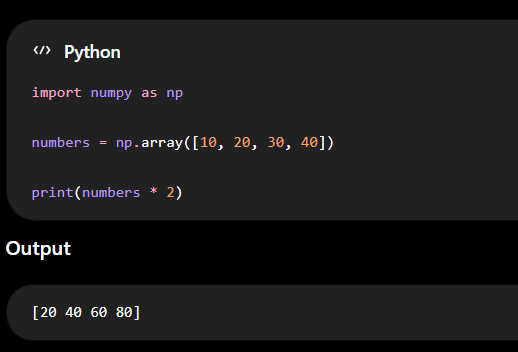
Here, every element is multiplied by 2 without writing a loop. That's one of the biggest advantages of NumPy.
What Is Pandas?
Pandas is another open-source Python library, but its primary focus is data manipulation and analysis rather than numerical computing.
If you've worked with Excel spreadsheets or SQL databases, Pandas will feel familiar because it organizes information into rows and columns.
Pandas introduces two important data structures:
Series – A one-dimensional collection of data
DataFrame – A two-dimensional table with rows and columns
A DataFrame is one of the biggest reasons why Pandas has become the most widely used library for data analysis.
With Pandas, you can easily import, clean, organize, filter, and analyze datasets from various sources.
Key Features of Pandas
Pandas offers several powerful features, including:
Reading CSV and Excel files
Working with JSON files
Handling missing values
Sorting and filtering data
Grouping data
Data merging and joining
Time-series analysis
Data cleaning and transformation
These features make Pandas an essential tool for business analytics, reporting, and exploratory data analysis.
Simple Pandas Example
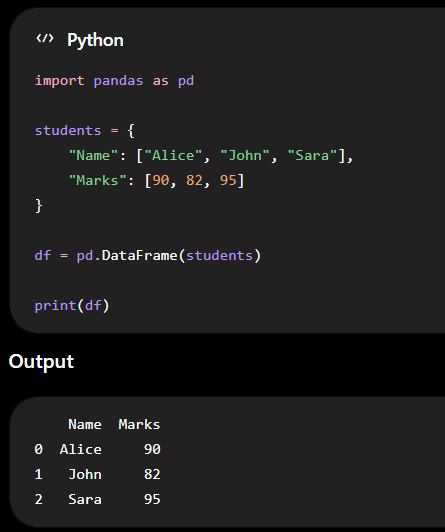
Unlike NumPy, Pandas automatically adds indexes and column names, making datasets much easier to understand.
Both NumPy and Pandas are part of Python’s powerful ecosystem. To understand why Python is so widely used for data analysis and development, explore the advantages of Python programming
Why Do People Compare NumPy vs Pandas?
At first glance, NumPy and Pandas seem very similar because both libraries help you work with data.
However, they solve different problems.
Beginners often compare NumPy vs Pandas because they don't know which library to learn first or which one is suitable for their projects.
Here's the reality:
NumPy focuses on numbers and calculations.
Pandas focuses on organizing and analyzing datasets.
NumPy vs Pandas: At a Glance
Feature | NumPy | Pandas |
Primary Purpose | Numerical computing | Data analysis and manipulation |
Data Structure | Array | Series and DataFrame |
Speed | Very fast | Fast, but slightly slower than NumPy |
Memory Usage | Lower | Higher |
Mathematical Operations | Excellent | Good |
Handles Missing Data | Limited | Excellent |
Reads CSV/Excel Files | No | Yes |
Best For | Scientific computing | Business and analytical data |
Built On | Python | NumPy |
This comparison makes one thing clear: NumPy and Pandas are designed to complement each other, not replace each other.
NumPy vs Pandas: Feature-by-Feature Comparison
Let's compare both libraries in more detail.
1. Data Structure
One of the biggest differences between NumPy vs Pandas is the way they store data. NumPy uses arrays, while Pandas uses Series and DataFrames.
A NumPy array stores values of the same data type. This makes calculations much faster.
Pandas DataFrames can store multiple data types within the same table. For example, one column can contain names, another can contain ages, while another stores dates.
NumPy for numerical arrays.
Pandas for structured datasets.
2. Performance
When speed matters, NumPy usually performs better. Since NumPy arrays are stored in continuous memory blocks, calculations happen very quickly.
For example:
Matrix multiplication
Statistical calculations
Mathematical formulas
Large numerical datasets
can all be processed much faster with NumPy.
Pandas adds extra information like row labels, column names, indexes, and metadata. These features improve usability but slightly reduce processing speed.
3. Memory Usage
Memory usage becomes important when working with large datasets. NumPy arrays are lightweight because every value follows the same data type.
Pandas DataFrames require additional memory because they store:
Indexes
Column labels
Different data types
Metadata
For small datasets, this difference is hardly noticeable. For datasets containing millions of records, however, NumPy consumes much less memory.
4. Data Cleaning
Real-world data is rarely clean.
You may encounter:
Missing values
Duplicate records
Incorrect entries
Empty cells
Formatting issues
Cleaning such datasets manually can be difficult. This is where Pandas shines.
With just a few lines of code, you can:
Remove duplicates
Fill missing values
Replace incorrect data
Filter unwanted rows
Rename columns
NumPy provides only basic support for these tasks.
5. Reading and Writing Files
Suppose you receive a customer report in Excel or a sales dataset in CSV format.
NumPy cannot directly read these files. Pandas can.
With a single command, you can import data from:
CSV
Excel
JSON
SQL databases
HTML tables
You can also export cleaned datasets back into these formats. This is why almost every data analyst begins a project using Pandas.
6. Mathematical Operations
Mathematics is where NumPy truly stands out.
It includes built-in functions for:
Mean
Median
Standard deviation
Matrix multiplication
Dot products
Trigonometric functions
Linear algebra
Random number generation
Although Pandas supports many mathematical operations, it relies heavily on NumPy behind the scenes.

Real-World Use Cases of NumPy and Pandas
Use Cases of NumPy
NumPy is commonly used in applications where speed and numerical accuracy matter.
Some common use cases include:
Machine learning algorithms
Artificial intelligence
Financial modeling
Engineering simulations
Scientific research
Weather forecasting
Robotics
Image processing
Signal processing
Computer vision
For example, if you're building an image recognition model, the image is converted into large numerical arrays before it is processed. NumPy makes these calculations fast and efficient.
Use Cases of Pandas
Pandas is widely used wherever structured data needs to be collected, cleaned, analyzed, and presented.
Some popular use cases include:
Sales analysis
Customer analytics
Marketing reports
HR dashboards
Inventory management
Financial reporting
Healthcare records
Survey analysis
Business intelligence
Data visualization preparation
Imagine a company wants to analyze five years of customer purchase data stored in Excel files.
Instead of manually sorting thousands of rows, Pandas can load the files, clean missing values, calculate trends, and prepare the data for visualization in just a few lines of code.
This is why Pandas has become one of the most valuable tools for data analysts.
Can NumPy and Pandas Work Together?
One of the biggest misconceptions among beginners is that they must choose either NumPy or Pandas.
In reality, that's not how Python projects work.
NumPy and Pandas are designed to work together. In fact, Pandas is built on top of NumPy, which means it uses NumPy arrays internally to perform many of its operations efficiently.
A typical data processing workflow looks like this:
Import raw data using Pandas.
Clean and organise the dataset with Pandas.
Convert selected columns into NumPy arrays when high-speed numerical calculations are needed.
Use the processed data for visualization or machine learning.
For example, if you're analyzing customer sales data, you might use Pandas to remove duplicate records and fill in missing values. Once the data is clean, you can use NumPy to perform complex statistical calculations or prepare it for a machine learning model.
Rather than asking "NumPy vs Pandas?", professional developers usually ask "How can I use NumPy and Pandas together?"
That approach gives you the flexibility of Pandas along with the speed and performance of NumPy.
NumPy vs Pandas for Data Science
If you're considering data analytics as a career, explore whether data analytics is a good career in 2026 and what opportunities the field offers. They are among the most commonly used Python libraries in data science because they solve different problems within the same workflow.
Data science projects usually involve four main stages:
Collecting data
Cleaning and preparing data
Analyzing data
Building predictive models
NumPy and Pandas play different roles during these stages.
Pandas is mainly used during data collection, cleaning, and exploration. It allows you to load datasets, remove duplicate records, handle missing values, and organize data into a structured format.
Once the data is ready, NumPy comes into the picture. It performs fast numerical operations that are often required before feeding the data into machine learning algorithms.
For example, imagine you're working on customer sales data for an e-commerce company. You may receive the data in a CSV file with thousands of rows. Pandas can help you clean the dataset by removing blank entries and correcting formatting issues. After that, NumPy can perform statistical calculations such as averages, standard deviations, or matrix operations needed for deeper analysis.
This is why most data science projects use both libraries instead of relying on just one.
NumPy vs Pandas for Machine Learning
Pandas is responsible for preparing the data, while NumPy helps process it efficiently for machine learning models.
A typical machine learning workflow looks like this:
Import the dataset using Pandas.
Clean missing or incorrect values.
Select useful features.
Convert the data into NumPy arrays.
Train the machine learning model.
Evaluate the results.
Most popular machine learning libraries, including Scikit-learn, TensorFlow, and PyTorch, work well with NumPy arrays. Even if your dataset starts as a Pandas DataFrame, it is often converted into NumPy arrays before model training.
If your goal is to build AI applications, recommendation systems, fraud detection models, or predictive analytics, learning both libraries will give you a strong foundation.
Which Should Beginners Learn First? NumPy or Panda
One of the most common questions beginners ask is: Should I learn NumPy or Pandas first?
The recommended approach is to start with NumPy.
Learning NumPy first helps you understand how data is stored, indexed, sliced, and manipulated in arrays. These concepts make it much easier to understand how Pandas DataFrames work later.
A practical learning roadmap would look like this:
Learn Python fundamentals.
Understand lists, tuples, and dictionaries.
Learn NumPy arrays and mathematical operations.
Move on to Pandas for data manipulation.
Learn data visualization using Matplotlib or Seaborn.
Explore machine learning with Scikit-learn.
This sequence builds your knowledge step by step and avoids confusion.
Once you build a strong foundation in Python, you can also explore other areas of development, including technologies such as React JS and Node JS.
That said, if your immediate goal is data analysis using Excel or CSV files, you can start exploring basic Pandas alongside NumPy. Since Pandas is built on NumPy, learning them together becomes much easier once you understand the basics.

Which One Should You Choose?
After comparing the features, performance, and use cases, the answer becomes much clearer.
Choose NumPy if you need to:
Perform mathematical calculations
Work with multidimensional arrays
Build scientific applications
Process numerical data quickly
Develop machine learning algorithms
Choose Pandas if you need to:
Read CSV or Excel files
Clean messy datasets
Analyze business data
Generate reports
Organize tabular information
If you're entering the fields of data science, AI, business analytics, or machine learning, don't think of it as NumPy vs Pandas. Think of it as NumPy and Pandas.
They complement each other and are often used together in real-world Python projects.
Also Read More About Python Projects: AI Applications Built Using Python: 5 Real Projects Developed by HACA Tech School Students
Common Mistakes Beginners Make
When learning NumPy vs Pandas, beginners often make a few common mistakes that slow down their progress.
1. Treating NumPy and Pandas as Competitors
Many people believe they have to choose one library and ignore the other. In reality, professional developers use both together because they solve different problems.
2. Learning Pandas Without Understanding Arrays
Pandas DataFrames are built on top of NumPy arrays. If you skip NumPy completely, concepts like indexing, slicing, broadcasting, and vectorized operations may seem difficult later. Learning the basics of NumPy first makes Pandas much easier to understand.
3. Using Pandas for Heavy Mathematical Computations
Pandas can perform calculations, but it wasn't designed for high-performance numerical computing. For large-scale mathematical operations, NumPy is faster and more memory efficient. Choose the right tool for the task instead of forcing one library to do everything.
4. Ignoring Data Cleaning
Some beginners jump directly into data visualization or machine learning without checking the quality of their data. Missing values, duplicate records, and incorrect formatting can produce inaccurate results. Always clean your dataset before performing any analysis.
5. Memorizing Instead of Practicing
Watching tutorials is helpful, but the best way to learn is by building small projects.
Try working with:
Student records
Sales reports
Weather datasets
Movie ratings
Employee databases
The more real datasets you work with, the more confident you'll become with both NumPy and Pandas.
Conclusion
Learning the difference between NumPy vs Pandas isIf you're learning Python for data analysis, you've probably come across two popular libraries: NumPy and Pandas. Many beginners wonder which one they should learn first and which is better for data processing.
The short answer is this: NumPy and Pandas are not competitors. They work together. NumPy handles fast numerical operations, while Pandas makes it easy to work with structured data like spreadsheets and CSV files.