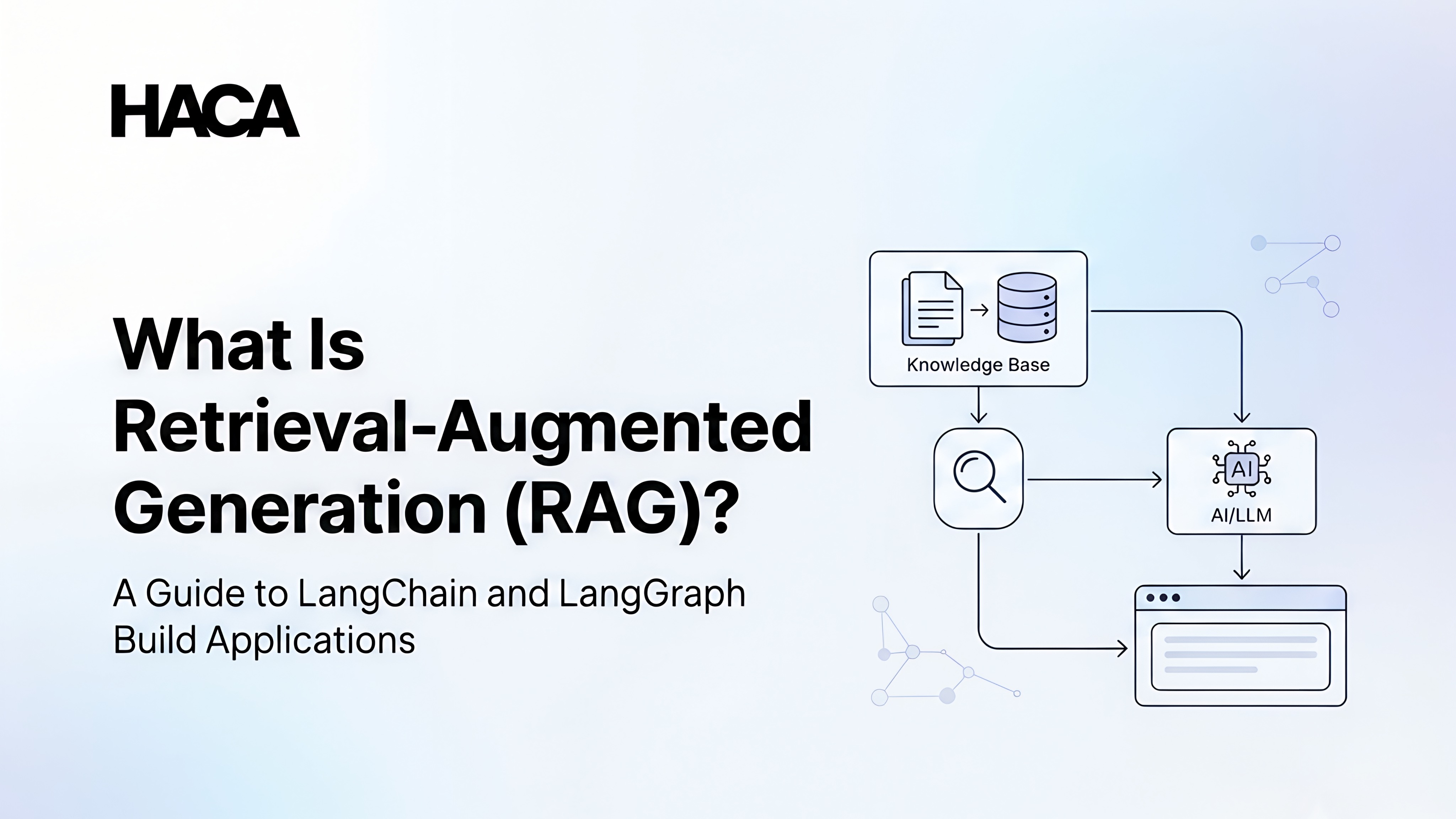
Retrieval-Augmented Generation (RAG) is an AI technique that improves the accuracy of Large Language Models (LLMs) by retrieving relevant information from external sources before generating a response. Instead of relying only on the data used during training, RAG allows AI models to access documents, databases, knowledge bases, and other up-to-date resources, making their answers more accurate and context-aware.
As businesses increasingly adopt AI for customer support, document search, coding assistants, and enterprise automation, RAG has become one of the most important technologies in modern AI development. It helps overcome common limitations of traditional AI models, such as outdated knowledge, AI hallucinations, and the inability to access private company data.
If you're learning main goal of Generative AI, understanding what Retrieval-Augmented Generation (RAG) is is just as important as learning Python or machine learning fundamentals. Developers often combine RAG with vector databases, LangChain, and LangGraph to build intelligent AI applications that can search documents, answer questions accurately, and automate complex workflows.
In this beginner-friendly guide, you'll learn how RAG works, why vector databases are essential, the difference between RAG vs Fine-Tuning, how to build AI applications using LangChain, and how LangGraph helps create advanced AI assistants with multi-step workflows.
What Is Retrieval-Augmented Generation (RAG)?
Retrieval-Augmented Generation (RAG) is an AI technique that combines information retrieval with language generation.
In simple words, RAG allows an AI model to:
Search for relevant information from external sources.
Retrieve the most useful data.
Use that information to generate a better answer.
A traditional AI model depends only on its training data. A RAG-based AI application works differently because it can access additional information whenever needed.
Think of it like an open-book exam.
A student without a book must answer questions based only on memory. But a student with a textbook can search for the correct information before answering.
RAG gives AI models a similar ability.
For example:
Without RAG:
User:
"What are the refund policies of ABC Company?"
AI:
"I don't have access to ABC Company's internal policies."
With RAG:
User:
"What are the refund policies of ABC Company?"
AI:
Searches company documents → Finds refund policy → Generates an accurate answer.
This makes RAG especially useful for businesses that want AI systems trained on their own information without creating an entirely new AI model.
How Does RAG Work?
The RAG process involves several important components working together.
The basic RAG architecture looks like this:
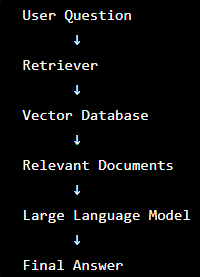
Let's understand each part.
1. User Query
Everything begins when a user asks a question.
Example:
"How can I apply for a refund?"
The AI system first understands what information the user needs.
2. Information Retrieval
Instead of immediately generating an answer, the system searches through available data sources.
These sources can include:
Company documents
PDFs
Websites
Research papers
Product manuals
Customer databases
The goal is to find information related to the user's question.
3. Vector Database
The retrieved information is usually stored in a vector database.
A vector database stores information in the form of embeddings, which help AI systems understand the meaning behind words instead of just matching exact keywords.
For example:
A traditional search system may see these as different:
"How can I cancel my subscription?"
"I want to stop my membership"
But a vector database understands that both questions have a similar meaning.
4. Large Language Model (LLM)
After finding relevant information, RAG sends that information along with the user's question to an AI model.
The language model then creates a response using the provided context. This improves accuracy because the AI is not only relying on its training data.
Why Do We Need RAG?
AI models are powerful, but they have certain limitations. RAG helps solve some of the biggest challenges in modern AI applications.
1. Reducing AI Hallucinations
One major problem with AI models is hallucination.
AI hallucination happens when an AI generates information that sounds believable but is incorrect.
For example:
A user asks: "Who won a company award in 2026?"
If the AI has no access to updated information, it may create an incorrect answer instead of admitting that it does not know.
RAG reduces hallucinations by giving the AI relevant and verified information before generating a response.
2. Handling Knowledge Cutoff Limitations
AI models are trained using large datasets collected at a specific time.
This means they may not know:
Recent company updates
New products
Latest research
Updated regulations
Current events
With RAG, developers can connect AI systems to updated databases and documents without retraining the entire model.
3. Accessing Real-Time Information
Many applications require constantly updated information.
Examples include:
Financial assistants
Customer support systems
News applications
E-commerce assistants
A chatbot for an online store needs information about current products, prices, and availability. RAG allows the AI system to retrieve updated information whenever needed.
4. Using Private Company Data
Many businesses want AI assistants that understand their internal information.
Examples:
HR policies
Employee handbooks
Product documentation
Legal documents
Customer records
However, this data is usually not available in public AI training datasets. RAG allows companies to connect their private data with AI models while keeping the original information separate.
How RAG Works Step by Step
Now, let's understand the complete process of building an AI application using RAG.
Step 1: User Asks a Question
The process starts when a user interacts with an AI application.
Example: "How many vacation days do employees get?"
The system receives this question and prepares it for searching.
Step 2: Creating Embeddings
The next step is converting the question into embeddings.
Embeddings are numerical representations of text that help AI understand meaning and relationships between information. Instead of seeing words as simple text, AI converts them into mathematical patterns.
For example:
"Car" and "Vehicle" have different words but similar meanings. Embeddings help AI recognise this connection.
Step 3: Searching the Vector Database
The system compares the user's question with stored information inside a vector database. It looks for documents that are closest in meaning.
For example:
User question: "What is the holiday policy?"
The vector database may find:
Employee handbook.pdf
HR policy document.pdf
Leave guidelines.pdf
Step 4: Retrieving Relevant Information
The system selects the most useful information from the search results. This prevents the AI model from receiving unnecessary data. Only relevant sections are provided as context.
Step 5: Sending Information to the LLM
The retrieved information is combined with the original question and sent to the language model.
The prompt may look like: "Answer this question using the following company policy information."
Step 6: Generating the Final Response
The AI model creates a response based on the retrieved information. Because the answer is supported by external data, it becomes more accurate and reliable.
What Are Vector Databases?
One of the most important parts of a RAG application is the vector database. If you're new to AI development, this term might sound complicated, but the concept is actually quite simple.
A vector database stores information based on its meaning, not just the exact words it contains. This allows AI systems to understand context and find information that is semantically similar to a user's query.
Why Aren't Traditional Databases Enough?
Traditional databases are excellent for storing structured data like customer records, product inventories, or employee information.
For example, if you search for: "Employee ID 1023"
A traditional database can quickly return the exact record.
However, imagine you ask: "How do I apply for annual leave?"
The document may actually contain the phrase: "Employees can request paid vacation through the HR portal."
A traditional keyword search might miss this because the wording is different. A vector database understands that "annual leave" and "paid vacation" refer to similar concepts.
That's what makes vector databases so powerful for AI search.
How Do Vector Databases Work?
When documents are added to a RAG system, they are converted into embeddings. These embeddings are numerical representations that capture the meaning of the text.
When a user asks a question:
The question is also converted into an embedding.
The vector database compares it with stored embeddings.
It retrieves the most relevant pieces of information.
The AI model uses those results to generate an answer.
This process happens in just a few seconds.
Popular Vector Databases
Several vector databases are widely used for building AI applications.
Pinecone: A fully managed cloud-based vector database that is easy to scale.
Chroma: A lightweight, open-source option popular among beginners and developers building prototypes.
FAISS: Developed by Meta, FAISS is known for its fast similarity search and is commonly used in research projects.
Weaviate: Offers vector search along with additional features like metadata filtering.
Milvus: Designed for handling large-scale AI applications with millions of vectors.
Qdrant: An open-source vector database optimized for semantic search and recommendation systems.
The best choice depends on your project size, budget, and deployment needs.
How Vector Databases Improve AI Search
Without vector databases, AI systems rely on exact keyword matching, which often produces incomplete results.
With vector databases, AI can:
Understand similar meanings
Find related information even when different words are used
Improve search accuracy
Reduce irrelevant results
Deliver more natural responses
This is why vector databases have become a core component of modern RAG applications.
RAG vs Fine-Tuning
One question many beginners ask is:
Should I use RAG or fine-tuning? The answer depends on what you're trying to achieve.
Although both improve AI models, they solve different problems.
Feature | Retrieval-Augmented Generation (RAG) | Fine-Tuning |
Uses external documents | Yes | No |
Requires retraining the model | No | Yes |
Easy to update information | Yes | No |
Works with private company data | Yes | Limited |
Cost | Lower | Higher |
Maintenance | Easier | More complex |
When Should You Choose RAG?
RAG is a good choice when:
Information changes frequently.
You want AI to answer questions using company documents.
You need access to real-time knowledge.
You want to avoid retraining a model every time data changes.
Examples include:
HR assistants
Customer support chatbots
Enterprise search systems
Document search applications
When Should You Choose Fine-Tuning?
Fine-tuning is useful when you want to change how a model behaves rather than what it knows.
For example, you may want an AI model to:
Write in a specific tone
Follow a particular response format
Perform specialized tasks more consistently
Fine-tuning updates the model itself, while RAG simply provides better information during inference.
In many production systems, developers use both RAG and fine-tuning together to achieve the best results.
Building AI Applications Using LangChain
Now that you understand RAG, the next question is: How do developers actually build these applications?
One of the most popular frameworks is LangChain. Developers can combine Python with frameworks such as LangChain to create practical AI Applications Built Using Python, including document search tools, chatbots, and intelligent assistants.
What Is LangChain?
LangChain is an open-source framework that helps developers build applications powered by Large Language Models.
Instead of writing complex code to connect AI models, databases, prompts, and external tools, LangChain provides reusable components that simplify the development process.
Key Components of LangChain
Prompt Templates
Prompt templates help developers create consistent prompts by inserting user input into predefined formats.
Chains
A chain combines multiple steps into a single workflow.
For example:
User Question → Retrieve Documents → Send to LLM → Generate Response
Instead of writing separate code for every step, LangChain allows developers to connect them into one pipeline.
Memory
Memory enables AI applications to remember previous interactions during a conversation.
Without memory:
User: "My name is Alex."
Later:
"What is my name?"
The AI may forget. With memory, it remembers the previous conversation and answers correctly.
Retrieval
Retrieval is one of the most important LangChain components.
It connects the AI model with vector databases so that relevant information can be retrieved before generating a response.
Agents
Agents allow AI systems to make decisions about which tools to use.
For example, an agent may decide to:
Search a document
Query a database
Perform calculations
Browse connected APIs
Generate the final answer
This makes AI applications more flexible and capable of handling complex tasks.
LangChain vs LangGraph
As AI applications became more advanced, developers needed a better way to manage complex workflows.
That's why LangGraph was introduced.
What Is LangGraph?
LangGraph is a framework built on top of LangChain for creating stateful and multi-step AI workflows.
Instead of following a simple linear process, LangGraph allows AI applications to:
Make decisions
Loop through tasks
Remember previous states
Coordinate multiple AI agents
This makes it ideal for building intelligent AI assistants.
LangChain vs LangGraph
LangChain | LangGraph |
Best for simple workflows | Best for complex workflows |
Linear execution | Graph-based execution |
Easier for beginners | Better for advanced AI agents |
Limited state management | Built-in state management |
Suitable for RAG pipelines | Suitable for multi-agent systems |
Which One Should You Learn?
If you're just getting started, begin with LangChain. It teaches the core concepts of building AI applications and is easier to understand.
Once you're comfortable with prompts, retrieval, and chains, learning LangGraph becomes much easier. It opens the door to building advanced AI assistants that can handle longer, more dynamic workflows.
Real-World Applications of RAG
Retrieval-Augmented Generation is already being used across many industries. From customer support and enterprise knowledge bases to AI in digital marketing, businesses are increasingly using AI to retrieve information, automate tasks, and deliver more relevant experiences.
Customer Support Chatbots
Instead of giving generic answers, RAG-powered chatbots retrieve information from product manuals, FAQs, and support documents to provide accurate responses.
AI Document Search
Companies often store thousands of documents. RAG enables employees to search these documents using natural language instead of manually browsing folders.
HR Assistants
Employees can ask questions about leave policies, benefits, payroll, or company guidelines, and the AI responds using official HR documents.
Medical Assistants
Healthcare organizations can use RAG to help doctors and staff quickly retrieve medical guidelines, treatment protocols, and clinical documentation. These systems should always support, not replace, professional medical judgment.
Legal Document Search
Law firms can search contracts, case files, and legal documents more efficiently by asking questions in plain language.
Enterprise Knowledge Bases
Businesses use RAG to create internal knowledge assistants that help employees find information quickly across multiple departments.
Educational AI Tutors
Educational platforms can build AI tutors that answer students' questions using course materials, textbooks, and learning resources instead of relying only on general knowledge.
Building AI Assistants Using LangGraph
Modern AI assistants often need to perform more than one task before giving an answer.
For example, a travel planning assistant may need to:
Find available flights.
Compare hotel prices.
Check the weather.
Create an itinerary.
Suggest nearby attractions.
Handling all these steps in sequence can become difficult.
LangGraph makes this easier by allowing developers to design workflows where different AI agents work together.
One agent might search for flights, another checks hotels, while another creates the final travel plan. Because LangGraph keeps track of each step, the assistant can make smarter decisions and produce more complete responses.
This approach is becoming increasingly common in enterprise AI applications.
The Future of RAG
Retrieval-Augmented Generation continues to evolve as AI becomes more capable.
Some of the biggest trends include:
Agentic AI
AI systems are moving beyond answering questions. They can now plan tasks, make decisions, and interact with multiple tools to complete complex workflows.
Multimodal RAG
Future RAG systems won't work only with text. They'll retrieve information from images, videos, PDFs, audio files, and other formats, making AI even more versatile.
Enterprise AI
More organizations are adopting RAG to build secure AI assistants that work with internal documents while keeping sensitive information protected.
As these technologies mature, skills in RAG, vector databases, LangChain, and LangGraph will become increasingly valuable for developers and AI professionals.
Conclusion
Retrieval-Augmented Generation (RAG) is changing the way AI applications access and use information. Instead of relying only on knowledge learned during training, RAG enables AI models to retrieve relevant data from external sources before generating a response. This results in more accurate, up-to-date, and context-aware answers.
In this guide, we explored what Retrieval-Augmented Generation (RAG) is, why it's important, how vector databases support semantic search, and the differences between RAG and fine-tuning. We also looked at how LangChain simplifies AI development and how LangGraph helps build advanced, multi-agent AI assistants.
If you're looking to gain hands-on experience, HACA's Python + Generative AI program in Calicut is a great place to start. The course covers Python programming, Large Language Models, Retrieval-Augmented Generation (RAG), LangChain, LangGraph, prompt engineering, and real-world AI projects. By building practical applications throughout the course, you'll develop the skills needed to create intelligent AI solutions for today's software industry.