Want to get your business in front of customers the moment they search on Google?
Then try Google Ads.
Google Ads is one of the fastest ways to reach potential customers online. Unlike SEO, which takes time to build organic rankings, Google Ads allows you to appear at the top of search results almost instantly.
However, simply creating a campaign isn't enough. A successful Google Ads strategy depends on choosing the right keywords, writing compelling ad copy, setting an appropriate bidding strategy, and continuously optimising campaign performance.
In this Google Ads guide, we’ll cover everything beginners need to know, from understanding PPC and choosing the right campaign type to keyword research, writing high-converting ads, improving Quality Score, and avoiding common mistakes.
Google Ads Guide for Beginners
What Is Google Ads?
Google Ads is Google's online advertising platform that enables businesses to display paid advertisements across Google Search, YouTube, Gmail, Google Maps, the Display Network, and other Google partner websites.
Instead of waiting months for organic rankings through SEO, businesses can use Google Ads to appear in front of users actively searching for their products or services.
For example, if someone searches for "best digital marketing course in Kerala," Google Ads can display a sponsored result above the organic listings, giving advertisers immediate visibility.
Some major advertising networks include:
Search Ads
Display Ads
Shopping Ads
Video Ads on YouTube
App Campaigns
Demand Gen Campaigns
Performance Max Campaigns
What Is PPC?
PPC stands for Pay-Per-Click, an online advertising model where advertisers pay only when someone clicks on their ad. Rather than paying for impressions or views, advertisers are charged based on user engagement.
For example:
Cost per click: 1₹
Total clicks: 150
Total advertising cost: 150₹
This model ensures you're spending money only when potential customers show interest by clicking your advertisement.
Benefits of PPC
Instant visibility on Google
Highly targeted advertising
Flexible budget control
Measurable campaign performance
Fast lead generation
Excellent return on investment when optimized correctly
How Does Pay-Per-Click Advertising Work?
Many beginners assume the advertiser with the highest bid always wins. In reality, Google considers several factors before displaying an ad.
Here's how pay-per-click advertising works:
Step 1: A User Searches on Google
Someone enters a search query like:
Affordable web design services
Running shoes for men
Google Ads course
Step 2: Google Starts an Auction
Google instantly analyzes every advertiser targeting that keyword.
Step 3: Advertisers Submit Their Bids
Each advertiser specifies the maximum amount they're willing to pay for a click.
Step 4: Google Calculates Ad Rank
Google doesn't simply reward the highest bidder. Instead, it evaluates:
Maximum bid
Expected click-through rate
Ad relevance
Landing page experience
Quality Score
Step 5: Ads Appear
The advertisers with the strongest combination of bid and quality earn the best positions. This is why smaller businesses can often outrank larger competitors by creating highly relevant ads and landing pages.

Types of Google Ads Campaigns
Choosing the right campaign type is just as important as selecting the right keywords.
Below are the most common types of Google Ads campaigns.
Campaign Type | Best For |
Search Campaign | Lead generation and sales |
Display Campaign | Brand awareness |
Shopping Campaign | Ecommerce businesses |
Video Campaign | YouTube marketing |
App Campaign | Mobile app installs |
Demand Gen Campaign | Customer engagement |
Performance Max Campaign | Multi-channel advertising |
Each campaign serves a different business objective, so understanding their purpose helps maximize your advertising budget.
Which Google Ads Campaign Type Should I Use?
The answer depends on your business goals.
Choose Search Campaigns if you want:
Website traffic
Phone calls
Leads
Local customers
Service inquiries
These campaigns target users actively searching for your products or services.
Choose Display Campaigns if you want:
Brand awareness
Visual advertising
Remarketing
Audience expansion
Display Ads appear on millions of partner websites.
Choose Shopping Campaigns if you sell products
These campaigns display:
Product image
Price
Store name
Reviews
They're ideal for ecommerce businesses looking to increase online sales.
Choose Video Campaigns
Perfect for:
Product demonstrations
Brand storytelling
Educational videos
YouTube advertising
Choose Performance Max Campaigns
If you want Google's AI to automatically optimize your ads across multiple platforms, Performance Max is an excellent option.
We'll explore this campaign type later in this guide.
Google Ads Keyword Research
Successful campaigns begin with effective Google Ads keyword research.
Google Ads keyword research is the process of finding and picking the best search words for your paid ads. It helps you discover what words people type, see how many monthly searches they get, and check the estimated cost per click (CPC)
Keywords determine when your ads appear and who sees them. Choosing the wrong keywords can quickly drain your advertising budget without delivering meaningful results.
For example:
Broad keyword: Digital marketing
Specific keyword: Digital marketing course in Kozhikode
The second keyword is much more likely to attract users who are ready to take action.
Focus on Search Intent
When selecting keywords, ask yourself:
Is the user looking for information?
Are they comparing options?
Are they ready to purchase?
Commercial and transactional keywords often generate higher conversion rates because users have stronger buying intent.
Don't Forget Negative Keywords
Negative keywords prevent your ads from showing for irrelevant searches.
To understand how negative keywords work and how to use them effectively, read our guide on negative keywords in Google Ads.
For example, if you're selling premium courses, you may exclude terms like:
Free
PDF
Jobs
Internship
Download
Using negative keywords helps reduce wasted ad spend and improve campaign performance.
How to Find Keywords for Google Ads
Finding profitable keywords requires a combination of research tools and customer insights.
Here are some proven methods:
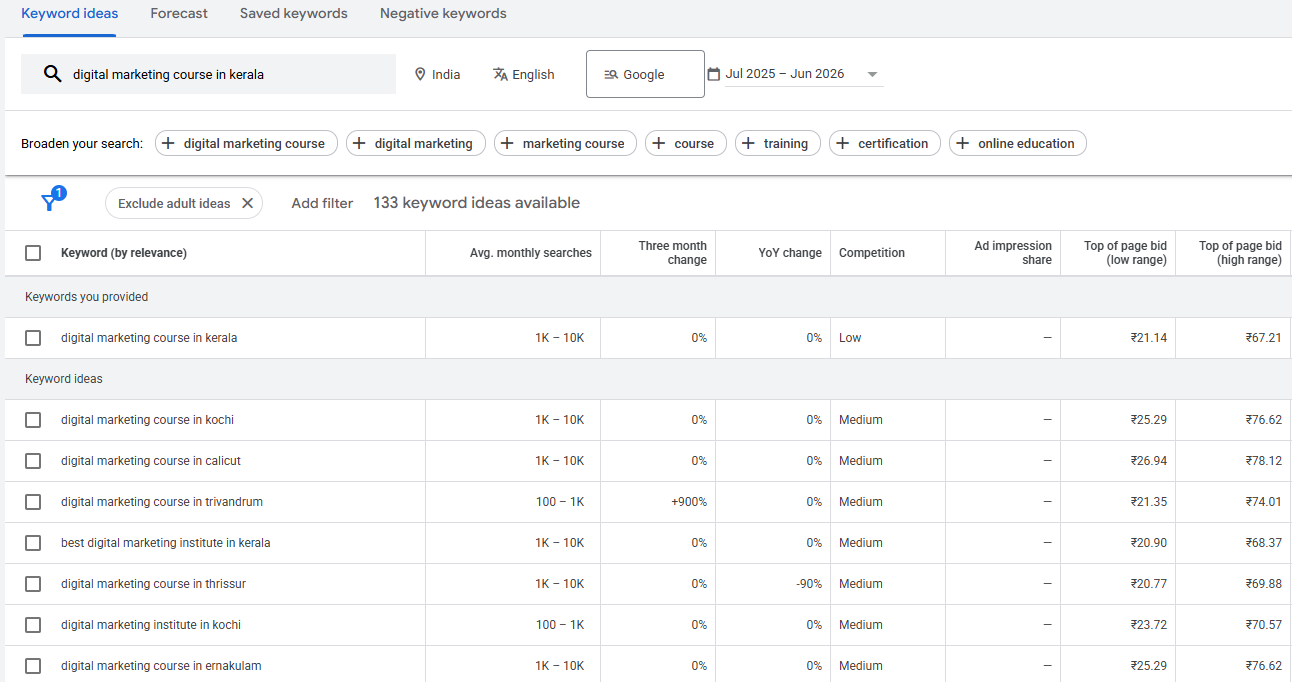
1. Google Keyword Planner
Google Keyword Planner is one of the best free tools for discovering:
Keyword ideas
Monthly search volume
Competition
Estimated CPC
Start with a seed keyword and explore related opportunities.
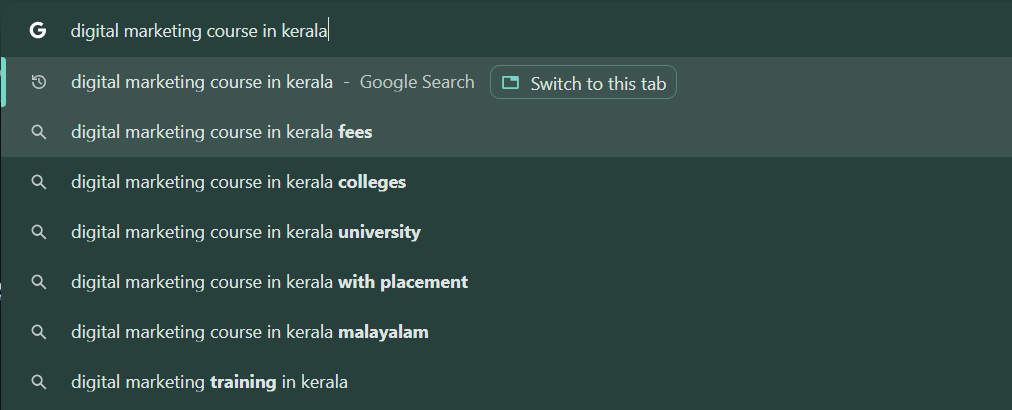
2. Google Search Suggestions
Begin typing your target keyword into Google Search. The autocomplete suggestions reveal popular searches that users frequently make. These suggestions can uncover valuable long-tail keywords with strong intent.
3. Analyze Competitors
Study competitors' landing pages and advertisements.
Look for:
Frequently used keywords
Headlines
Offers
Calls to action
This can provide inspiration while helping you identify content gaps.

4. Use Google Trends
Google Trends shows whether keyword popularity is increasing or declining over time. It's especially useful for seasonal campaigns and trending topics.
5. Review Your Search Terms Report
Once your campaign is running, regularly review the Search Terms Report.
You'll discover:
New converting keywords
Irrelevant searches to exclude
Additional negative keywords
Opportunities to improve targeting
Keyword research isn't a one-time task. The best-performing advertisers continuously refine their keyword lists based on campaign data.
Google Ads Copywriting
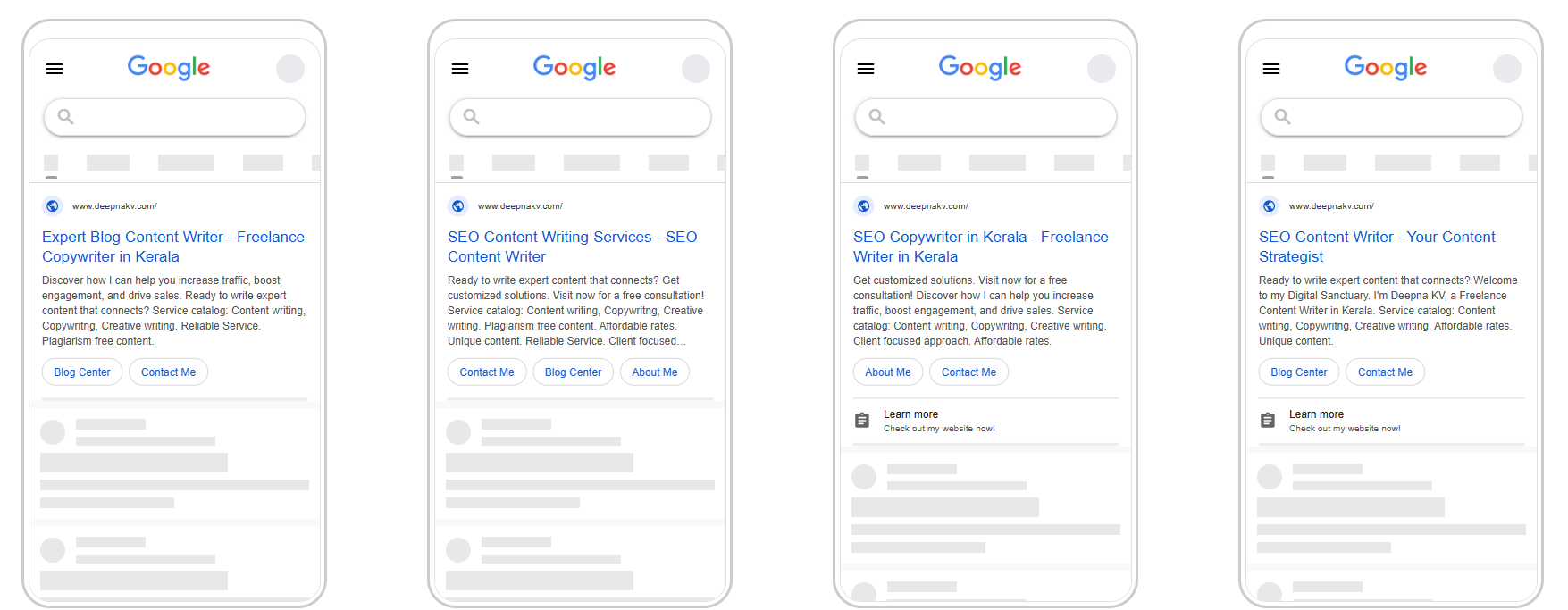
Getting someone to click your ad starts with persuasive copy. Even if you've selected the right keywords and set up your campaign correctly, weak messaging can lead to a low click-through rate (CTR) and poor conversions.
Google Ads copywriting is about writing concise, relevant, and compelling ads that match the user's search intent while encouraging them to take action.
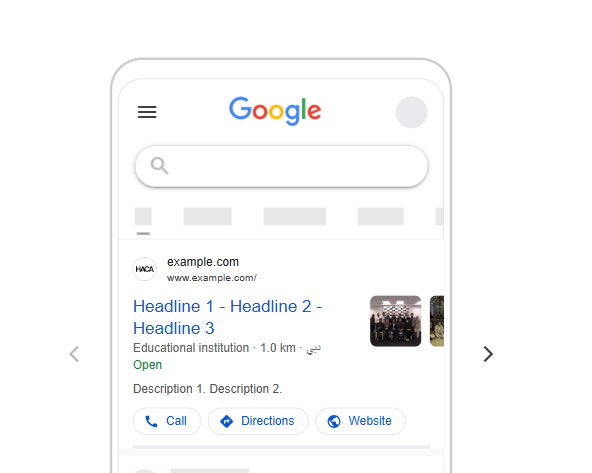
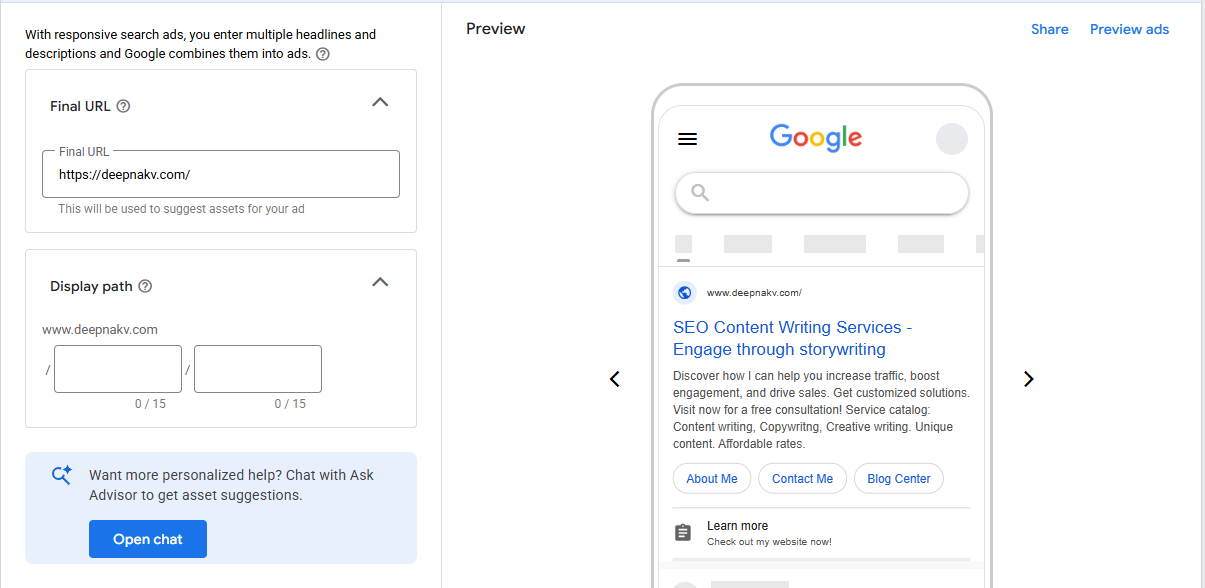
A standard Search ad includes:
Headlines (up to 15)
Descriptions (up to 4)
Display URL
Ad extensions such as sitelinks, callouts, and structured snippets
Google automatically tests different headline and description combinations to find the best-performing variations. That's why it's important to provide multiple high-quality options.
What Makes Great Google Ads Copy?
Effective ad copy should:
Include the target keyword naturally
Highlight a clear benefit rather than just a feature
Address the user's problem or need
Build trust with proof or credibility
End with a strong call to action
For example, compare these two headlines:
Learn Digital Marketing
Become Job-Ready with Practical Digital Marketing Training
The second headline is more specific, communicates value, and gives users a stronger reason to click.
How to Write High CTR Ad Copy
A high click-through rate tells Google that your ad is relevant to users. Over time, this can improve your Quality Score and lower your cost per click.
Here are some proven techniques to write ads that attract more clicks.
Match the User's Search Intent
If someone searches for Google Ads course for beginners, your headline should reflect that exact intent.
For example:
Google Ads Course for Beginners | Learn from Industry Experts
This reassures users they've found exactly what they're looking for.
Focus on Benefits
Instead of listing features, explain what users gain.
Instead of:
Live Classes
Expert Trainers
Try:
Learn Google Ads Through Live Campaigns
Get Hands-on Experience with Real Projects
Use Numbers and Specific Details
Specific information grabs attention and builds credibility.
Examples:
Learn Google Ads in 30 Days
Over 5,000 Students Trained
100+ Practical Exercises
Create Urgency
Encourage immediate action with phrases like:
Limited Seats Available
Apply Today
Start Learning This Week
Use urgency honestly and avoid misleading claims.
End with a Strong CTA
Every ad should guide users toward the next step.
Examples include:
Enroll Now
Book a Free Demo
Get Started Today
Request a Free Consultation
Google Ads Quality Score
One of the most important metrics you'll encounter in Google Ads is Google Ads Quality Score.
Quality Score is Google's rating of the relevance and usefulness of your ads, keywords, and landing pages. It is scored on a scale from 1 to 10, with higher scores indicating better performance.
A higher Quality Score can lead to:
Lower cost per click
Better ad positions
Higher click-through rates
Improved return on ad spend
Google evaluates three primary factors.
Expected CTR
How likely users are to click your ad based on historical performance.
Ad Relevance
How closely your ad matches the user's search query.
Landing Page Experience
Whether your landing page is relevant, easy to navigate, mobile-friendly, and loads quickly. A high bid alone won't guarantee top placement. Google rewards advertisers who create useful and relevant experiences for users.
Want to understand how Google Ads Quality Score works and how to improve it? Explore our detailed guide to Google Ads Quality Score
How to Improve Quality Score in Google Ads
Improving your Quality Score requires continuous optimisation rather than one-time changes.
Here are some practical ways to increase it.
Organize Keywords into Smaller Ad Groups
Avoid placing dozens of unrelated keywords in the same ad group. Instead, group similar keywords together so your ads can closely match each search query.
Write More Relevant Ads
Include your primary keyword naturally in:
Headlines
Descriptions
Display URLs
The closer the match, the more relevant your ad appears to Google.
Improve Landing Pages
A landing page should:
Match the promise made in the ad
Load quickly
Work well on mobile devices
Have a clear call to action
Provide valuable information
If users click your ad but immediately leave the page, your Quality Score may suffer.
Increase Click-Through Rate
Test multiple headlines and descriptions regularly. Pause underperforming ads and continue improving the best-performing versions. Optimization is an ongoing process rather than a one-time task.
Automated Bidding Google Ads
Managing bids manually becomes difficult as campaigns grow. That's where automated bidding Google Ads strategies help.
Smart Bidding uses machine learning to automatically adjust bids based on the likelihood of achieving your campaign goals.
Google considers signals such as:
Device
Location
Time of day
User behavior
Browser
Search intent
Previous interactions
Some popular Smart Bidding strategies include:
Maximize Clicks
Designed to generate as many clicks as possible within your budget.
Best for:
Driving website traffic
Brand awareness
New campaigns
Maximize Conversions
Automatically adjusts bids to generate the highest number of conversions. Ideal when conversion tracking is already set up.
Target CPA
CPA stands for Cost Per Acquisition. Google attempts to generate conversions while staying close to your desired acquisition cost.
Target ROAS
ROAS stands for Return on Ad Spend. This strategy is commonly used by ecommerce businesses aiming to maximise revenue from advertising.
Maximize Conversion Value
Focuses on generating the highest possible conversion value rather than simply increasing the number of conversions.
Manual vs Smart Bidding Google Ads
Choosing between manual and automated bidding depends on your experience, campaign objectives, and available data.
Manual CPC Manual CPC is helpful if you're just starting with Google Ads and want to understand how bidding affects campaign performance. | Smart Bidding Once your campaign has gathered enough conversion data, Smart Bidding can often outperform manual strategies by making faster, data-driven adjustments. |
Greater control over bids | AI automatically adjusts bids |
Suitable for learning campaign behavior | Saves time through automation |
Requires regular monitoring | Uses real-time signals for optimization |
Better for small campaigns | Better for mature campaigns with conversion data |
Performance Max Campaigns
One of Google's newest campaign types is Performance Max campaigns.
Instead of creating separate campaigns for Search, Display, YouTube, Gmail, Discover, and Maps, Performance Max combines them into a single AI-powered campaign.
It helps advertisers reach customers across Google's entire advertising ecosystem while automatically optimizing placements and bids.
Performance Max is particularly useful for businesses that want to maximize conversions without manually managing multiple campaign types.
Performance Max is part of a broader performance marketing approach focused on measurable results; learn more about performance marketing, its benefits, channels, and key metrics.
How Does Google Performance Max Work?
Performance Max uses machine learning to determine where and when your ads should appear.
Here's a simplified workflow:
Choose your campaign objective.
Upload creative assets such as headlines, descriptions, images, logos, and videos.
Add audience signals to help Google understand your ideal customers.
Set your budget and bidding strategy.
Google automatically tests different combinations of assets across all Google channels.
The system continuously learns and optimizes for better performance over time.
While Performance Max offers powerful automation, it's still important to review asset performance, audience insights, and conversion reports regularly.
Common Google Ads Mistakes
Even experienced advertisers make mistakes that reduce campaign performance. Recognizing these issues early can save both time and advertising budget.

Some of the most common Google Ads mistakes include:
Targeting Broad Keywords
Broad keywords often trigger irrelevant searches, resulting in wasted clicks and higher costs.
Ignoring Negative Keywords
Without negative keywords, your ads may appear for searches that have little or no buying intent.
Writing Generic Ad Copy
Ads that fail to highlight unique value or address user needs are less likely to earn clicks.
Sending Traffic to a Poor Landing Page
A slow, confusing, or irrelevant landing page can significantly reduce conversion rates.
Choosing the Wrong Bidding Strategy
Using automated bidding without enough conversion data or sticking with manual bidding when campaigns have matured can limit performance.
Not Tracking Conversions
Without proper conversion tracking, it's impossible to know which keywords, ads, or campaigns are actually generating results.
Why Is My Google Ads Campaign Not Converting?
Many advertisers assume low conversions mean Google Ads doesn't work. In reality, poor performance usually stems from campaign setup or optimization issues.
If your campaign is getting clicks but not generating leads or sales, consider these possible reasons.
Your Keywords Don't Match User Intent
Attracting visitors who are only researching rather than ready to buy often leads to low conversion rates.
Your Landing Page Doesn't Deliver
If users can't quickly find the information promised in your ad, they're likely to leave without taking action.
Your Offer Isn't Competitive
Even well-targeted traffic won't convert if your pricing, messaging, or value proposition doesn't stand out.
Your Website Is Slow
A slow-loading website increases bounce rates and negatively affects both user experience and Quality Score.
You're Targeting the Wrong Audience
Review your location, demographics, audience signals, and search terms to ensure you're reaching the right people.
You're Not Testing
Successful advertisers continuously experiment with:
Headlines
Descriptions
Landing pages
Calls to action
Bidding strategies
Regular testing reveals what resonates most with your audience.
Conclusion
Mastering Google Ads doesn't happen overnight, but understanding the fundamentals puts you ahead of many new advertisers. From learning what is PPC and choosing the right types of Google Ads campaigns to conducting effective Google Ads keyword research, writing compelling ad copy, improving your Google Ads Quality Score, and selecting the right bidding strategy, every element plays a role in campaign success.
The key is to start small, measure everything, and optimize continuously. Test different keywords, refine your ad copy, improve your landing pages, and let campaign data guide your decisions. Over time, these incremental improvements can lead to lower costs, higher click-through rates, and better conversions.
If you're looking to build practical Google Ads skills and run campaigns with confidence, consider enrolling in a hands-on Digital Marketing Course in Kerala. Learning through live projects, expert mentorship, and real campaign optimization can help you move beyond theory and become job-ready in today's competitive digital marketing landscape.